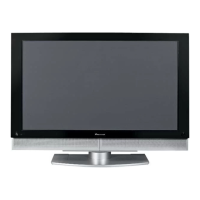
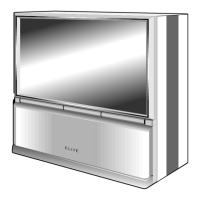
This document serves as a service manual for the Pioneer PRO-730HD, PRO-630HD, and PRO-530HD HDTV Projection Monitors. It provides detailed information for qualified service technicians regarding the device's function, technical specifications, usage, and maintenance.
Function Description
The Pioneer PRO-730HD, PRO-630HD, and PRO-530HD are HDTV Projection Monitors designed for displaying high-definition television signals. They incorporate various input terminals to accommodate different video and audio sources, including multiple video inputs, S-VIDEO, component video, DVI, and audio inputs. The monitors feature a tuner section for receiving VHF, UHF, and CATV channels, and an audio amplifier with built-in speakers for sound output. The core functionality revolves around processing and projecting video signals onto a large screen using three high-focus CRTs (Red, Green, Blue). The internal architecture includes dedicated blocks for video processing, control, audio, signal handling, DVI services, and power management, all working in concert to deliver a high-quality projected image.
Important Technical Specifications
Display and Amplifier Section:
- Reception System: American TV standard NTSC system.
- Screen Size:
- PRO-730HD: 64 inches
- PRO-630HD: 58 inches
- PRO-530HD: 53 inches
- CRT: 7-inch High Focus CRT x 3.
- Brightness (White Peak):
- PRO-730HD: 360 Foot-Lambert
- PRO-630HD: 380 Foot-Lambert
- PRO-530HD: 450 Foot-Lambert
- (White window signal input contrast Max.) without protective screen.
- Horizontal Resolution:
- PRO-730HD: More than 1400 lines
- PRO-630HD: More than 1250 lines
- PRO-530HD: More than 1150 lines
- (Input digital test pattern (1400 lines resolution)).
- Input Terminals:
- 4 video inputs
- 4 S-VIDEO input jacks (Y/C separate INPUT)
- 2 COMPONENT VIDEO INPUT jacks (Y, PB, PR)
- 6 audio inputs
- CENTER INPUT jack
- Mini D-sub 15 pin INPUT jack (RGB)
- BNC VIDEO INPUT jack
- BNC COMPONENT VIDEO INPUT jack (Y, PB, PR)
- 2 DVI 25 pin INPUT jacks (Digital)
- Note: INPUT 1 video and component input can be input to both BNC and RCA type. The Mini D-sub 15 pin jack (RGB) and DVI jacks cannot be used with a personal computer.
- Output Terminals: MONITOR/TV, AUDIO.
- Input Terminal Signal Ratings:
- Video signal: Composite and S-VIDEO (Y): 1.0 Vp-p (75 ohms load); COMPONENT (Y): 1.0 Vp-p (75 ohms load), (PB, PR): 0.7 Vp-p (75 ohms load); Digital signal: 3.3V T.M.D.S, 50 ohms.
- Audio signal (including CENTER): 400mV rms.
- Input Impedance: Video input: 75 ohms; Audio input (including CENTER): 22 kΩ or more.
- Input Signal Polarity (Video): Synchronized negative.
- Output Terminal Signal Ratings: Video signal: 1 Vp-p (75 ohms load); Audio signal: 500 mV rms (100 % modulation).
- Output Impedance: Video output: 75 ohms; Audio output: Less than 1 kilo-ohms.
- Effective Output: Front both channels driven: 10 W + 10 W.
- Built-in Speaker System: 16 cm (6-5/16 in) full range x 2.
Tuner Section:
- Circuit Type: Video signal detection: PLL full synchronous detection; PLL digital synthesizer system; Audio multiplex: BTSC system.
- Reception Channels: VHF; CH2~CH13, UHF; CH14~CH69; CATV (STANDARD, IRC or HRC); CATV 1-125 CH.
- Antenna Terminals: Antenna terminal, 75 ohms UNBAL, F-type connector (VHF, UHF MIXED).
Electrical Section, Miscellaneous:
- Power Requirements: 120 V AC, 60 Hz.
- Power Consumption: At time of shipment: 250 W, 450 VA (CSA).
- External Dimensions (W x H x D):
- PRO-730HD: 1510 x 1425 x 709 mm (59-7/16 x 56-1/8 x 27-15/16 inches)
- PRO-630HD: 1378 x 1351 x 675 mm (54-1/4 x 53-3/16 x 26-9/16 inches)
- PRO-530HD: 1268 x 1289 x 640 mm (49-15/16 x 50-3/4 x 25-3/16 inches)
- Weight of Main Unit:
- PRO-730HD: 155 kg (341 lb 11 oz)
- PRO-630HD: 138 kg (304 lb 4 oz)
- PRO-530HD: 123 kg (271 lb 3 oz)
Wireless Remote Control Unit:
- Operation System: Infrared remote control system.
- Power Source: Two DURACELL® "AA" MN1500 1.5 V ALKALINE dry cell batteries.
- Dimensions (W x D x H): 66 x 226.5 x 24.6 mm (2-19/32 x 8-29/32 x 31/32 inches).
- Weight: 165 g (6 oz) (without batteries).
Usage Features
The manual highlights several usage features, particularly concerning the remote control unit and on-screen display (OSD) for adjustments and settings.
- Remote Control Unit: The remote control unit (AXD1468) is essential for accessing and navigating the monitor's menu system, including setup, program blocking, and various adjustments. It features dedicated buttons for power, input selection, screen mode, display, channel selection, volume, muting, and menu navigation.
- Menu System: The monitor's menu system allows users to configure various settings, such as picture quality (color, tint, contrast, brightness, sharpness), sound (bass, treble, balance, surround), and system settings (time, screen mode, CC, RLS).
- Program Blocking (V. Chip): The V. Chip function allows users to block undesirable programming based on MPAA and Canadian rating systems. This feature can be configured via the setup menu, requiring a password for access and changes.
- Multi-Screen Function: The monitor supports multi-screen viewing modes, including SPLIT screen (two vertically split images) and FREEZE screen (freezing one image while another continues). These modes are accessible via dedicated buttons on the remote control.
- Searching for Programs (SEARCH screen): The SEARCH screen mode allows users to view multiple images (nine or four) simultaneously, facilitating program searching.
- Power Management: The monitor automatically enters power management mode if no digital signal is input when digital input is selected, conserving power. The POWER STANDBY indicator (green) flashes during this mode.
- Input Selection: The monitor provides multiple input terminals, and users can switch between different sources using the INPUT SELECT button on the remote control or front panel.
Maintenance Features
The service manual provides extensive information for qualified service technicians to perform maintenance and repairs safely and effectively.
- Safety Information: Emphasizes the importance of safety precautions, including wearing shatterproof goggles when handling CRTs, using an isolation transformer during service, replacing protective devices, observing original lead dress, and using manufacturer's replacement components. It also details leakage current checks (cold and hot) and X-radiation warnings related to the picture tube.
- Charged Section and High Voltage Generation: Identifies areas with high voltage (over 100V) and charged sections, warning against electric shock and equipment damage.
- X-ray Protection: Highlights the importance of using PIONEER-approved replacement tubes and ensuring proper operation of the high voltage circuit to prevent X-ray radiation.
- Important Symbols for Good Services: Uses specific symbols to indicate procedures requiring adjustments, settings, cleaning, product safety, lubricants/glues, and shipping mode/screws.
- Adjustment Procedures: Detailed instructions are provided for various adjustments, including brightness, deflection yoke, focus, screen size, convergence, white balance, ACL, and panel adjustments for different resolutions (480i, 480p). These procedures often involve using specific test patterns, remote control functions, and measuring instruments like oscilloscopes and DC voltmeters.
- EEPROM Replacement: Instructions for replacing EEPROMs to retain adjustment data, emphasizing the need for readjustment if data is corrupted.
- Diagnosis Method: Provides a systematic approach to diagnosing failures based on LED indicators (D107, D111) and symptoms related to power down (P.D.) conditions, such as blown fuses, abnormalities in heater regulators, overload detection, and H/V deflection stopping.
- Disassembly Procedures: Step-by-step instructions for disassembling the monitor, including removing the frame cover, AR panel, and screen. It also includes warnings about handling the AR panel with gloves to prevent stains and the importance of the "Rear Cover opened!" detection system.
- Wiring Diagram: Provides diagrams and guidelines for proper wiring, including minimum distances for FBT focus wires and anode cables from other parts.
- PCB Connection Diagram and Parts List: Comprehensive diagrams and lists for all PCBs and their components, including part numbers and descriptions, crucial for accurate replacement and repair.
- IC Information: Detailed pin assignments, block diagrams, and functions for various integrated circuits (ICs) used in the monitor, aiding in troubleshooting and component replacement.

 Need help?



 To Next Page
 General