Connecting Up2 Raccordement
8
En/Fr
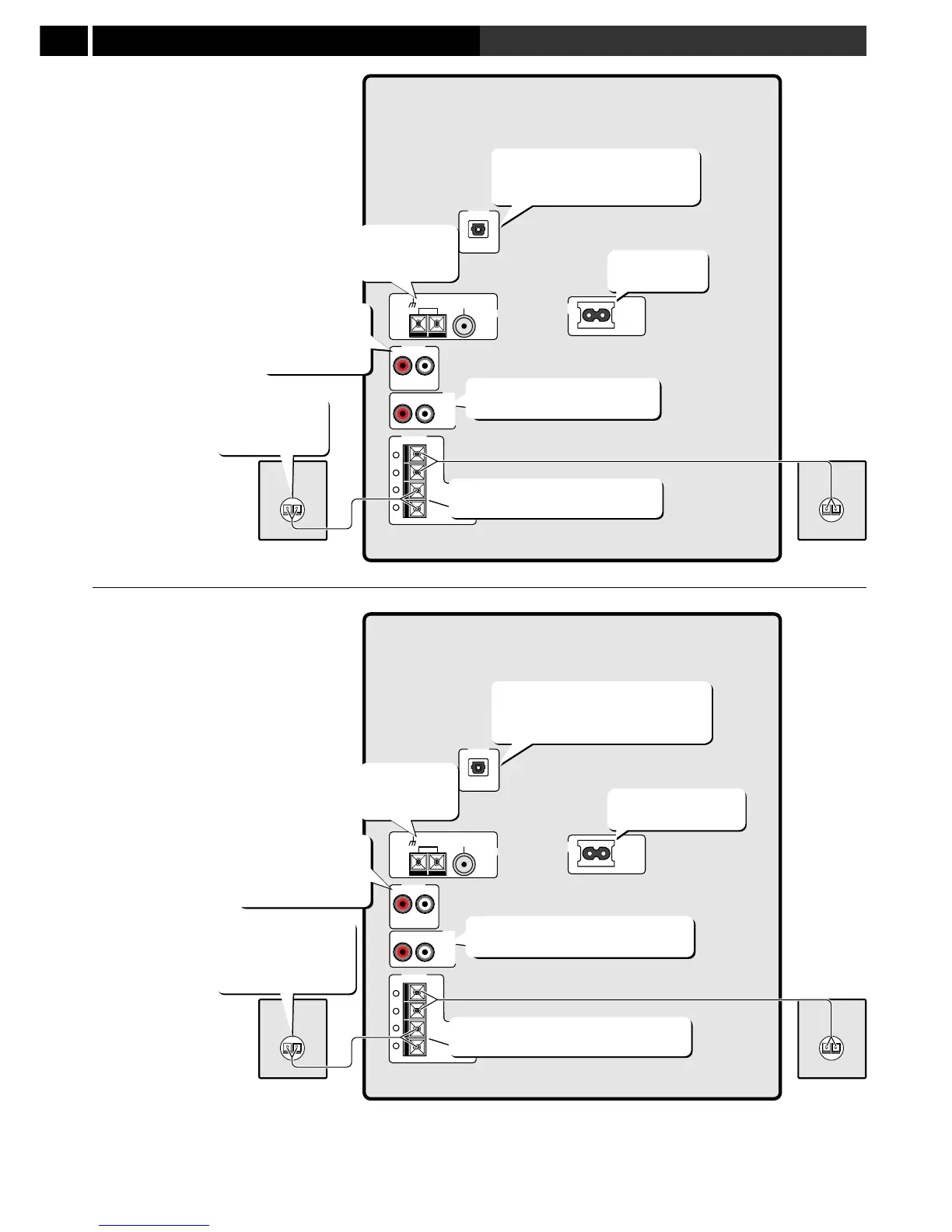
The rear panel
The illustration on this page shows the
XR-A6800. Not all features are available
on the XR-A4800.
Important: Before making or
changing any rear panel connections,
make sure that all the components are
switched off and unplugged from the
power supply.
OPTICAL
DIGITAL OUT
AUX IN
L
R
ANTENNA
AM
LOOP
ANTENNA
FM
UNBAL
75Ω
AC
INLET
REAR
SPEAKERS
L
R
R
L
+
+
-
-
FRONT
SPEAKERS
(R) (L)
Connect an external AV amp or
digital recorder here
(XR-A6800 only)
Connect the
AM and FM
antennas here
Connect to the
analog inputs
of an external
recorder here
Connect the rear speakers here
(XR-A6800 only)
Connect to a
power outlet
Connect the
speaker cords
(S-A6800 only)
Connect the front speakers here
Le panneau arrière
L’illustration sur cette page montre le XR-
A6800. Toutes les caractéristiques ne sont pas
disponibles sur le XR-A4800.
Attention: Avant d’effectuer le
raccordement ou de modifier les connexions
sur le panneau arrière, vérifiez que les
composants sont éteints et qu’ils sont
débranchés.
OPTICAL
DIGITAL OUT
AUX IN
L
R
ANTENNA
AM
LOOP
ANTENNA
FM
UNBAL
75Ω
AC
INLET
REAR
SPEAKERS
L
R
R
L
+
+
-
-
FRONT
SPEAKERS
(R) (L)
Raccordez ici un enregistreur
numérique
ou un ampli AV externe
(XR-A6800 uniquement)
Raccordez ici
les antennes
AM et FM
Raccodez à une prise
d’alimentation
Raccordez ici aux
entrées analogiques
d’un enregistreur
externe
Raccordez ici les enceintes arrière
(XR-A6800 uniquement)
Raccordez ici les enceintes frontales
Raccordez les
cordons d’enceinte
(S-A6800
uniquement)



 To Next Page
 Loading...