SECTION 9
PA-28-181, ARCHER III SUPPLEMENT 13
ISSUED: JULY 12, 1995 REPORT: VB-1611
REVISED: JANUARY 2, 2001 7 of 10, 9-77
SECTION 9
PA-28-181, ARCHER III SUPPLEMENT 13
ISSUED: JULY 12, 1995 REPORT: VB-1611
REVISED: JANUARY 2, 2001 7 of 10, 9-77
SECTION 7 - DESCRIPTION AND OPERATION (continued)
Keys for Other GTX 327 Functions (continued)
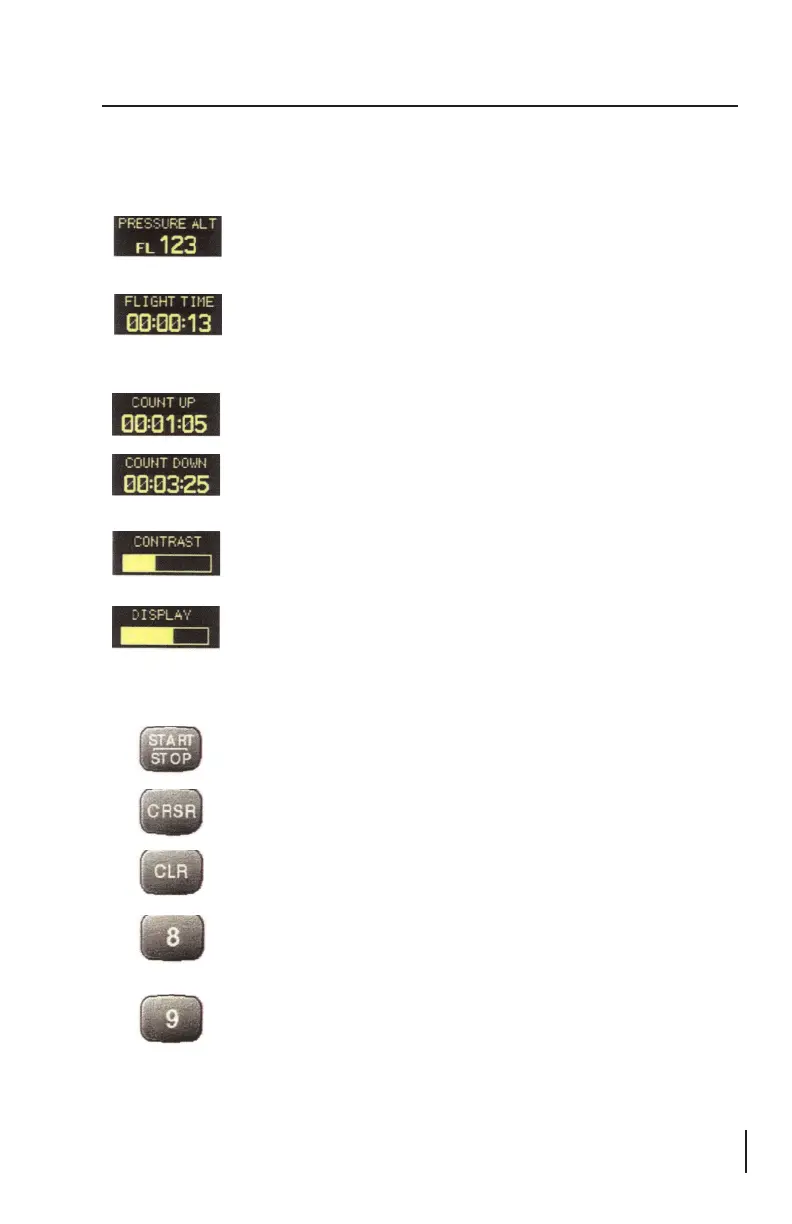
PRESSURE ALT: Displays the altitude data supplied to the
GTX 327 in feet, hundreds of feet (i.e., flight level), or meters,
depending on configuration.
FLIGHT TIME: Displays the Flight Time, which is controlled
by the START/STOP key or by a squat switch as configured
during installation. With squat switch control, the timer begins
when lift off is sensed and pauses when landing is sensed.
COUNT UP TIMER: Controlled by START/STOP and CLR
keys.
COUNT DOWN TIMER: Controlled by START/STOP,
CLR, and CRSR keys. The initial Count Down time is entered
with the 0 - 9 keys.
CONTRAST: This page is only displayed if manual contrast
mode is selected in Configuration Mode. Contrast is controlled
by the 8 and 9 keys.
DISPLAY: This page is only displayed if manual backlighting
mode is selected in Configuration Mode. Backlighting is
controlled by the 8 and 9 keys.
START/STOP - Starts and stops the Count Up and Count Down
timers.
CRSR - Initiates entry of the starting time for the Count Down
timer and cancels transponder code entry.
CLR - Resets the Count Up and Count Down timers and cancels
the previous keypress during code selection.
8 - Reduces Contrast and Display Brightness when the respective
pages are displayed. Also enters the number 8 into the Count
Down timer.
9 - Increases Contrast and Display Brightness when the respective
pages are displayed. Also enters the number 9 into the Count
Down timer.
SECTION 7 - DESCRIPTION AND OPERATION (continued)
Keys for Other GTX 327 Functions (continued)
PRESSURE ALT: Displays the altitude data supplied to the
GTX 327 in feet, hundreds of feet (i.e., flight level), or meters,
depending on configuration.
FLIGHT TIME: Displays the Flight Time, which is controlled
by the START/STOP key or by a squat switch as configured
during installation. With squat switch control, the timer begins
when lift off is sensed and pauses when landing is sensed.
COUNT UP TIMER: Controlled by START/STOP and CLR
keys.
COUNT DOWN TIMER: Controlled by START/STOP, CLR,
and CRSR keys. The initial Count Down time is entered with the
0 - 9 keys.
CONTRAST: This page is only displayed if manual contrast
mode is selected in Configuration Mode. Contrast is controlled
by the 8 and 9 keys.
DISPLAY: This page is only displayed if manual backlighting
mode is selected in Configuration Mode. Backlighting is
controlled by the 8 and 9 keys.
START/STOP - Starts and stops the Count Up and Count Down
timers.
CRSR - Initiates entry of the starting time for the Count Down
timer and cancels transponder code entry.
CLR - Resets the Count Up and Count Down timers and cancels
the previous keypress during code selection.
8 - Reduces Contrast and Display Brightness when the respective
pages are displayed. Also enters the number 8 into the Count
Down timer.
9 - Increases Contrast and Display Brightness when the respective
pages are displayed. Also enters the number 9 into the Count
Down timer.






 To Next Page