1
2
4
3
OPEN COMPRESSION DAMPING
OPEN MODE ADJUST
TO LEVEL 1
FLOAT
OPEN COMPRESSION
DAMPING
CLIMB SWITCH OPEN
OPEN COMPRESSION
DAMPING
OPEN MODE ADJUST
TO LEVEL 1
DPS
3
Setting Sag on FOX Air Shocks
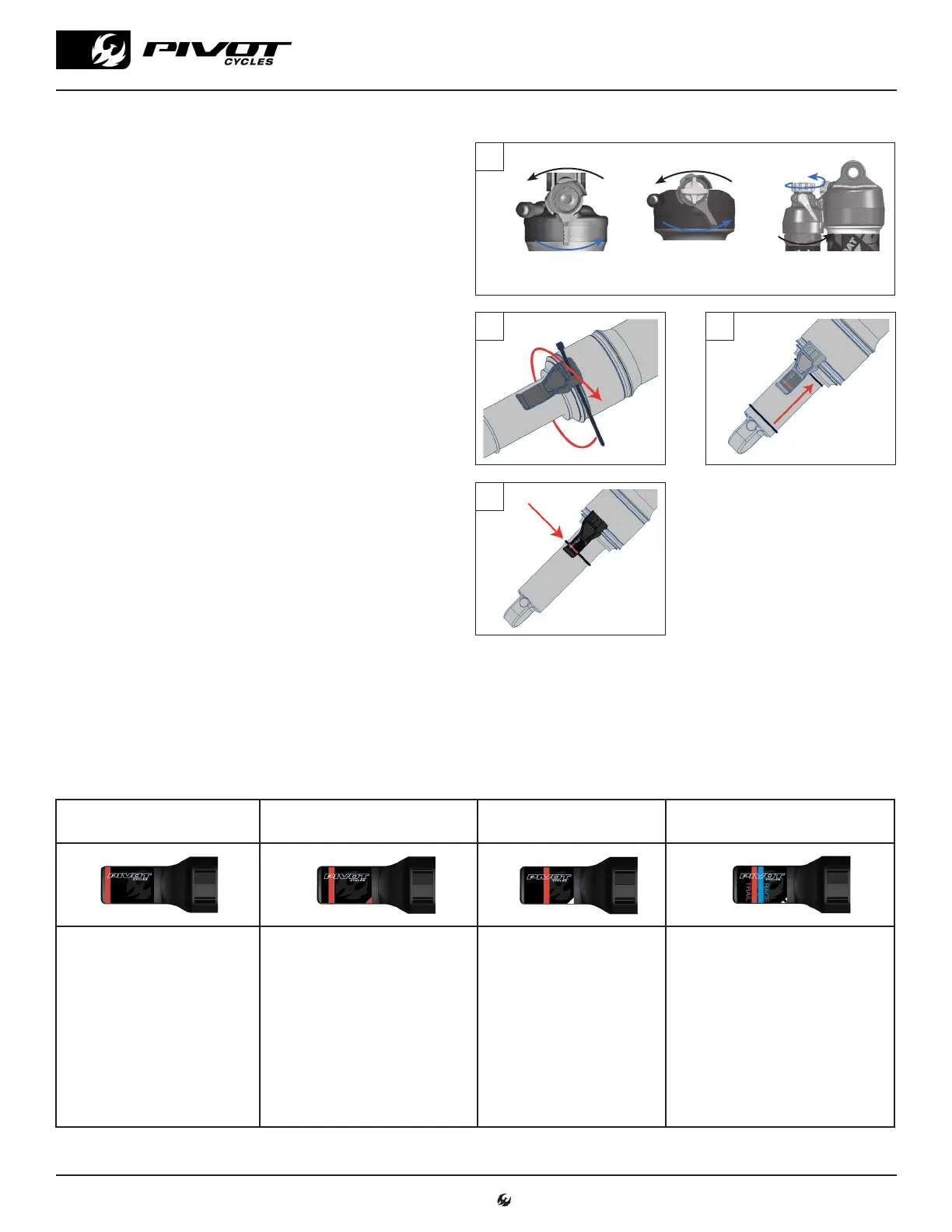
1. Always set sag with the blue compression lever to the open
position. (fig. 1)
2. If your shock has additional compression and rebound
adjustments ensure they are adjusted to be fully open, com-
pression to the softest setting, and rebound to its fastest
setting (all the way counter-clockwise).
3. If it is not installed already, attach the sag indicator to the
bottom of the shock body using the provided zip-tie and
carefully cut the excess.(fig. 2)
4. Find a level surface and something to steady yourself while
mounted on the bike so you can be on the pedals in a seated
position. It may be easier to have a partner hold your bike
steady from the front, by holding the handlebars while you
are in your riding position.
5. While standing on the pedals, sit down hard into the saddle
to cycle the suspension well into the stroke. This will en-
sure the bike comes to rest at the natural sag setting with
the rider in the saddle.
6. While in the saddle and not moving, slide the O-ring up into
position against the air can. (fig. 3)
7. Once the O-ring is set in place, gently step off the bike with-
out compressing the bike as not to move the O-ring.
8. Make adjustments to the sag by removing or adding air so
that steps 4-7 result in the O-ring lining up with the red line
on the sag indicator (fig. 4). When adjusting air pressure in
the shock, cycle the shock before re-checking sag, so the large Evol negative air chamber equalizes pressure with the main chamber
each time air is added or removed. You can do this by pushing down on the saddle several times to compress the shock past the sag
point.
9. Some of our models feature a sag indicator with both a blue line (RACE) and a red line (TRAIL). You can set the sag anywhere in this
range to achieve a firmer or plusher overall feel depending on rider preference.
2. Fox Float & Float X
WARNING: Make sure the sag
indicator does not contact the
frame or linkage through the
suspension cycle. Otherwise,
the indicator may break while
riding.
Indicator A*
Sag: 0.74" (18.8mm)*
Indicator B
Sag: 0.65" (16.5mm)
Indicator C
Sag: 0.49" (12.4mm)
Indicator D
Sag: 0..55" (14.0mm)
Bikes:
• Mach 5.7
• Mach 5: M-XL
• Mach 6 (V1-V5)*
• Mach 6 Alloy*
• Firebird V3*
• Firebird 29*
• Firebird 27.5*
• Shuttle LT*
Bikes:
• Switchblade (V1-V5)
• Shuttle (V1-V2)
• Shuttle AM (V3-V6)
• Shuttle SL
• Shadowcat
• Mach 5.5
• Mach 5.7 Carbon
• Mach 4: S-XL (2010 & Older)
• Mach 5: XS-S
• Mach 429 Alloy
Bikes:
• Mach 4: XXS-XS
• Mach 4 SL(V1-V2)
• Mach 4 SL V3 190x40
Bikes:
• Mach 4: S-XL (2011 & newer)
• Mach 429 Carbon
• Mach 429 SL
• Mach 429 Trail
• Trail 429 (V1-V3)
• Mach 4 SL V3 190x45 (setting sag
to the blue line is recommended)
*Sag Measurement: 0.76" (19.5mm); set between the red line and the end of the indicator
If there is no sag indicator on the shock, use the measurements listed below to determine sag. Different models and sizes of Pivot
bikes use different length shocks and therefore require different sag settings.
FLOAT X
www.pivotcycles.com 1.877.857.4868
SUSPENSION SETUP GUIDE



 To Next Page