1 4
1 5
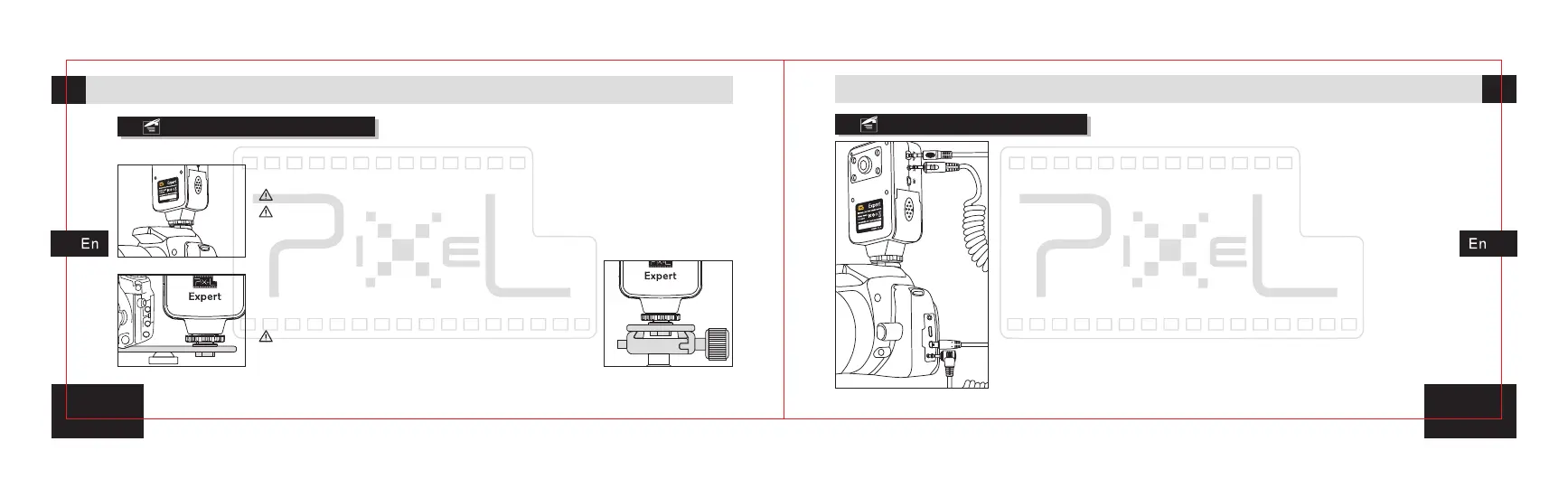
Holding Expert Transmitter
Available to hold the transmitter on hot shoe, rack or tripod.
Connect with the camera
Insert shutter release cable A side to transmitter shutter release
socket, another side insert to camera shutter release socket.
*The shutter cable has various models to match with different
camera.
Insert video cable B side to transmitter A/V socket, insert another
side to camera A/V output.
*The video cable has various models to match with different camera.
1 .
2.
(Picture1)
(Picture2) (Picture3)
1.Hold the transmitter on the hot shoe of camera.
Lock the hot shoe locknuts.
Loosen the hot shoe locknut first when you remove
the transmitter. Do not forcibly pull out it, in order to
avoid damage to the transmitter and camera.
2.Fix the transmitter on the rack of camera accessory.
3.Fix the transmitter on the tripod.
Make sure the transmitter is held firmly so that will
not fall down.
UsageUsage



 To Next Page