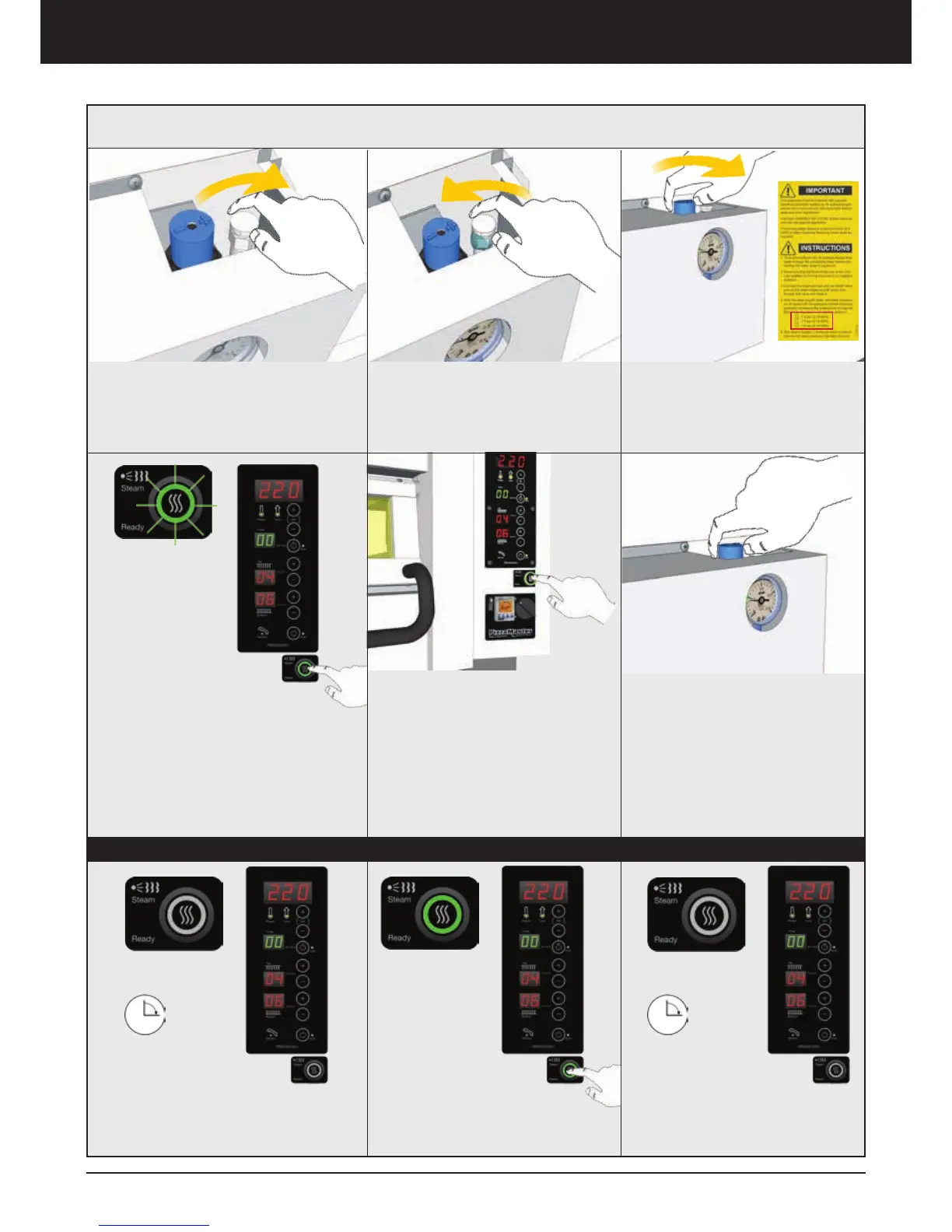
4. Open the Air Relief Valve
5. Turn ON the water and let water
flow through the valve and then
close the Air Relief Valve
7. Turn ON the oven and set the
temperature to 220 C (428 F). The
Steam Button will light up to show
that the system is ready (15 minutes
after the oven has reached 200 C
(392 F))
Press the Steam Button to produce
steam inside the deck
9. Adjust the Steam System if
necessary
8. The Steam System needs 12
minutes to reload.
Test the Steam System 2 times
per deck to assure that correct
water pressure has been achieved
6. Set the water to the pressure
marked on the label by turning
slowly the Blue Knob regulator
in the (+) positive direction.
* Repeat for all decks
Steam System Installation and Use
1. At first start when the oven reach
200 C (392 F), the steam system
takes 15 minutes to get ready
2. After the 15 minutes, the
Steam Button lights as a signal that
the system is ready to be use. Press
and release the button at anytime
3. The button light turns off and
waits 12 minutes to get ready one
more time
Use
Installation – Steam System



 To Next Page