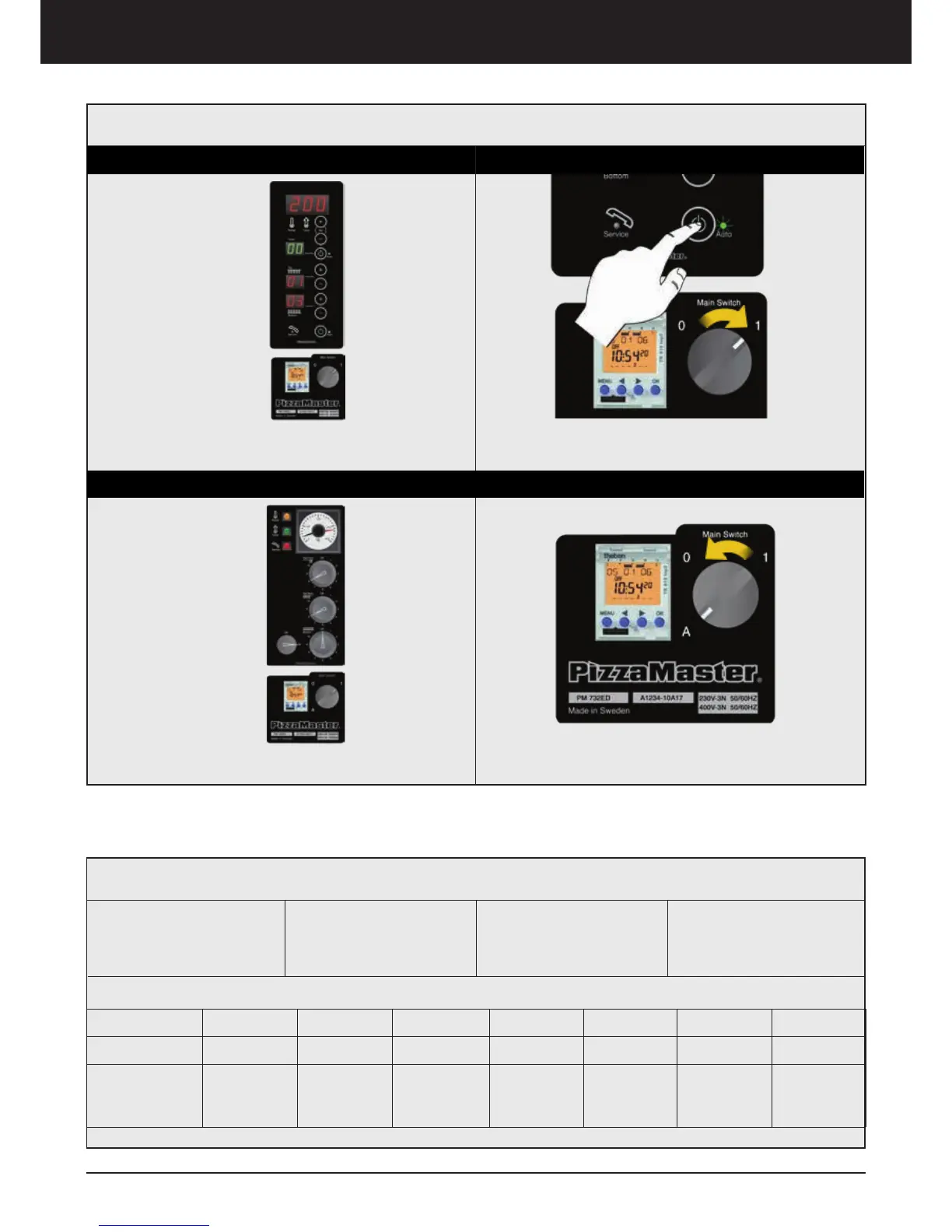
2. Place Main Switch in position 1, press and hold
Deck ON/OFF button until the green lamp is turned on
1. To activate the Timer in a Digital panel
2. Place the Main Switch in A position
Digital Panel
1. Before starting to
program, write down your
Start and Stop Times
2. START: Set the start
45 minutes before ope-
ning
3. STOP: Set the stop 15
minutes after closing
4. Example: Observe the
example below
*Note: The Timer is not configured from factory. You need to follow ”Timer Set Up” and ”Program Set Up” steps before
first use.
*How to use
Weekday Monday Tuesday Wednesday Thursday Friday Saturday Sunday
Open Hours
11.00 - 21.00 11.00 - 21.00 11.00 - 21.00 11.00 - 22.00 11.00 - 22.00 12.00 - 22.00 12.00 - 20.00
Suggested
Start / Stop
Times
10:15 - 21.15 10:15 - 21.15 10:15 - 21.15 10:15 - 22.15 10:15 - 22.15 11:15 - 22.15 11:15 - 20.15
Tip/Example
Clock timer
Classic Panel
1. To activate the Timer in a Classic panel



 To Next Page