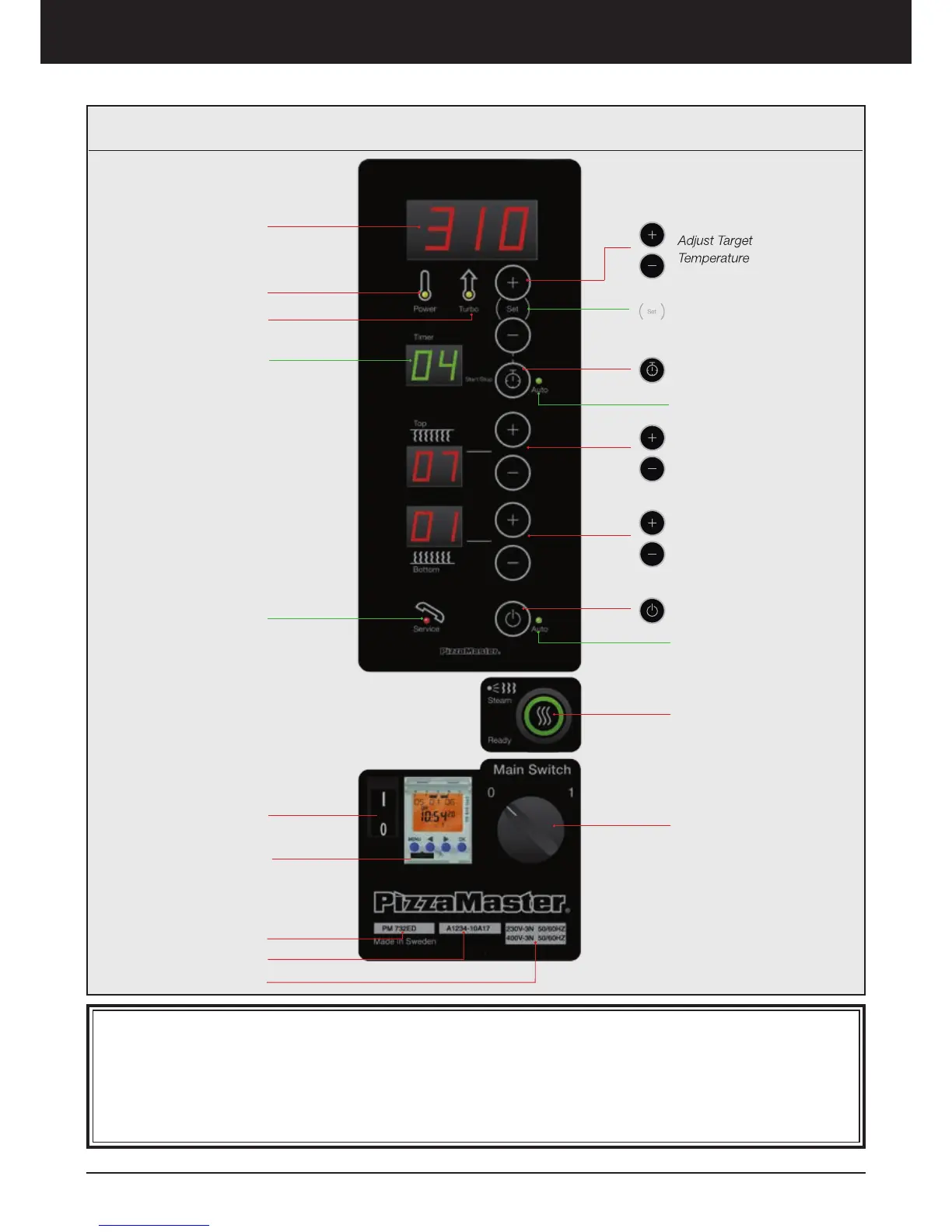
Oven operation – Display ED
Display Real
Time Temperature
Timer Button
Timer Auto Mode When Lit
Adjust Bottom Heat Intensity
from 0 to 10
Adjust Top Heat Intensity
from 0 to 10
Turn Deck ON/OFF
Auto Light
(7 days Timer Option)
Steam System (Option)
– Ready to use when lit
MAIN SWITCH:
Turn Oven ON/OFF
0= Off
1= ON
Target Temperature
Power Light
Turbo Light
Service Light
Serial Number
Model
Timer Indicator
Power Supply
UBC switch
(option)
7-day clock timer
(option)
Power : A yellow lamp indicates that the heating element is on.
Turbo: The turbo-start function, engaged automatically at start up, brings the oven up to temperature very quickly.
When the desired temperature has been reached, the turbo-start shuts off automatically. A yellow lamp indicates
that the turbo is in operation.
Service: If the oven overheats, it is turned off automatically. A red light will show when the overheating cut-off has
been activated. The oven can be reset by turning off the main switch and turn it on again, when the temperature
have gone down below 390 °C / 734 °F (for standard model), 490 °C / 914 °F (for high temperature model).
Digital Control Panel



 To Next Page