EasyManua.ls Logo

PizzaMaster PM 721 - Page 25

PizzaMaster PM 721
48 pages
Print Icon
To Next Page IconTo Next Page
To Previous Page IconTo Previous Page
Loading...
25
PizzaMaster®
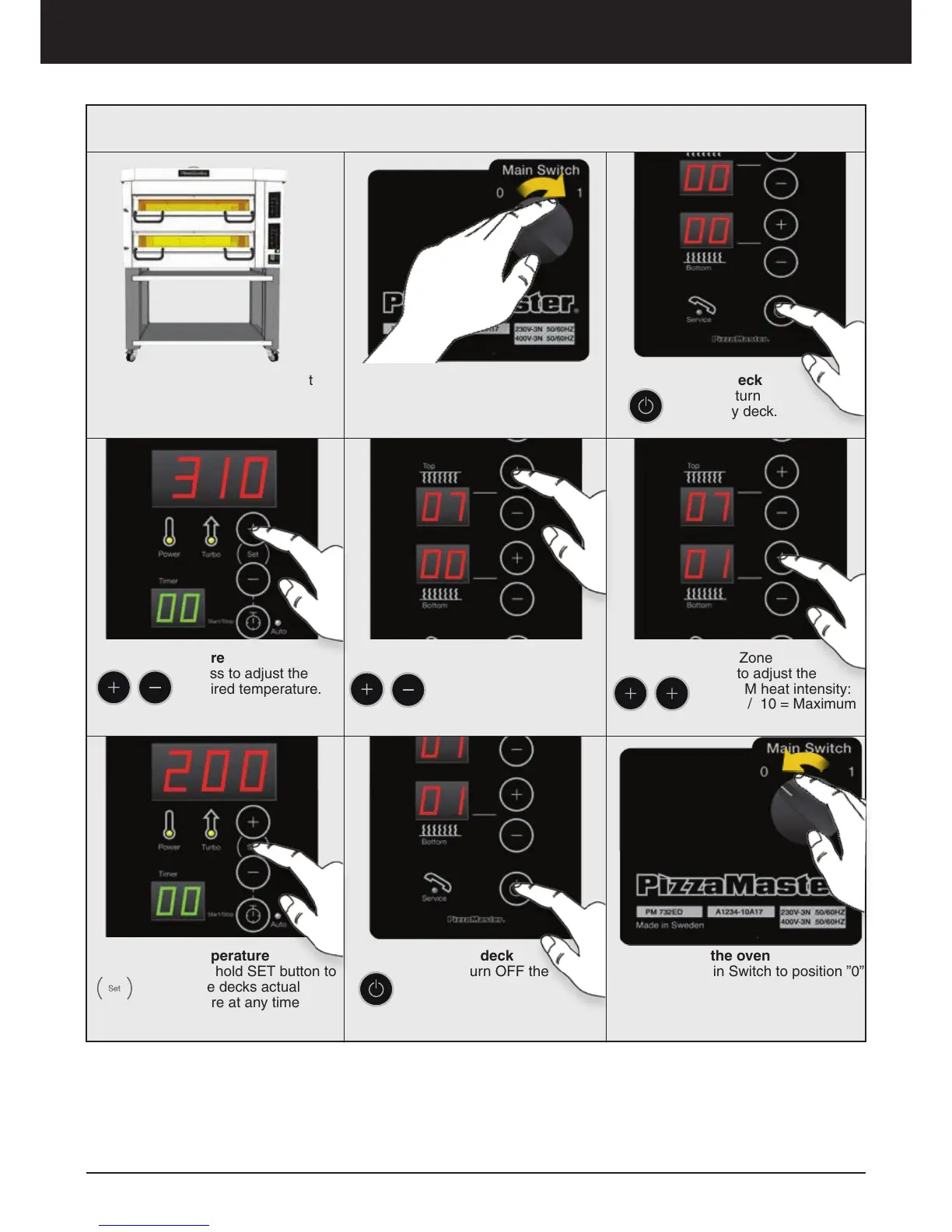
Oven operation – Display ED
Every deck has an independent
Control Panel.
4. Set Top Heat Zone
Press to adjust the TOP
heat intensity:
0 = Off / 10 = Maximum
5. Set Bottom Heat Zone
Press to adjust the
BOTTOM heat intensity:
0 = Off / 10 = Maximum
3. Set Temperature
Press to adjust the
desired temperature.
2. Turn ON the deck
Press to turn
ON every deck.
6. Real Time Temperature
Press and hold SET button to
display the decks actual
temperature at any time
7. Turn ”OFF” the deck
Press to turn OFF the
deck.
8. Turn OFF the oven
Place the Main Switch to position ”0”
to turn OFF the oven.
Operation Guide
1. Turn ON the oven
Place the Main Switch to position ”1”
to turn ON the oven.

Related product manuals