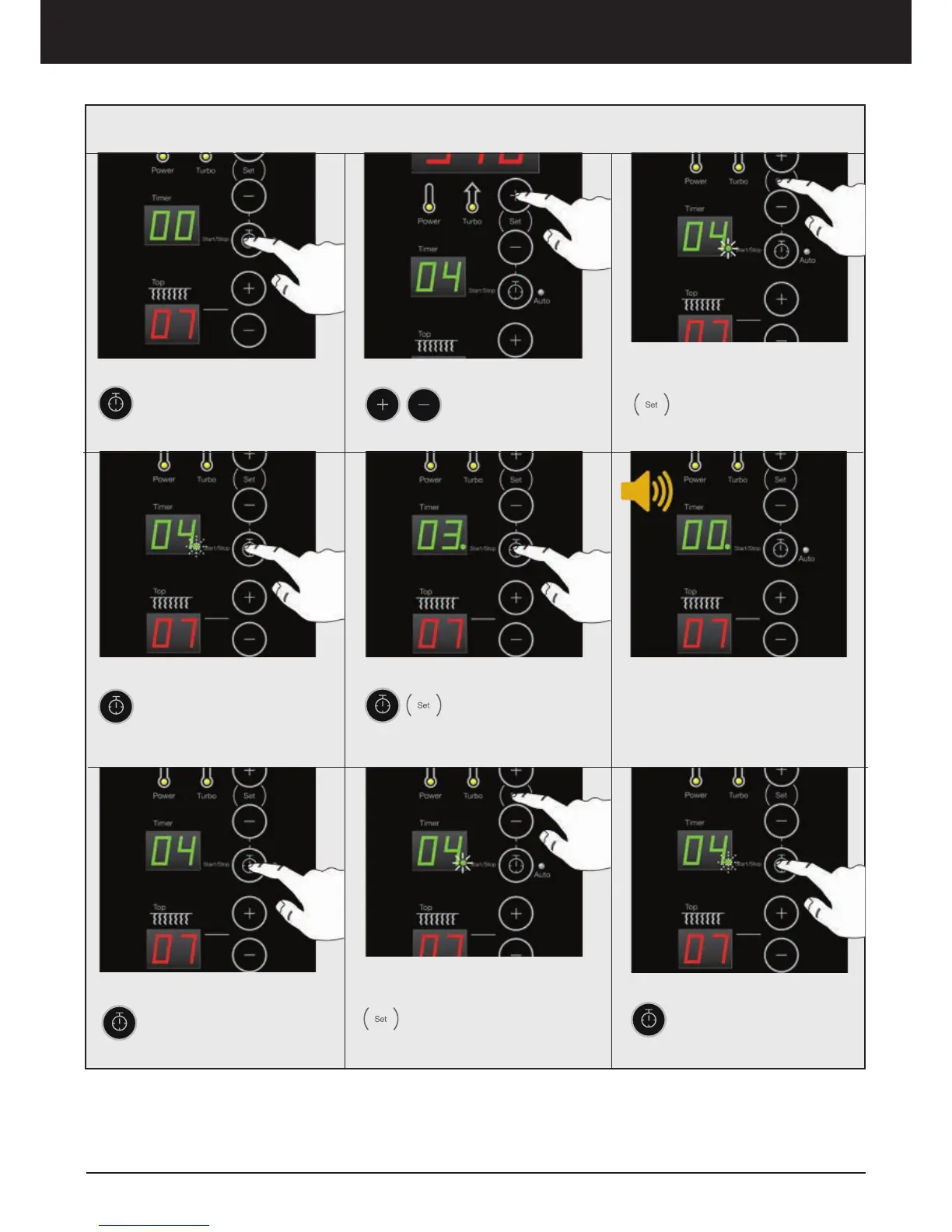
1. Turn ON Timer
Press Timer button
2. Set Time
Press to adjust the
desire baking time
(minutes)
5. PAUSE / STOP
Press Timer to
PAUSE time. Press
Timer and SET to
STOP
6. Alarm
An alarm comes on when the
time has passed, count down
comes to 0 (zero)
4. Start Timer
Press Timer button to
START timer. The green
light is flashing and remain-
ing time is showed
3. Confirm
Press SET button to
confirm. A green indica-
tion light is turned on in
the timers display
7. Shutting Off the Alarm
Press Timer button to
Shut off the alarm
8. Finish
Press SET button to
finish. The green indica-
tion light is turned on in
the timers display
9. Repeat the cycle
Press Timer button to
repeat the cycle. The
green indication light will
flash
Individual Baking Times - Normal Mode
Oven operation – Display ED



 To Next Page