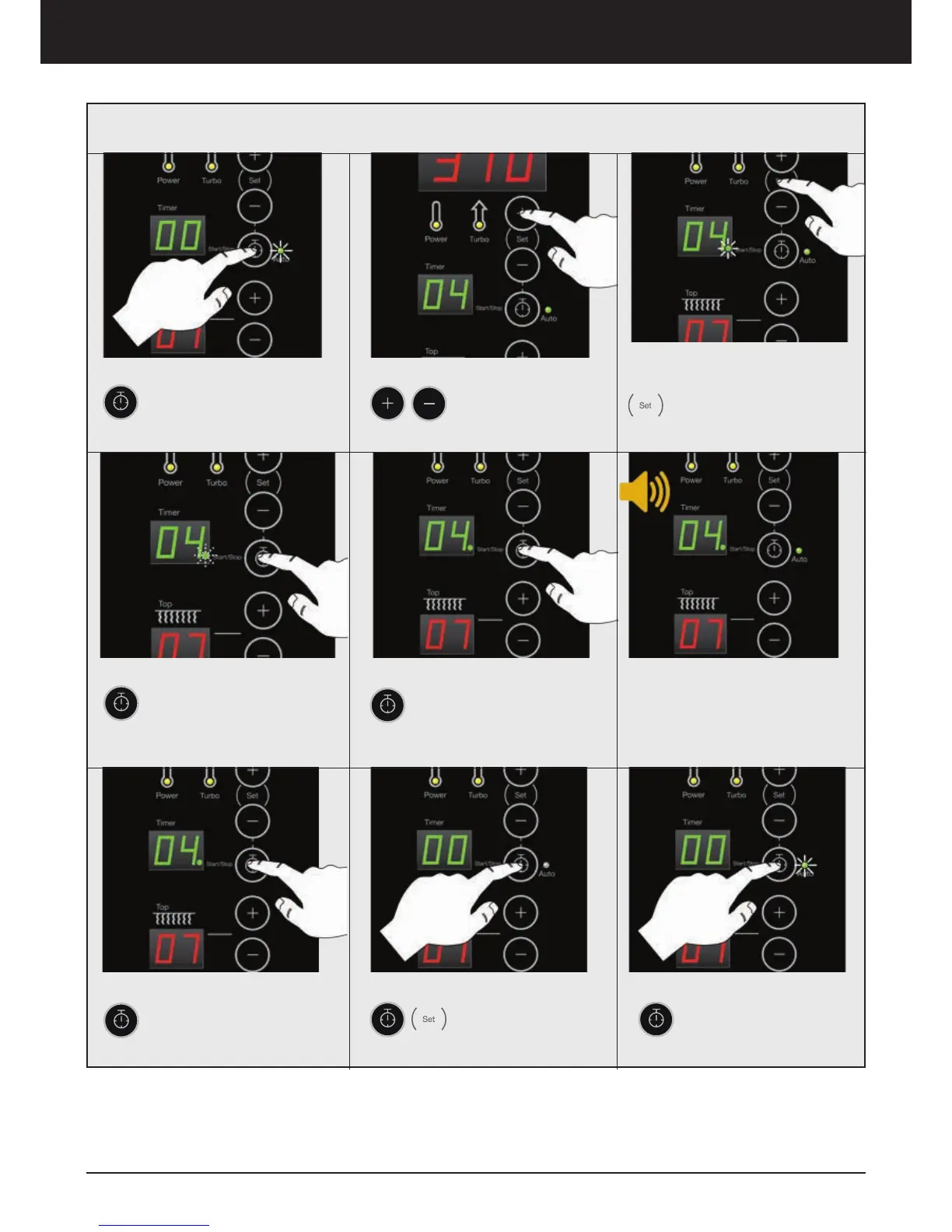
1. Turn ON timer
Press and hold Timer
button until the green Auto
lamp is turned On
2. Set Time
Press to adjust the
desired baking time
(minutes)
5. Five (5) independent Alarms
Up to 5 independent
alarms can be activated.
Press Timer button for
each one of them
6. Alarm
After desired baking time, the
oven gives a 3 second alarm for
every preset time
4. Start Timer
Press Timer button to
START timer. The green
light will flash
3. Confirm
Press SET button to
confirm. A green indica-
tion light is turned on in
the timers display
6. New Alarm
You can add a new alarm as
soon as another alarm has
finished, press Timer to set
the new time
7. Turn ”OFF” Timer
Hold Timer until the
light goes off, and
press SET to turn
OFF the timer
8. Repeat
To replay, press and
hold Timer button until
the green Auto lamp is
Turned On
Common Baking Time - Auto Mode
Oven operation – Display ED



 To Next Page