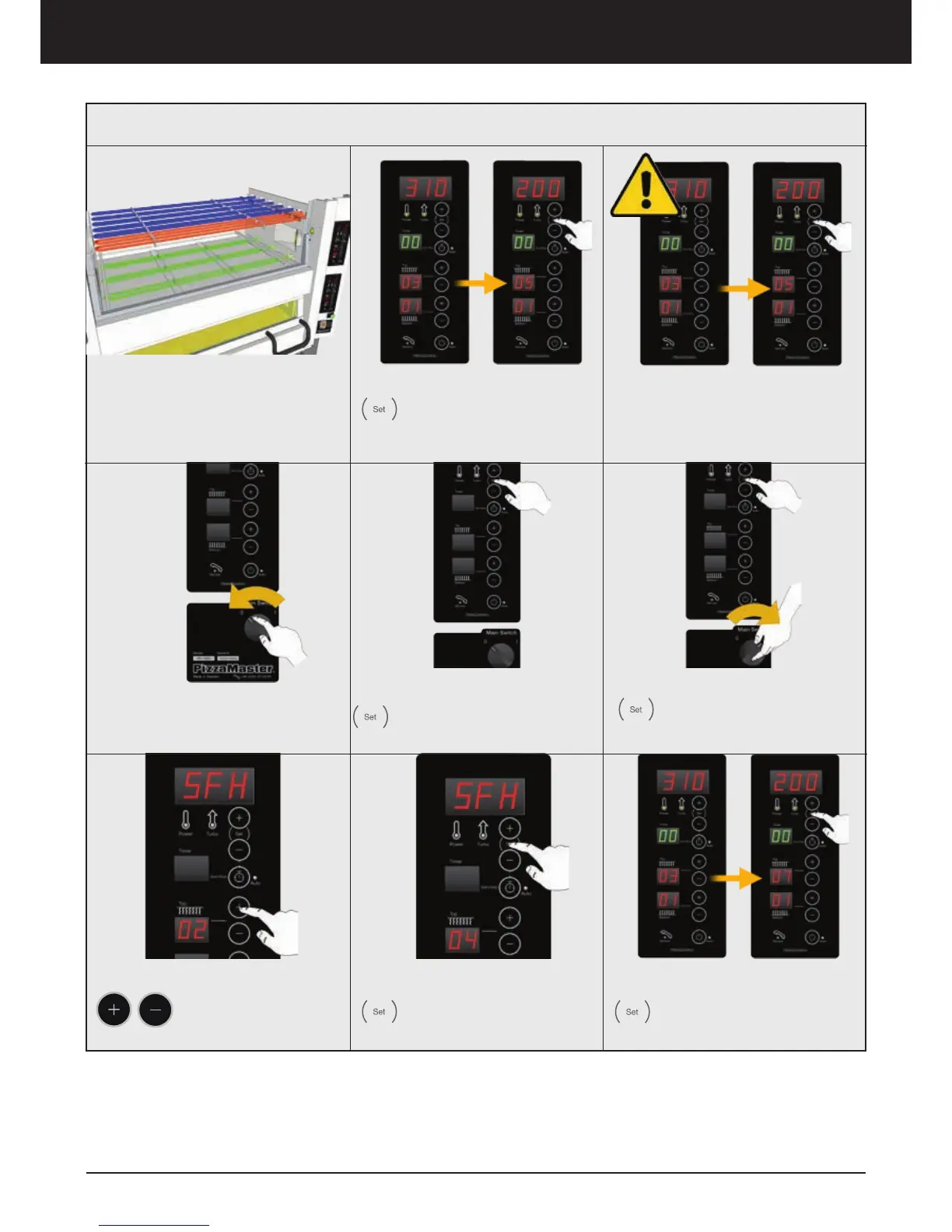
HEAT ZONES
The oven has 3 independent heat
zones, Bottom, Top and Top Front.
Top Front is adjustable between 0 to
+4 for the Top heat setting
1. Top Front Setting
Press SET to see the Top
Front setting and the actual
temperature.
5. Turn ON the Oven
Hold SET and Turn ON the
oven from the Main Switch
2. Factory Settings
Pizza Deck: +2
Bakery Deck: 0
4. Press Set
Press SET and hold it
3. To Configurate
Turn OFF the oven from the Main
Switch
6. Top Front Settings
Press to adjust the
Top Front settings
from 0 to 4
7. Press SET
Press SET to finish the
configuration
8. Check
Press SET at any time to see
the Top Front Settings
Top Front Setting
Oven operation – Display ED



 To Next Page