EasyManua.ls Logo

PizzaMaster PM 721 - Oven operation - First-time start-up

PizzaMaster PM 721
48 pages
Print Icon
To Next Page IconTo Next Page
To Previous Page IconTo Previous Page
Loading...
31
PizzaMaster®
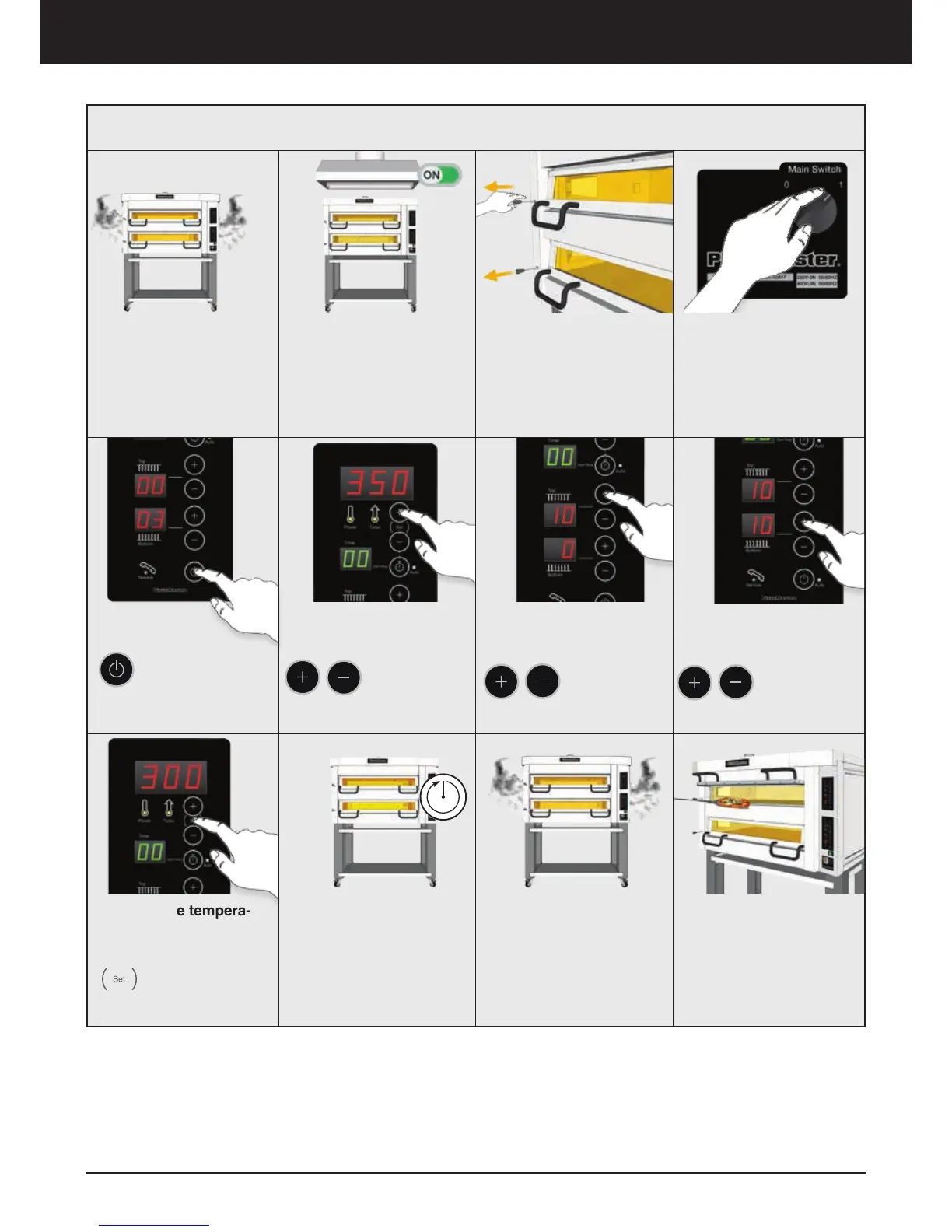
You must Burn Off any
remaining protective oil.
This process will emit
certain amount of smoke,
which is normal.
1. Turn ON External
Ventilation
Turn ON the hood or any
ventilation system and
open any near windows.
8. Real Time tempera-
ture
Press and hold
SET button at any
time to display the
deck’s actual
temperature.
2. Open Oven
Ventilation
Pull out the ventilation
handle.
10. Smoke
Let all the smoke go
out from the oven.
Congratulations!
Now your oven is
ready to use!
*First Time Start-Up
9. Wait 60 Minutes
When the oven reaches
350°C (662°F), you must
wait 60 minutes.
3. Turn ON the Oven
Turn ON the oven from
the Main Switch.
Oven operation - First-time start-up
*Note: Use the same configuration for a Classic Control Panel model.
4. Turn ON every
Oven Deck
Press ON/OFF
button in every
deck to turn them
ON.
5. Set Temperature in
350°C (662°F)
Press the
buttons to set
the oven
350°C (662°F)
6. Set Top Heat Zone
Press the button to adjust
the Top Heat
intensity:
10 in every deck.
7. Set Bottom Heat Zone
Press the button to adjust
the Bottom
Heat intensity
10 in every deck.

Related product manuals