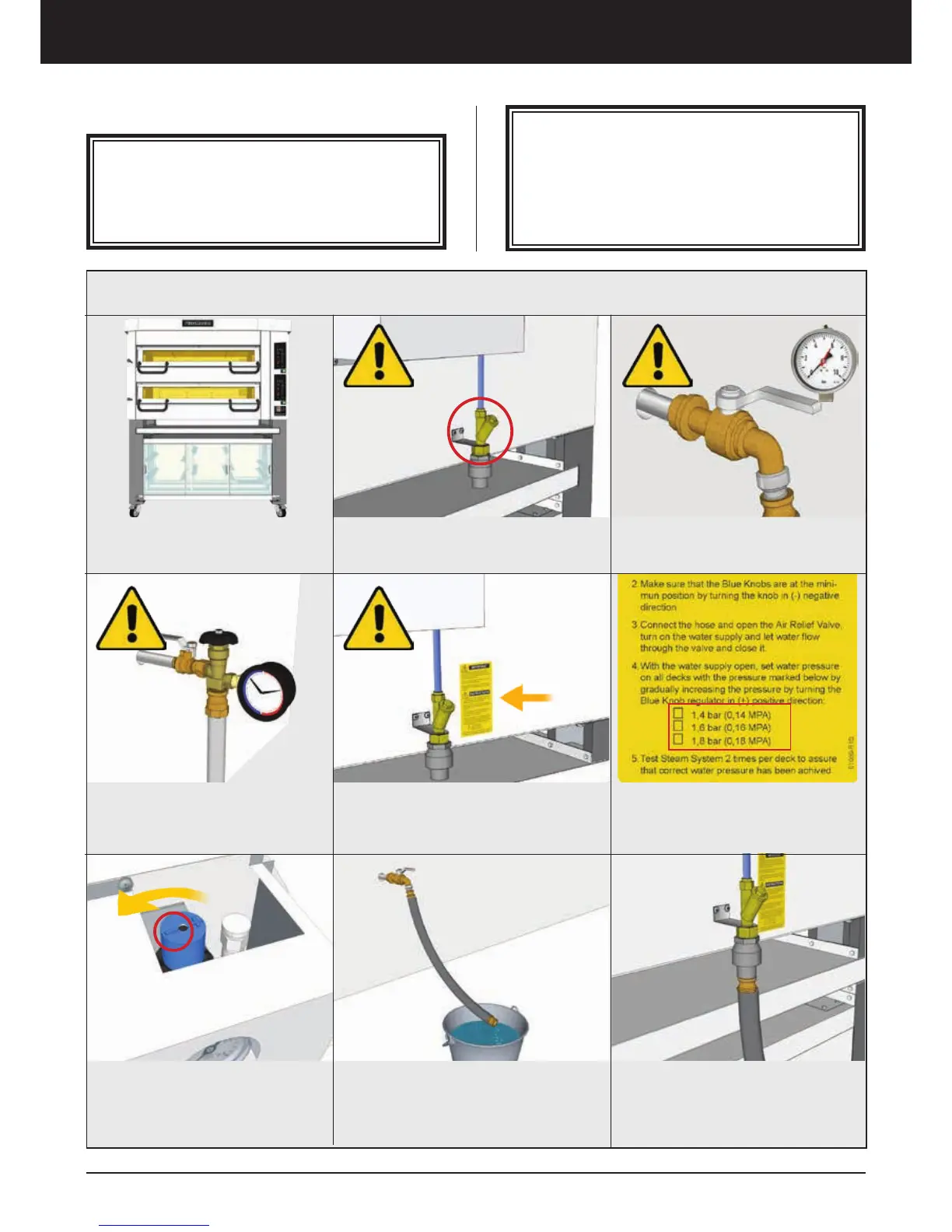
Installation – Steam System
Your oven can be equipped with
an optional Steam System in 1 or
more decks
This appliance must be installed with
a proper backflow protection system
by an authorized personnel
If incoming water pressure is
above 6.0 bar (0.6 MPA) a Water
Pressure Reducing Valve must be
installed
The label indicates the water pres-
sure that the system needs to be
adjusted to
1. Make sure that the Blue Knobs
are at the minimum position by
turning the knob in (-) negative
direction
2. Open the water supply and let wa-
ter run, this will clean the hose and
any other residue in the water system
before connecting the water supply to
the Steam System
3. Connect the hose to the oven
Incoming water pressure must not
exceed 6.0 bar (0,6 MPA)
Read carefully the instructions on the
label attached to the steam system
Steam System Installation
Steam System Installation
Important!
• Particle filter must be installed on incoming
water line.
• Water softener is recommended to install on
incoming water line.
Important!
Guidelines for water quality:
• Magnesium, Mg (<30 mg/l)
• Calcium, Ca (20 – 100 mg/l)
• Hardness, dH (4,0 – 7,0 dH)
• pH at 20°C (7,5 – 8,5 pH)
• Alkalinity, HCO3 (>60 mg/l



 To Next Page