EasyManua.ls Logo

PizzaMaster PM 721 - Timer Set Up

PizzaMaster PM 721
48 pages
Print Icon
To Next Page IconTo Next Page
To Previous Page IconTo Previous Page
Loading...
33
PizzaMaster®
Clock timer
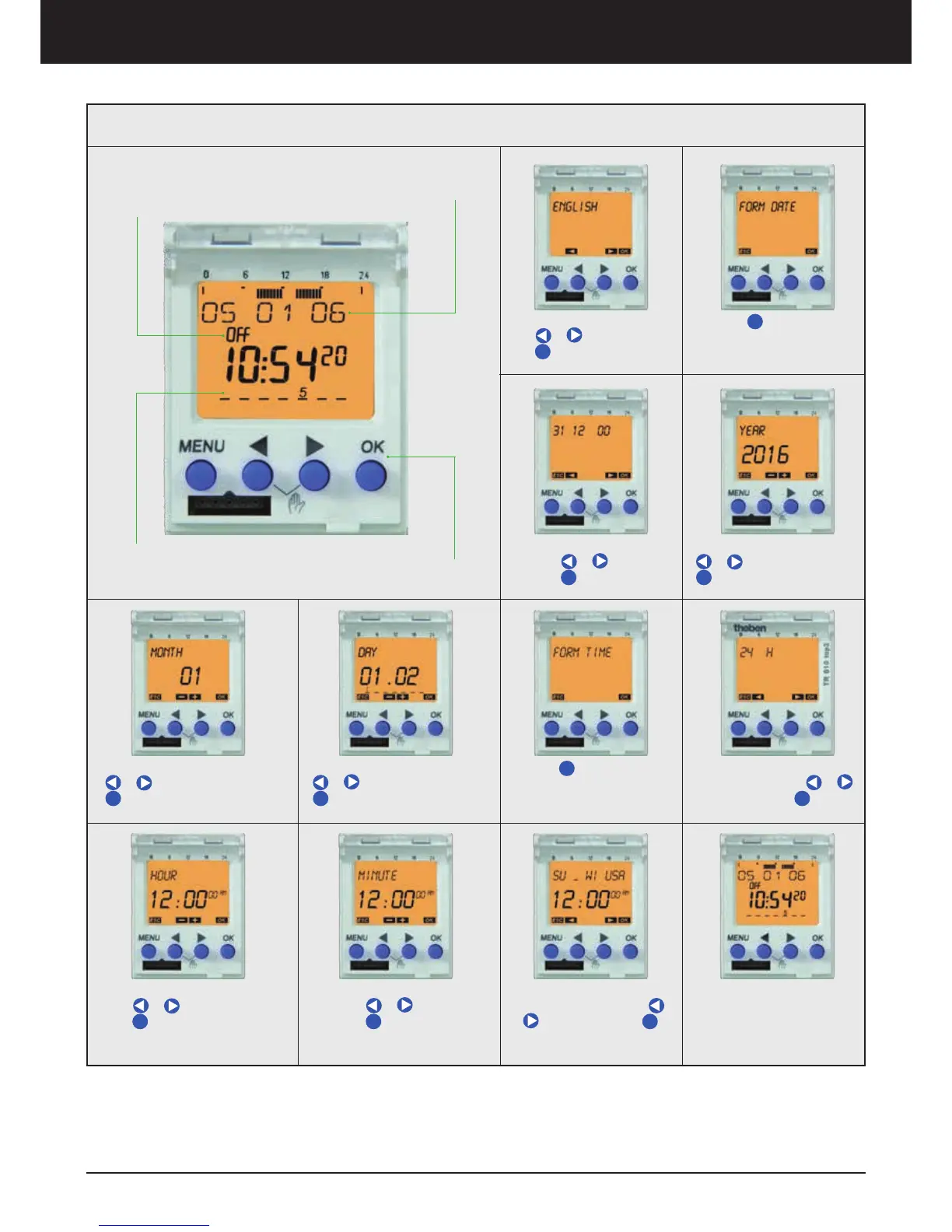
5. Select Month by pressing
or and confirm with
OK
OK
2. Press
OK
OK to configu-
rate Form Date
Date Display
Oven Status:
- ON : Oven Operating
- OFF : Oven Inoperating
Current Weekday:
1= Monday, 2= Tuesday;
......; 7= Sunday
Menu
1. Select language by pres-
sing or and confirm
with
OK
OK
3. Select Date format by
pressing
or and con-
firm with
OK
OK
4. Select Year by pressing
or and confirm with
OK
OK
7. Press
OK
OK to configu-
rate Form Time
6. Select Day by pressing
or and confirm with
OK
OK
8. Select Time display
format by pressing or
and confirm with
OK
OK
9. Configurate hour by pres-
sing or and confirm
with
OK
OK
11. Configurate Summer or
Winter time by pressing
or and confirm with
OK
OK
10. Configurate minute by
pressing or and con-
firm with
OK
OK
Now your timer is configu-
rated
Timer Set Up

Related product manuals