EasyManua.ls Logo

PizzaMaster PM 721 - Program Set Up

PizzaMaster PM 721
48 pages
Print Icon
To Next Page IconTo Next Page
To Previous Page IconTo Previous Page
Loading...
34
PizzaMaster®
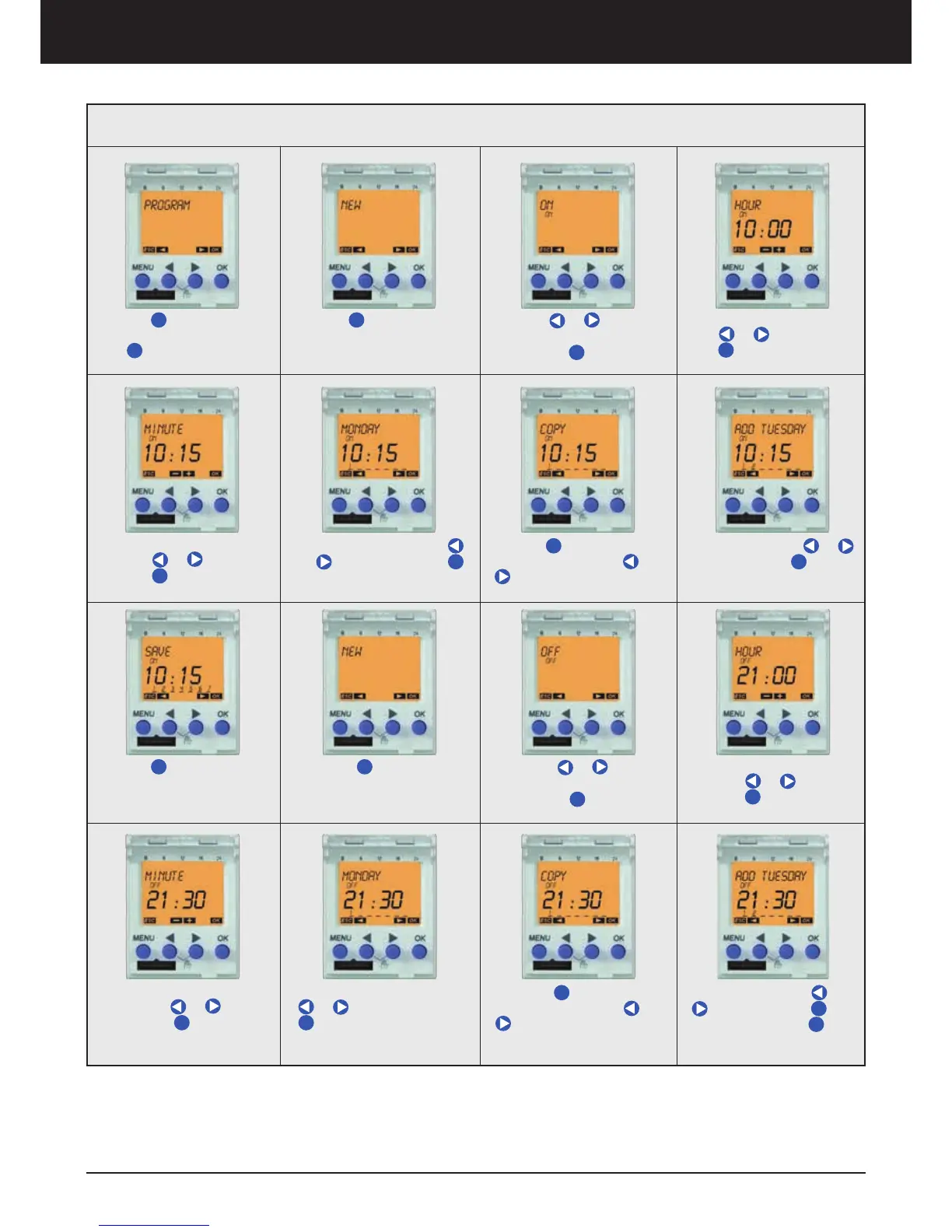
Program Set Up
4. Select ON Hour by pres-
sing
or and confirm
with
OK
OK
3. Press or to pro-
gram ON or OFF times and
confirm with
OK
OK
7. Press
OK
OK to Copy to
another day(s). Press or
to Save. Repeat steps 2
to 7 for individual day times
8. Select days with or
and confirm with
OK
OK
2. Press
OK
OK to configu-
rate new program
5. Select ON minutes by
pressing or and con-
firm with
OK
OK
6. Select day by pressing
or and confirm with
OK
OK
12. Select OFF Hour by
pressing or and con-
firm with
OK
OK
11. Press or to pro-
gram ON or OFF times and
confirm with
OK
OK
15. Press
OK
OK to Copy to
another day(s). Press or
to Save. Repeat steps 10
to 15 for individual day times
16. Select days with or
and confirm with
OK
OK.
Save after pressing
OK
OK
10. Press
OK
OK to configu-
rate new program
9. Press
OK
OK to Save
13. Select OFF minutes
by pressing
or and
confirm with
OK
OK
14. Select day by pressing
or and confirm with
OK
OK
1. Press
MENU
Menu to pro-
gram ON-OFF time, confirm
with
OK
Clock timer

Related product manuals