2. Set Temperature and humidity.
Recommendation! for best fermenta-
tion result factory settings should be
used (see above)
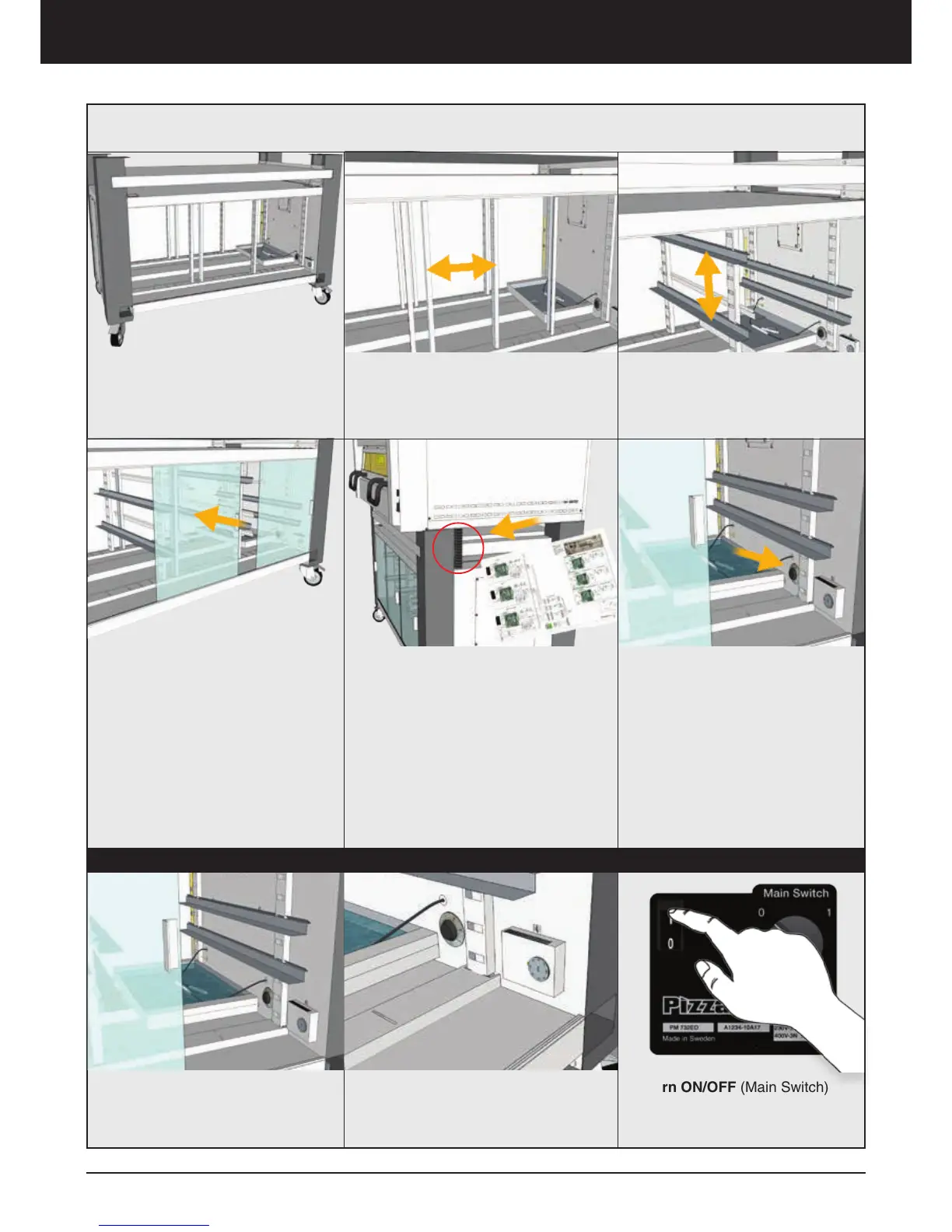
1. Starting from inside the cabinet.
The unique and smart design makes
it possible to adjust both the width
and the height inside the cabinet, to
fit your exact needs.
UBC Assembly
2. Fit the dividers
3. Fit the supports
4. Fit the glass-doors to the cabinet.
The number of glasses depend of
the size of your UBC.
Electrical connection
(only for UBC-P)
Feed the electrical wires and the
protective plastic tube through the
access hole in the bottom of the
oven. Then connect the electrical
wires to the oven, see attached
Technical decription and the Electri-
cal diagram.
Factory settings (UBC-P)
Temperature: 38 C (100 F)
Humidity: 78%
Available temperature settings:
room temperature - 50 C (122 F)
Tip! for best fermentation result
the factory settings should not be
changed. If slower fermentation
is required lower the temperature
slightly.
Installation – Assembly UBC
UBC-P Use
1. Place the two water heaters in
the container, fill with water until the
heaters are cover with water approxi-
mately 1cm (1/2”)
3. Turn ON/OFF (Main Switch)
I = On
0 = Off



 To Next Page