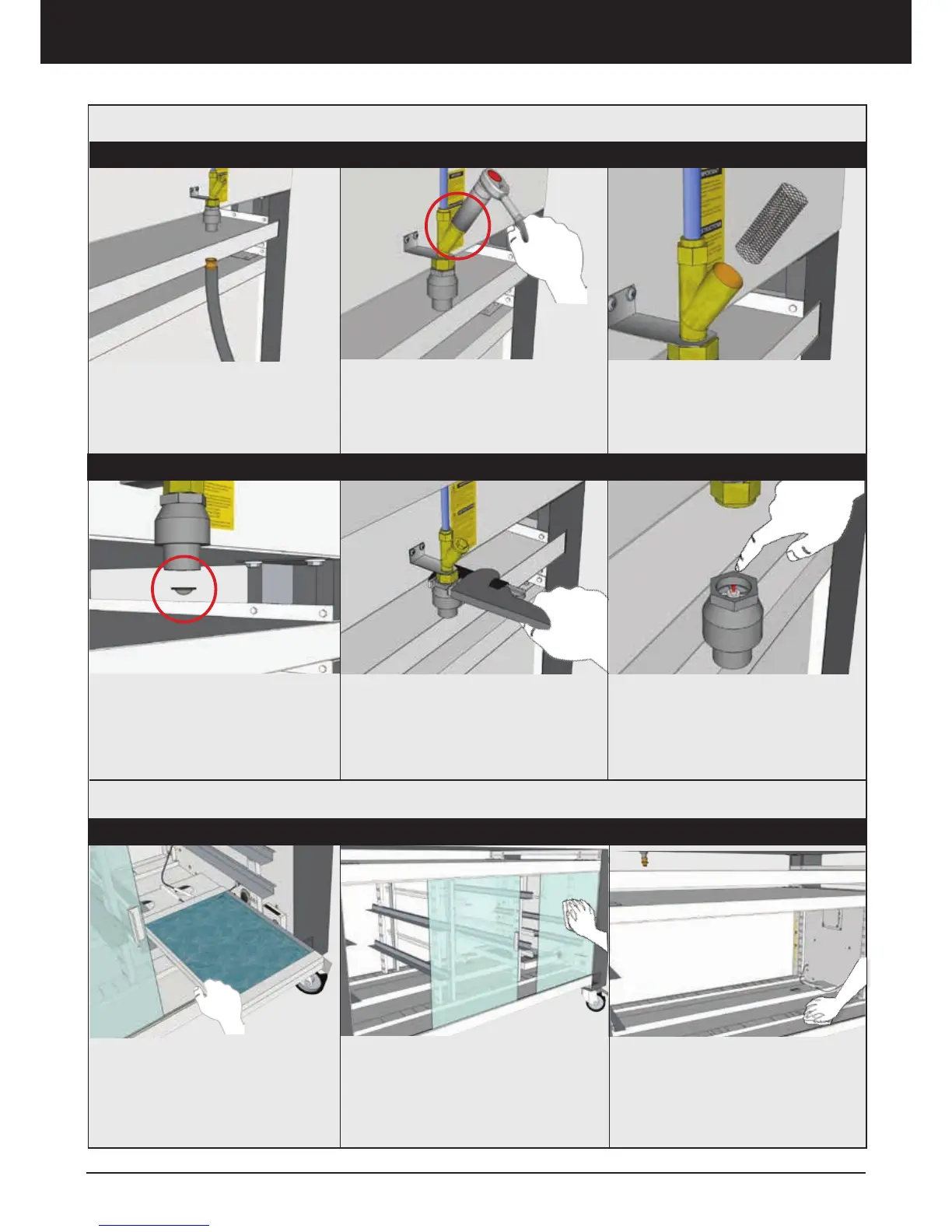
1. Turn off the water supply and
disconnect the hose from the
oven.
3. Take out the filter and clean it
4. From the Water Block, take out
the filter and clean it
*Repeat the ”Installation steps”
before using the Steam System
1. RESET WATER BLOCK:
If a failure occurs causing a conti-
nuous water leak, the Water Block
will shut off.
Using a pipe wrench, remove the
Water Block Safety valve
2. Press the red plunger to reset
the Water Block
*Repeat the ”Installation steps”
before using the Steam System
2. Open the filter on the back flow
valve
Cleaning
Maintenance
Steam System Cleaning and Maintanence
Maintenance and Preventative Maintenance
UBC Cleaning
Empty the water container and
clean the inside of the container
with a sponge lightly damped with
a mix of water and dish fluid. Dry
with a clean soft cloth.
Remove all interior removable parts.
Clean all surfaces and corners
inside with a sponge lightly damped
with a mix of water and dish fluid.
Dry surfaces with a clean soft cloth.
Clean the glass and interior cabinet
using a sponge lightly damped with a
mix of water and dish fluid. If neces-
sary use the sponges white non abra-
sive side. Dry with a clean soft cloth
Daily Weekly Monthly



 To Next Page