13
Note
Thefollowingweb screenbased onIGS-10020HPTwillbe thesame
asthatofIGS-10020PT.
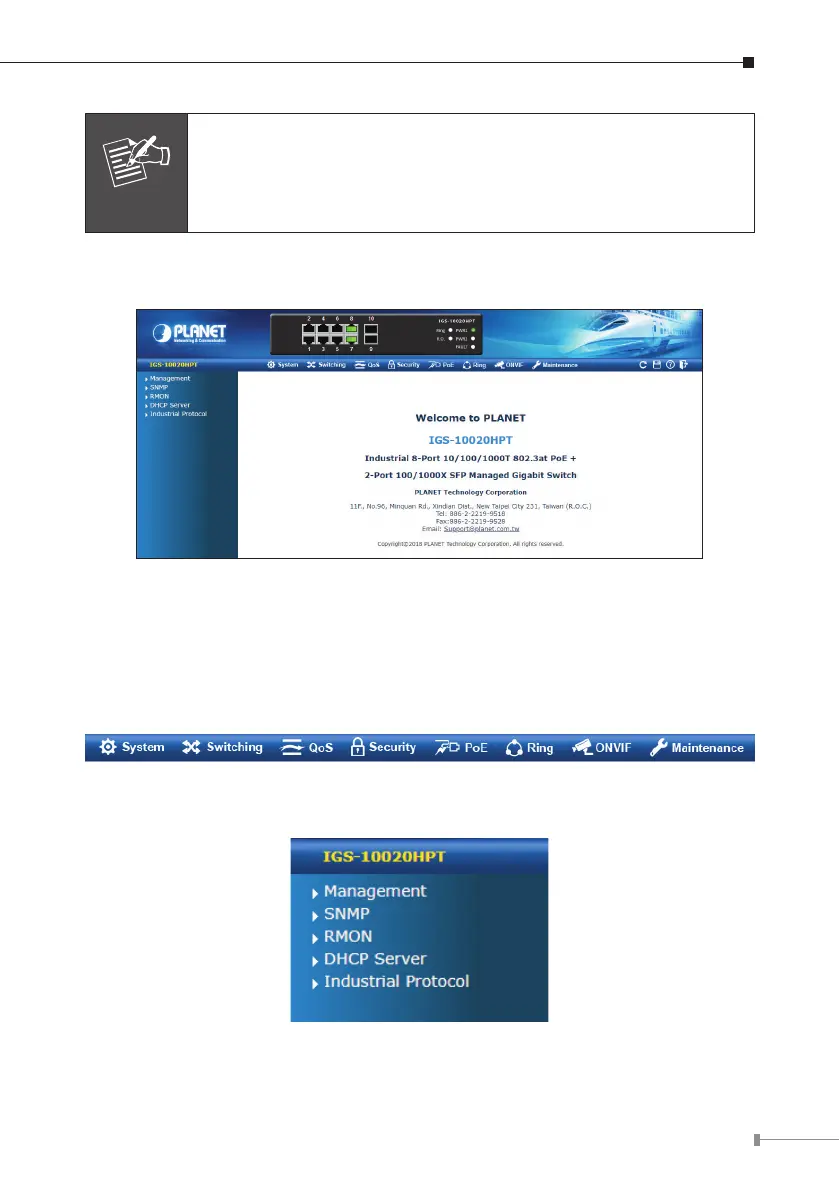
3.Afterenteringthepassword,themainscreenappearsasshowninFigure5-3.
Figure 5-3: Web Main Screen of Industrial Managed PoE+ Switch
The Switch Menu on the top of the Web page lets you access all the commands
and statistics the Industrial Managed PoE+ Switch provides. The Switch Menu
always contains one or more buttons, such as “System”, “Switching”, “QoS”,
“Security”,“PoE”,“Ring”,“ONVIF”and“Maintenance”.
Figure 5-4: Switch Menu
Figure 5-5: Switch Menu -- System



 To Next Page