5
3. Wiring the Power Inputs
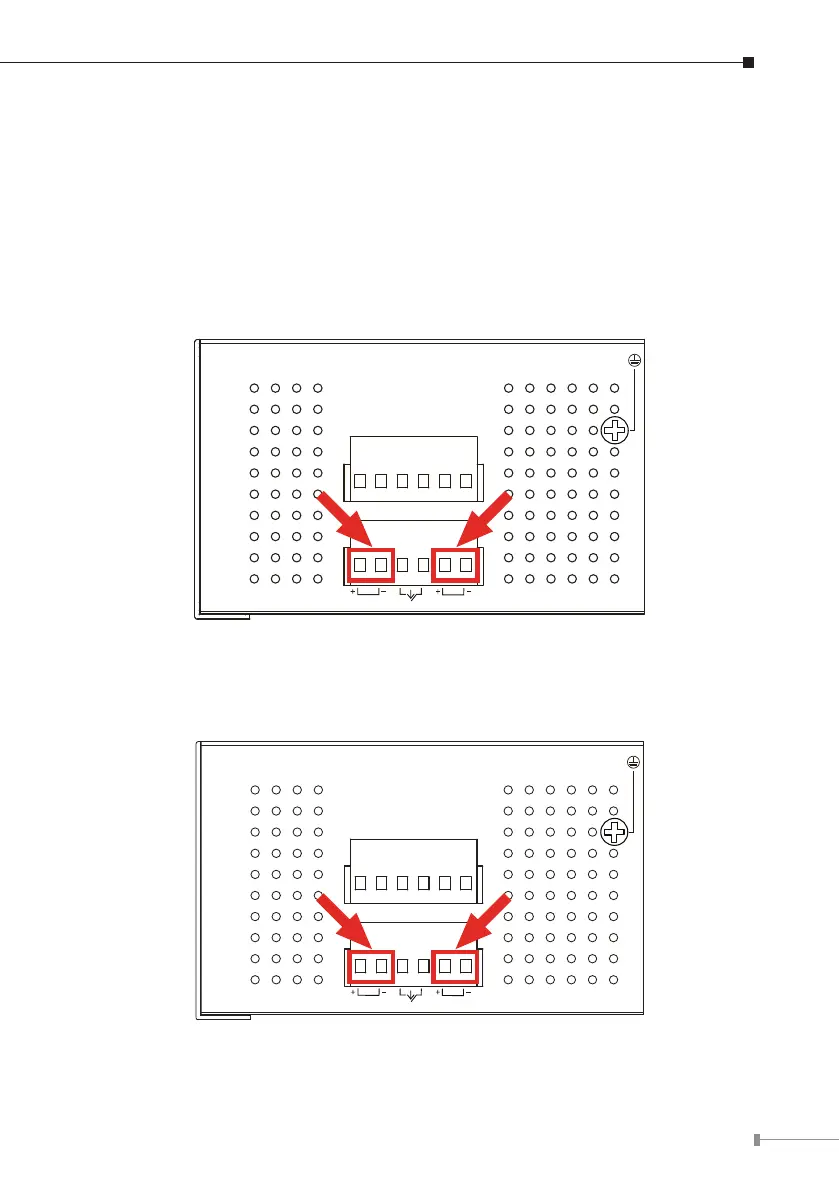
TheUpper Panelof theIndustrial ManagedPoE+Switchindicates aDC inletpower
socketandconsistsofoneterminalblockconnectorwithin6contacts.Pleasefollow
the steps below to insert the power wire.
1.Insert positive/negative DC power wires into Contacts 1 and 2 for Power 1, or
Contacts5and6forPower2.
z IGS-10020PT:48V~56VDC
Input DC 48~56V
DC1 DC2
Fault
DI1 DO0 DO1DI0 GNDGND
1A@24V
Figure 3-1: IGS-10020PT Upper Panel
z IGS-10020HPT:DC12~48V
DI1 DO0 DO1DI0 GNDGND
1A@24V
Input DC 12-48V
DC1 DC2
Fault
Figure 3-2: IGS-10020HPT Upper Panel












 To Next Page