17
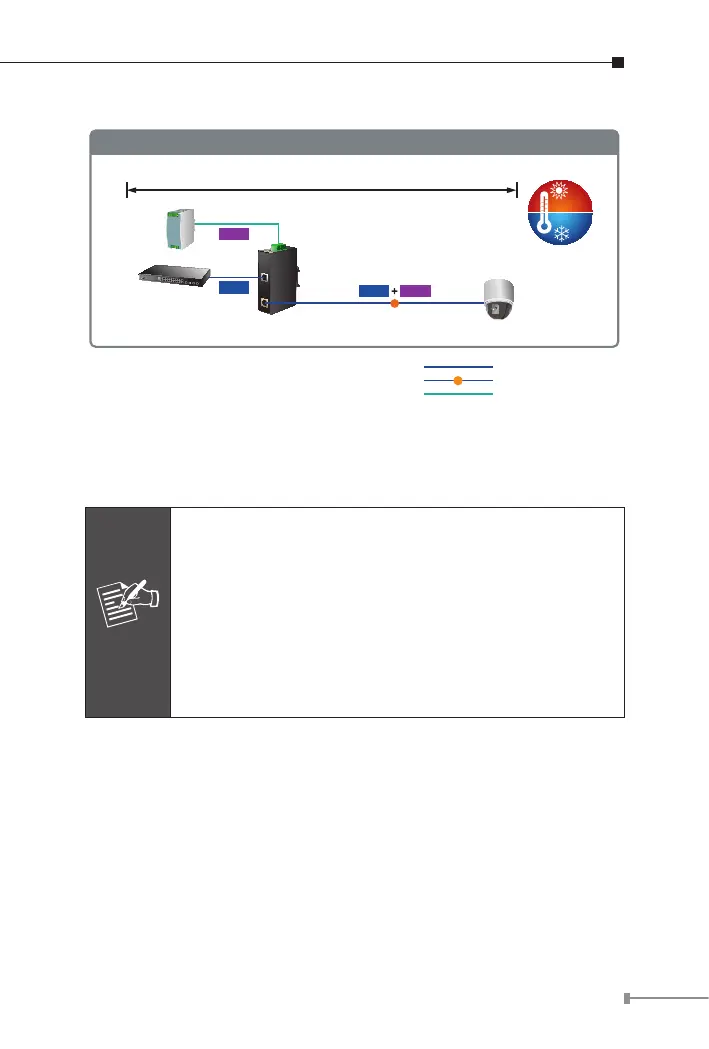
Power Line
1000BASE-T UTP
PoE
1000BASE-T UTP with PoE
IPOE-162
Industrial
Switch
Power
Supply
AC 24V/DC 12~48V
IPOE-162 Installation
-40
℃
75
℃
Power
Data
PoE
PTZ Camera
PoE
Power
Data
100 meters
Once the IPOE-162 detects the existence of an IEEE 802.3at device,
the POE-in-use LED indicator will be steadily on to show it is providing
power.
Note
1. As the IPOE-162 PoE port supports 56V DC PoE
power output, make sure PDs accept DC power
ranging from 52 to 56V DC. Otherwise, it will damage
the PDs.
2. If the connected PDs do not fully comply with IEEE
802.3at Power over Ethernet or in-line power device,
the IPOE-162 might encounter the incompatible issue
and thus fails to power up the devices
IPOE-162 Injector and IPOE-162S Splitter Installation
1. Connect the power (AC 24V or DC 12 ~ 48V) to the 6-pin terminal
block of the IPOE-162. The power LED will be steadily on.
2. Connect a standard network cable from the “Ethernet+DC” port of
IPOE-162 to the “PoE In” port of the IPOE-162S. The POE-in-use
LED of the IPOE-162/IPOE-162S will then light up continuously.
3. Connect a standard network cable from a switch/workstation to the
“Ethernet” port of the IPOE-162.



 To Next Page