18
4. Then connect the UTP cable from the “Ethernet” port of the IPOE-
162S to the RJ45 port of a remote device.
5. Adjust the proper DC voltage power output and connect the DC plug
from the “Power Output” of the IPOE-162S to a remote device.
6. Power on the remote device and its power LED indicator will remain
on.
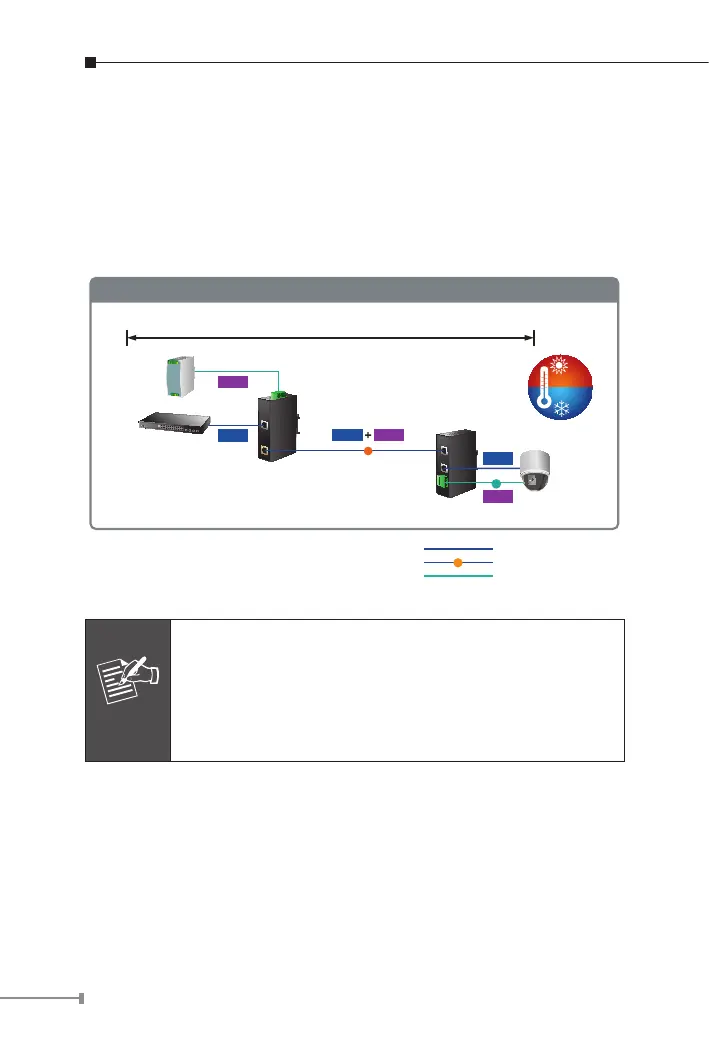
Power Line
1000BASE-T UTP
PoE
1000BASE-T UTP with PoE
IPOE-162
Industrial
Switch
Power
Supply
AC 24V/DC 12~48V
IPOE-162 + IPOE-162S Installation
-40
℃
75
℃
802.3at
PoE Splitter
Power
Data
Power
DC
PTZ Camera
12V/24V DC Output
PoE
Power
Data
Data
100 meters
Note
1. The IPOE-162 injector will not inject power over the
cable to non-IEEE 802.3at devices.
2. Please ensure the output voltage is correct before
applying power to a remote device. Otherwise, it will
damage the PD.



 To Next Page