The basics
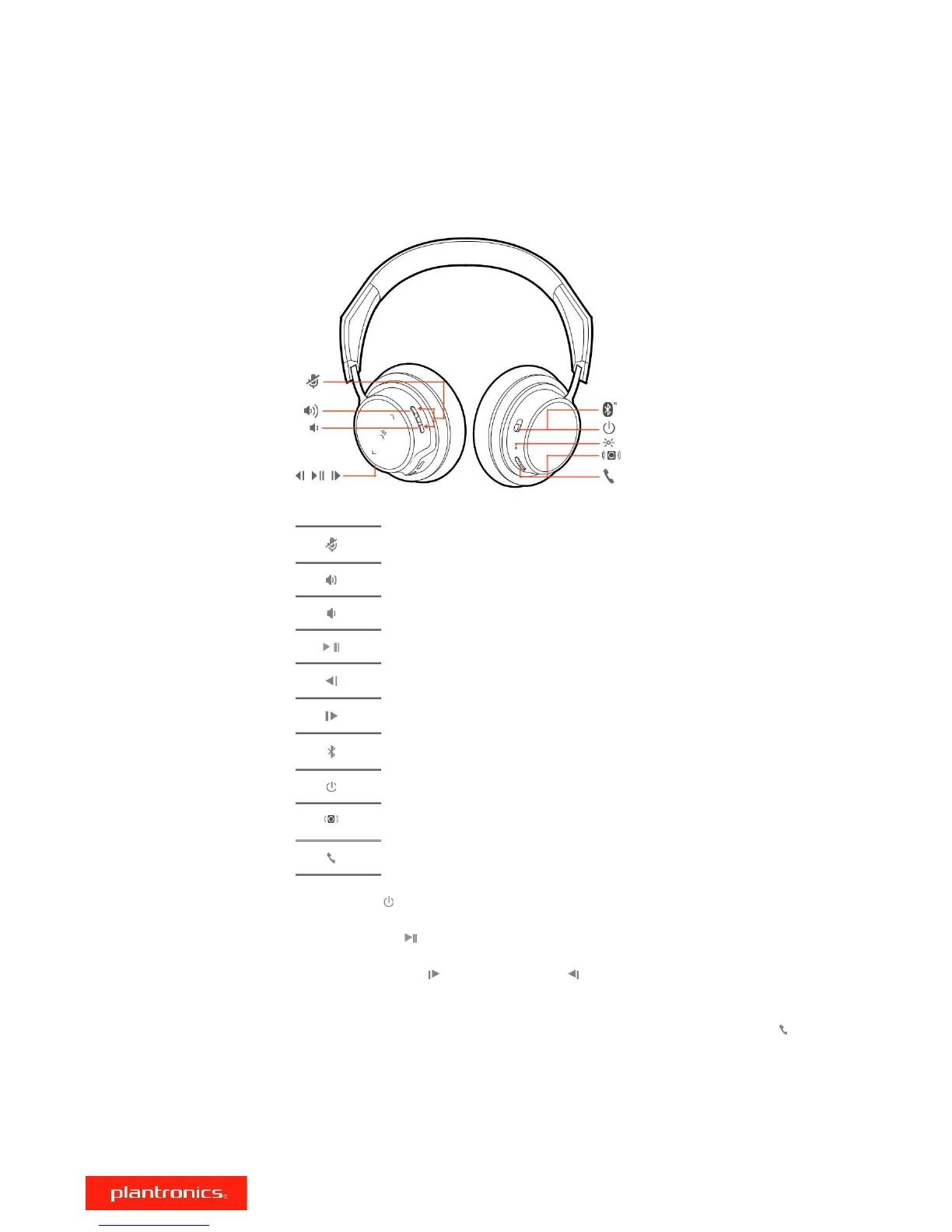
Headset overview
BASS BOOST
Mute/unmute
Volume up
Volume down
Play/pause music
Track forward
Track backward
Bluetooth pair button
Power on/off
Bass boost
BASS BOOST
Call button
Power on/off Slide the switch to power on or off.
Play/pause music Tap the Play/pause button.
Track selection Press the Track forward or Track back buttons as desired.
NOTE Functionality varies by application. May not function with web-based apps.
Activate voice assistant If your smartphone has a voice-enabled assistant, press and hold the Call button
for 2 seconds and wait for the phone prompt.
Adjust the volume To adjust the volume, tap the Volume up or Volume down button.
Adjust headset microphone volume (softphone)
Place a test softphone call and adjust softphone volume and PC sound volume accordingly.
5











 To Next Page