Congratulations on purchasing your new Plantronics product. This guide contains instructions
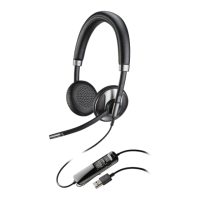
for setting up and using your Blackwire 725 headset.
Please refer to the safety instructions for important product safety information prior to
installation or use of the product.
Computer
• Supported Operating Systems: Windows Vista
®
Windows
®
7, Windows
®
8, 8.1
• Processor: 400 MHz Pentium
®
processor or equivalent (Minimum); 1 GHz Pentium processor or
equivalent (Recommended)
• RAM: 96 MB (Minimum); 256 MB (Recommended)
• Hard disk: 280 MB (Minimum); 500 MB or more (Recommended)
• Microsoft
®
Windows XP
®
Service Pack 3 (SP3) or later (Recommended) Microsoft Windows
Vista Service Pack 1 (SP1) or later (Recommended)
Display
• At least 800 x 600, 256 colours
• 1024 x 768 high colour, 32-bit (Recommended)
Browser
• Internet Explorer
®
V10 or better must be on the user’s system (required)
Visit our web site at plantronics.com/support for technical support including frequently asked
questions, compatibility and accessibility information.
Welcome
System requirements
NEED MORE HELP?
3












 To Next Page