E-22
PC-CARD
CrCbY
PrPbY
COMPONENT
COMPONENT
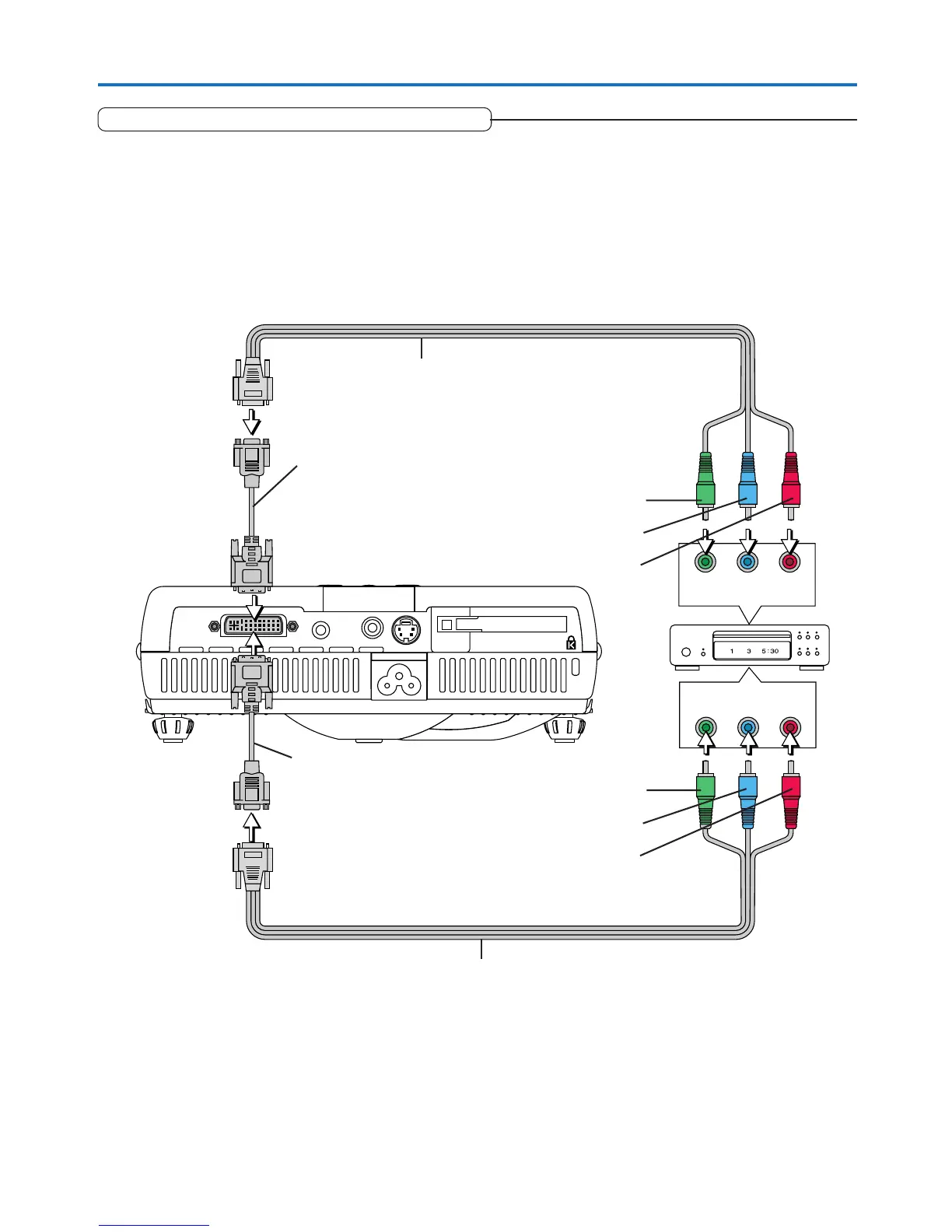
Connecting Personal Computers and Video Equipment
Connections with Component Signals
When the Video Equipment Has a YCbCr Connector or YPbPr Connector
• The projector has been set to “Auto” at the factory; however, if it does not project, please change the input setting to “Compo-
nent” using the menu sequence of [Setup] → [Input Format] → [PC].
See “Input Format” on Page E-50.
• This projector automatically distinguishes the YCbCr input signal and the YPbPr input signal and projects it.
When projecting the YCbCr signal or YPbPr signal, if the color of the overall image strongly leans toward being greenish or
another color, change the setting under the menu of [Color] → [Color Space].
See “Color Space” on Page E-46.
Component cable (Available as an option)
Order code: 28-690
Component cable (Available as an option)
Order code: 28-690
Green
Blue
Red
Green
Blue
Red
DVI/mini D-Sub 15-pin conversion cable
(Not supplied)
DVI/mini D-Sub 15-pin conversion cable
(Not supplied)


 To Next Page