Instruction book
26 9828 0931 61
Digital controller
Identification
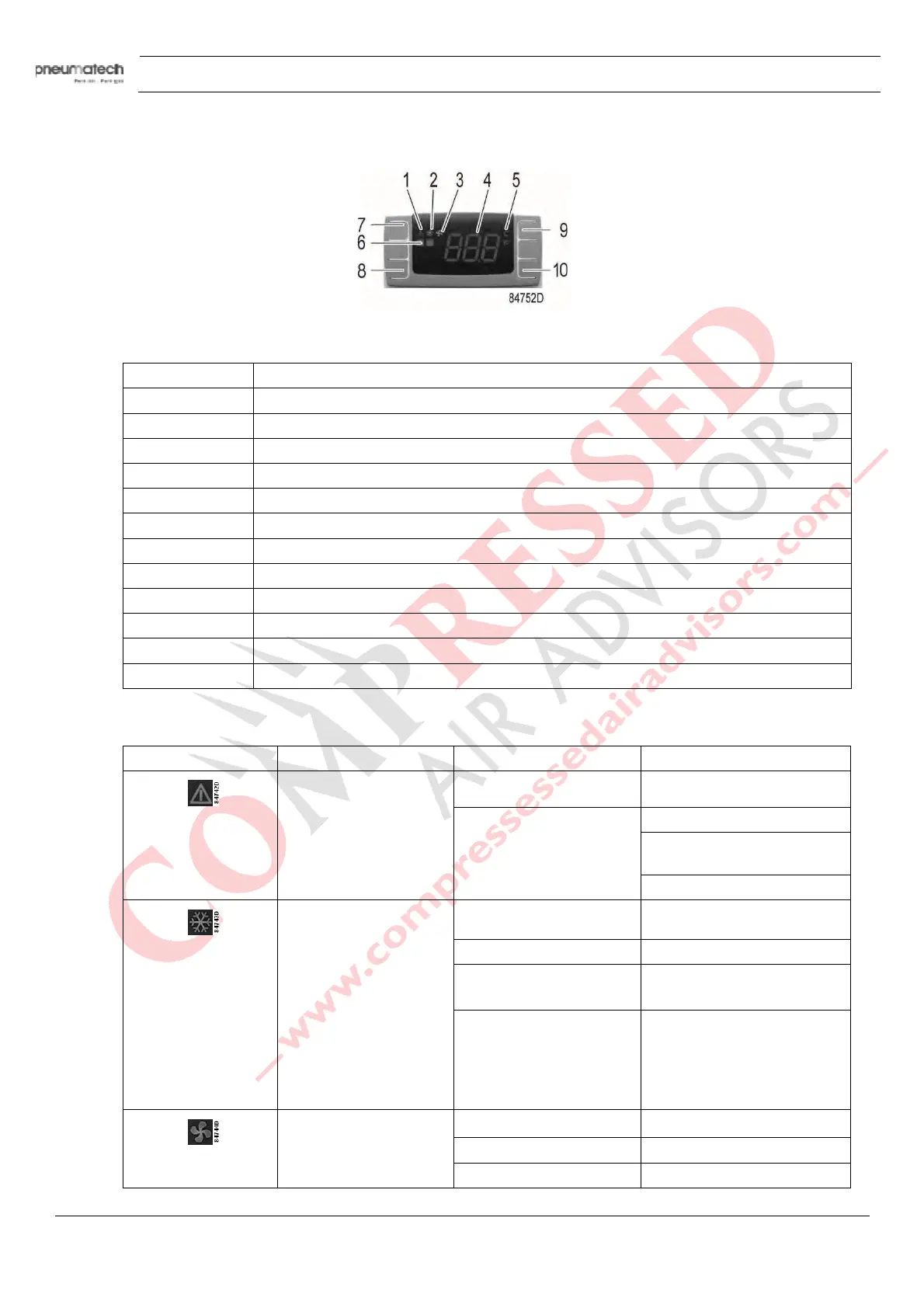
Front panel of the controller
Reference Name
1 Alarm icon
2 Refrigerant compressor icon
3 Fan icon
4 PDP (dewpoint) temperature
5 Unit (°C or °F)
6 Alarm LED
7 Button to snooze or to reset the alarm
8 SET button
9 UP button
10 DOWN buttom
8+9 Back to previous screen
8+10 Menu
Icons
Icon N
ame Mode Function
Alarm Off No active alarms
On Probe failure alarm
High temperature or low
temperature alarm
Service alarm
Refrigerant compressor
On Dryer on
Flashing + SE Maintenance warning
Flashing + L2 Dewpoint too low
Dryer is stopped
Flashing + H3 Too high discharge
temperature of the
refrigerant compressor
(see further)
Dryer is stopped
Fan Off Fan off
Flashing Not applicable
On Fan on
Remote alarm function



 To Next Page