4 Controller
4.1 Control panel
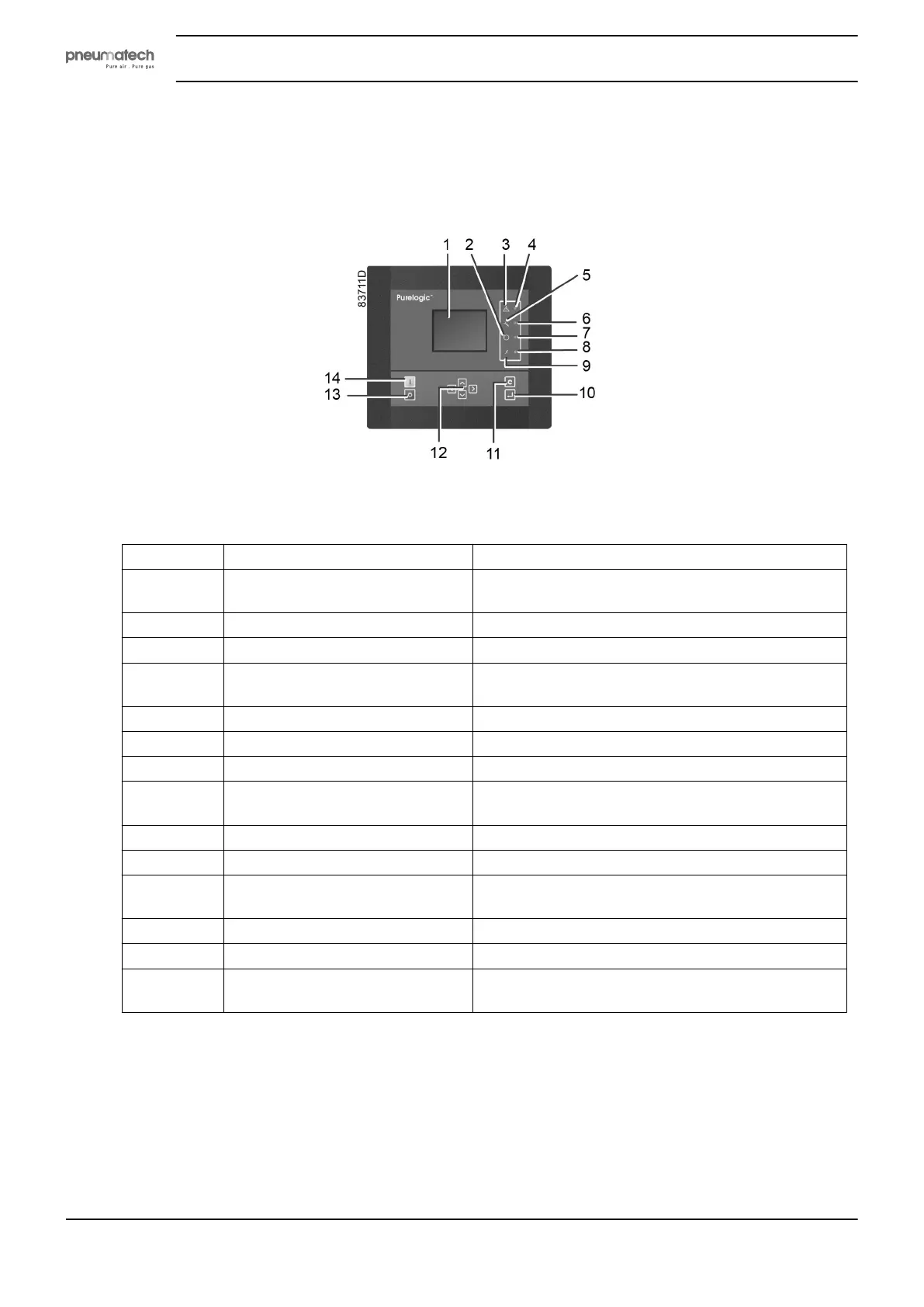
Purelogic controller
Reference Designation Function
1 Display Shows the dryer operating condition and a number
of icons to navigate through the menu.
2 Pictogram Automatic operation
3 Pictogram General alarm
4 General alarm LED Blinks when operating in shutdown warning
condition.
5 Pictogram Service
6 Service LED Lights up when service is needed.
7 Automatic operation LED Indicates that the controller runs in automatic mode.
8 Voltage on LED Lights up when supply is switched on. Dryer unit
might start automatically!
9 Pictogram Voltage on
10 Enter key Enter and confirmation key
11 Escape key To navigate to previous screen or to cancel current
action
12 Scroll keys Keys to scroll through the menu
13 Stop button Button to stop the dryer. LED (7) dims.
14 Start button Button to start the dryer. LED (7) lights up, indicating
that the controller is operational.
Instruction book
14 2920 1891 00


 To Next Page