Other Functions
Status LED
Test Button (Two Stage Trigger)
Reset
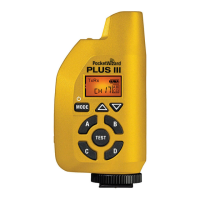
The Plus III’s status LED will blink in three different colors: Green, Red
and Amber.
Green Blinking indicates good battery life
Amber Blinking indicates the batteries are getting low or when test button is
half-pressed
Red Blinking indicates batteries are critically low and should be changed
immediately. The status LED turns solid red when Plus III is
transmitting or receiving a trigger.
Half-pressing < > the test button on a transmitting Plus III pre-releases a re-
mote camera connected to a receiving PocketWizard radio with a remote camera
cable, waking up the camera if it is asleep and making it respond more quickly
and consistently, but also reducing battery life. Half-pressing this button does not
affect remote ashes.
Fully pressing < > the test button res any remote cameras or ashes
connected to receiving PocketWizard radios set to the same channel and zones.
To reset your Plus III Transceiver back to the default setting, hold the TEST button
as you power the radio on. The default mode after a reset is TxRx on Channel
17 with all Zones enabled.


 To Next Page