23
GB
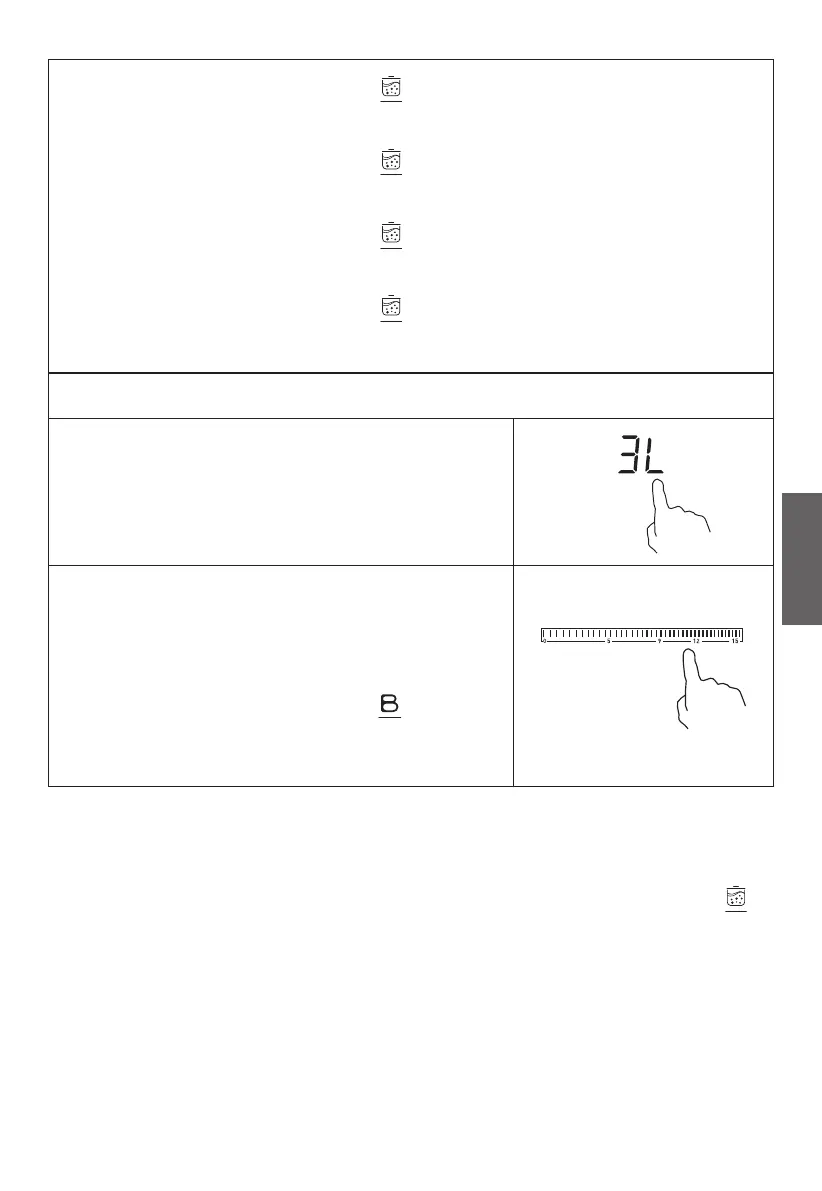
Touching the boiling cue control , the zone indicator
shows “2L”.
Touching the boiling cue control again, the zone indicator
shows “3L”.
Touching the boiling cue control for the third time, the zone
indicator shows “5L”.
Touching the boiling cue control for the fourth time, the zone
indicator shows “0”.
Cancel the boiling cue function
Touching the heating zone selection control.
a: Touching the slider control, then the
cooking zone will revert to the level you
select.
OR
b: Touching the function control , then
the cooking zone will revert to the level you
select.
• It is important that the water temperature is neither too hot nor too cold
when cooking begins, as this could aect the final result.
• Once the water has boiled, a series of beeps is heard and the zone
indicator flashes. Then give a short press on the boiling cue control .
Power 9 is displayed by default.
• The function can only work in 3rd cooking zone.
• Use pans whose diameter is as large as the graphic of the zone selected.
• Do not use cast iron cookware.
• Do not use a lid.
• As the boost function of 3rd cooking zone is activated, the 4th cooking
zone is limited.


 To Next Page