8
CLEANING AND MAINTENANCE
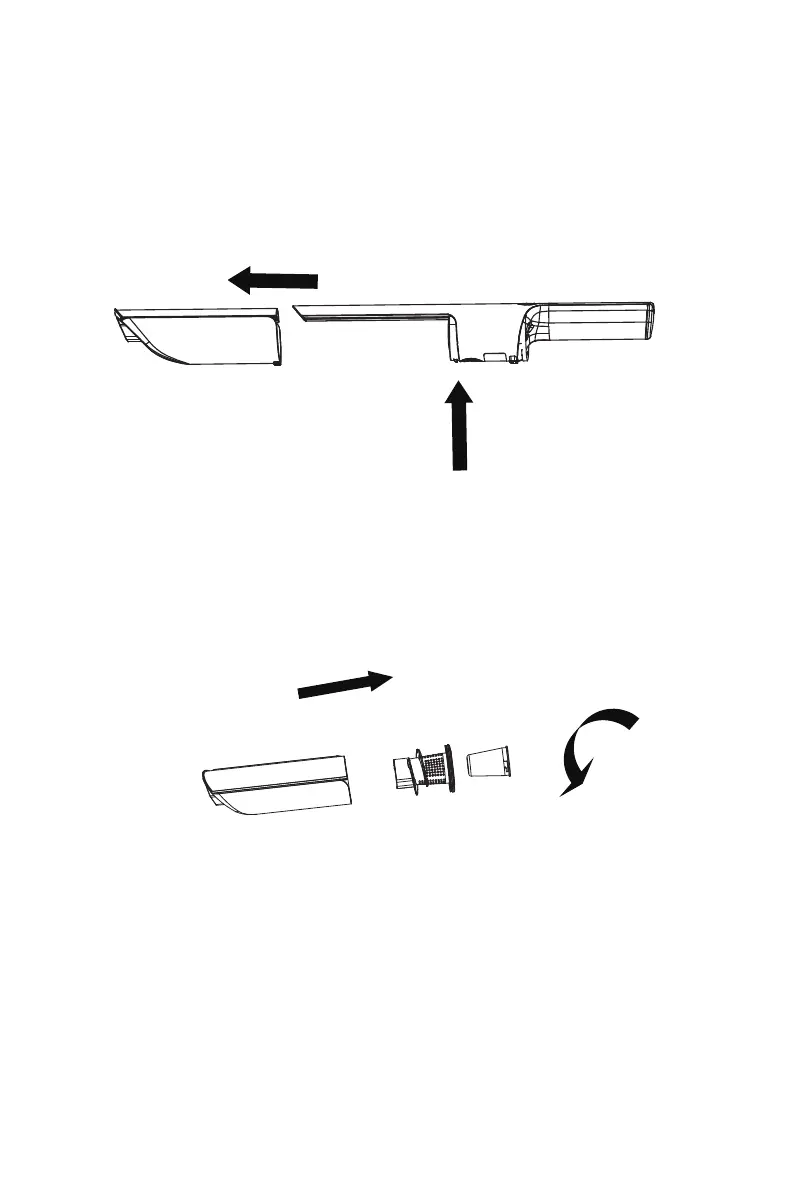
1. Follow these steps to remove the dust cup: Press the Dust Cup Release
Button (B) while simultaneously pulling the dust cup forward (C) to detach it
from the main body (see Fig. 6).
3. When the vacuuming performance degrades, you can clean the filter cloth
with water
but do not use a small brush. After cleaning, dry it thoroughly
before using again.
NOTE: The filter cloth and other wear-and-tear parts can be purchased from
the vacuum cleaner retailer.
4. After the dust cup is cleaned well, first install the filter cloth into the filter
cover clockwise and then install the filter cover into the dust cup, finally,
install the dust cup onto the main body (see Fig.8).
Fig.6
2. Grasp the Filter cover and rotate it anticlockwise at the same time to
remove the filter cloth and empty the dust cup (see Fig.7). The dust cup can
be rinsed with water, but the dust cup needs to be dried after being rinsed
with water.
Fig.7
C
B



 To Next Page