11
CONNECTIONS & APPLICATIONS
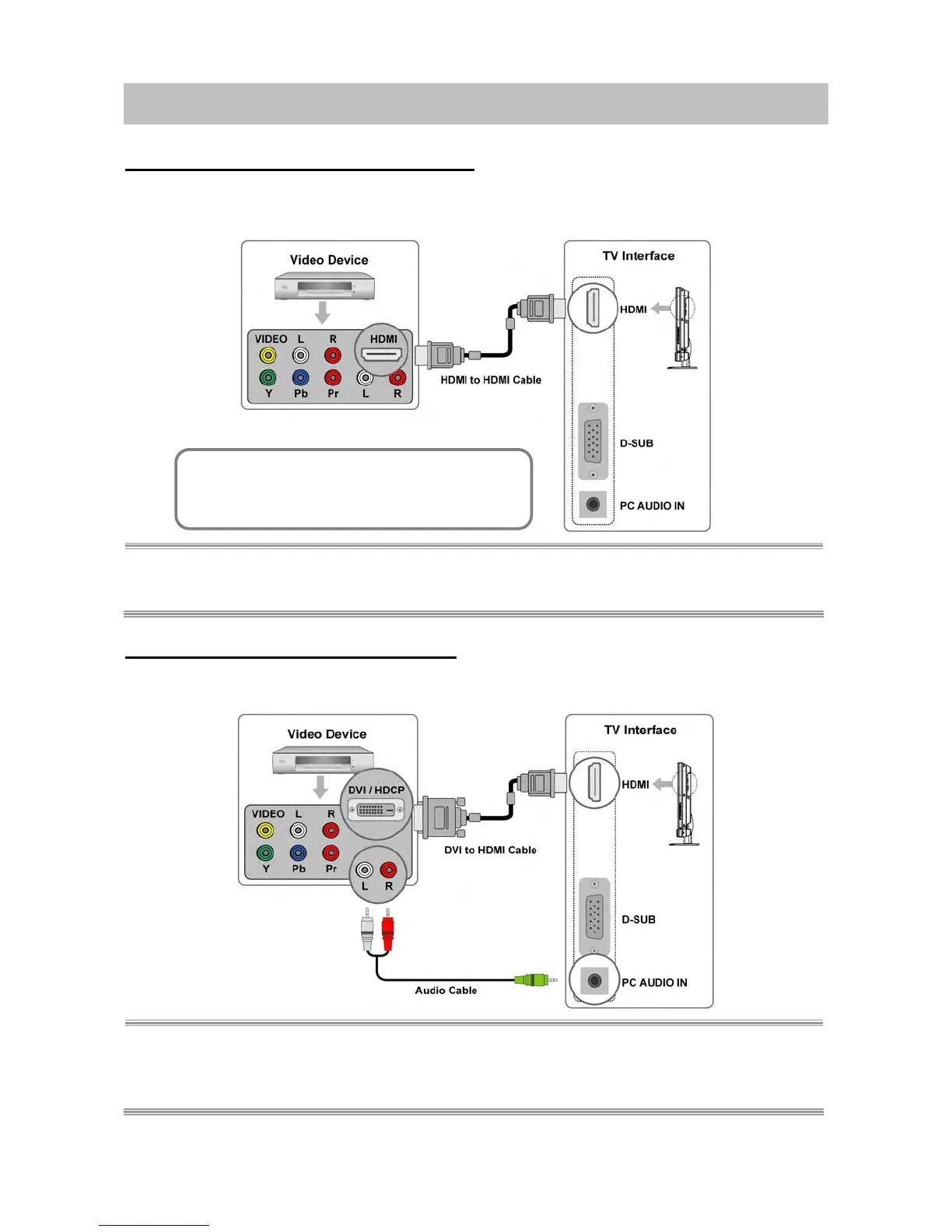
Connecting Video Devices via HDMI
* This can be applied only if there is the HDMI Output connector on the external device.
NOTE 1: No sound connector is needed for an HDMI to HDMI connection.
NOTE 2: Connect an HDMI cable between the HDMI connector on the TV and the HDMI connector on the
DVD player / Set-Top Box.
Connecting Video Devices via DVI
* This can be applied only if there is the DVI Output connector on the external device.
NOTE 1: Connect a DVI-to-HDMI cable or DVI-HDMI adapter between the HDMI connector on the TV and
the DVI connector on the DVD player/ Set-top box.
NOTE 2: Connect an audio cable between the PC Audio In jack on the TV and Audio Out jack on the DVD
player/ Set-Top box.
▪ Video Device: ex. DVD Player, Set - Top Box…
▪ HDMI: High-Definition Multimedia Interface



 To Next Page
 Loading...










