90
Polaroid m737t Digital Camera User Guide
www.polaroid.com
IMPORTANT!
• Make sure you turn off the camera before inserting or removing a memory
card.
• Be sure to orient the card correctly when inserting it. Never try to force a
memory card into the slot when you feel resistance.
• SD memory cards have a write protection switch that you can use to protect
fi les from accidental deletion. However, you must remove the write protection
whenever you want to record new fi les onto it, format it, or delete its fi les.
• Files contained in the SD card recorded by other cameras may confl ict with the
m737t camera, and valuable data in your existing SD card may be distorted or
lost when the card is inserted in the m737t camera. We strongly recommend
the user to use a new or formatted Polaroid (not included) SD card for the
m737t camera. The manufacturer is not liable for losing or corrupting any
valuable data or fi les in your SD card due to improper operation.
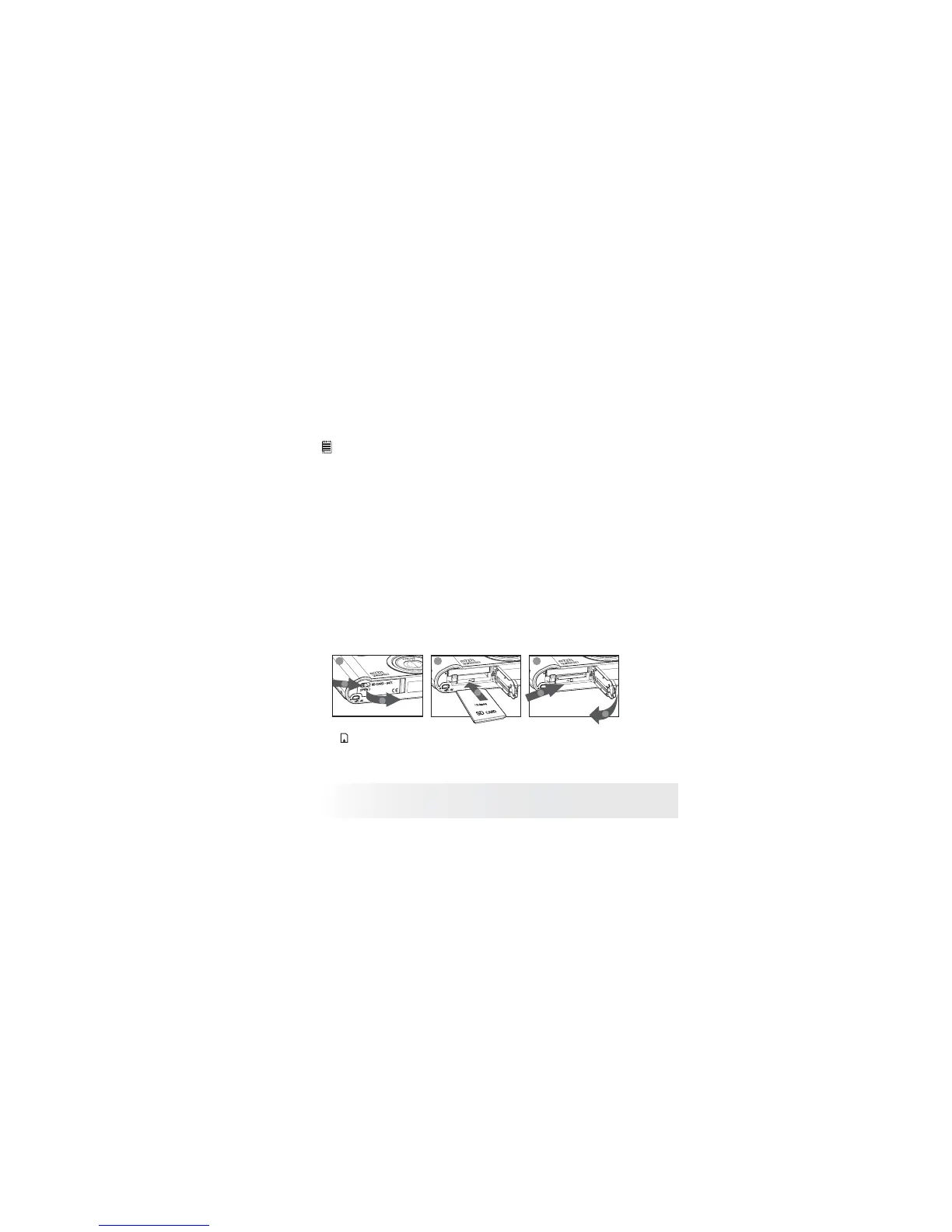
Inserting a SD card
1. Slide the SD Card/Battery door switch to the right as illustrated, and
release it. The door will automatically open.
2. Insert the SD card as shown, ensuring you follow the correct
orientation.
3. Press the battery door downwards until you hear a click.
b
a
a
1 2 3
a
b
The icon will appear on the LCD screen when a SD card is inserted into
the camera.



 To Next Page
 Loading...








