EasyManua.ls Logo

POLMAR DB-10 - Page 64

POLMAR DB-10
Print Icon
To Next Page IconTo Next Page
To Previous Page IconTo Previous Page
Loading...
62
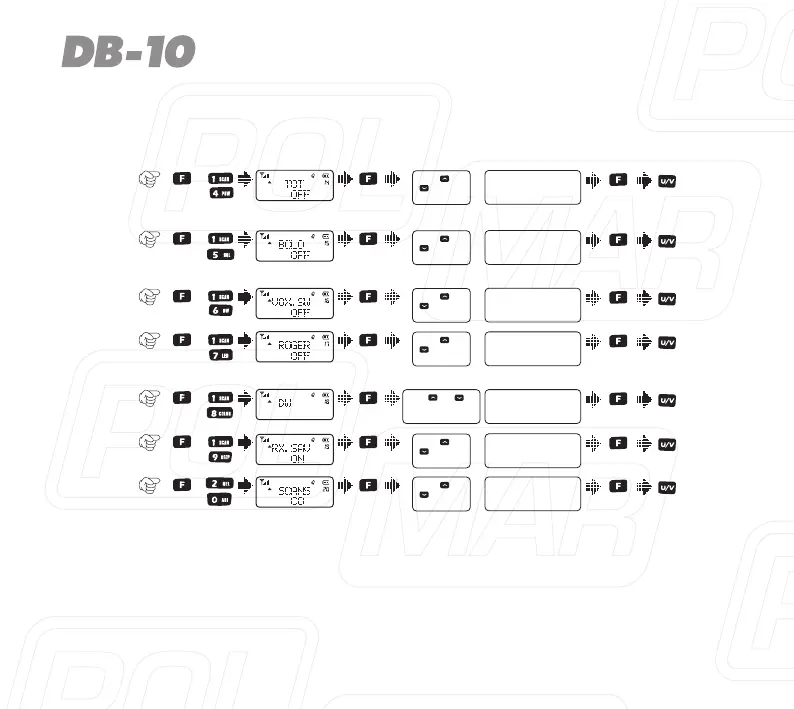
Item
No.
Item
Name
Enter
item
Screen
Display
Parameter
Explanation
ConfirmReturn
Standby
Select
parameter
+
11)
ON / OFF
+
12)
+
13)
VOX
switch
16)
Transmit
over
beeper
17)
ON / OFF
ON / OFF
+
Transmitter
time-out
timer
14)
Busy
channel
lock-out
15)
OFF/WAVE/CALL
18)
ON / OFF
+
Receive
saver
19)
ON / OFF
+
Repeater
frequency
setting
ID
input 0-9
F to confirm,
*lock to delete
PTT ID
BOT/EOT/BOTH/
OFF
Press [ ] or
[ ] to select
available values
OFF / 30... / 270s
+
Press [ ] or
[ ] to select
available values
+
Press [ ] or
[ ] to select
available values
+
Press [ ] or
[ ] to select
available values
Monitor
Press [ ] or [ ]
OR channel knob to
select available values
Press [ ] or [ ] or
rotate the channel knob
to change the frequency
+
Press [ ] or
[ ] to select
available values
Scan
mode
20)
TO / CO / SE
Press [ ] or
[ ] to select
available values
Press [ ] or [ ]or
rotate the channel knob
to change the frequency
Item
No.
Item
Name
Enter
item
Screen
Display
Parameter
Explanation
ConfirmReturn
Standby
Select
parameter
+
11)
ON / OFF
+
12)
+
13)
VOX
switch
16)
Transmit
over
beeper
17)
ON / OFF
ON / OFF
+
Transmitter
time-out
timer
14)
Busy
channel
lock-out
15)
OFF/WAVE/CALL
18)
ON / OFF
+
Receive
saver
19)
ON / OFF
+
Repeater
frequency
setting
ID
input 0-9
F to confirm,
*lock to delete
PTT ID
BOT/EOT/BOTH/
OFF
Press [ ] or
[ ] to select
available values
OFF / 30... / 270s
+
Press [ ] or
[ ] to select
available values
+
Press [ ] or
[ ] to select
available values
+
Press [ ] or
[ ] to select
available values
Monitor
Press [ ] or [ ]
OR channel knob to
select available values
Press [ ] or [ ] or
rotate the channel knob
to change the frequency
+
Press [ ] or
[ ] to select
available values
Scan
mode
20)
TO / CO / SE
Press [ ] or
[ ] to select
available values
Press [ ] or [ ]or
rotate the channel knob
to change the frequency

Table of Contents

Related product manuals