EasyManua.ls Logo

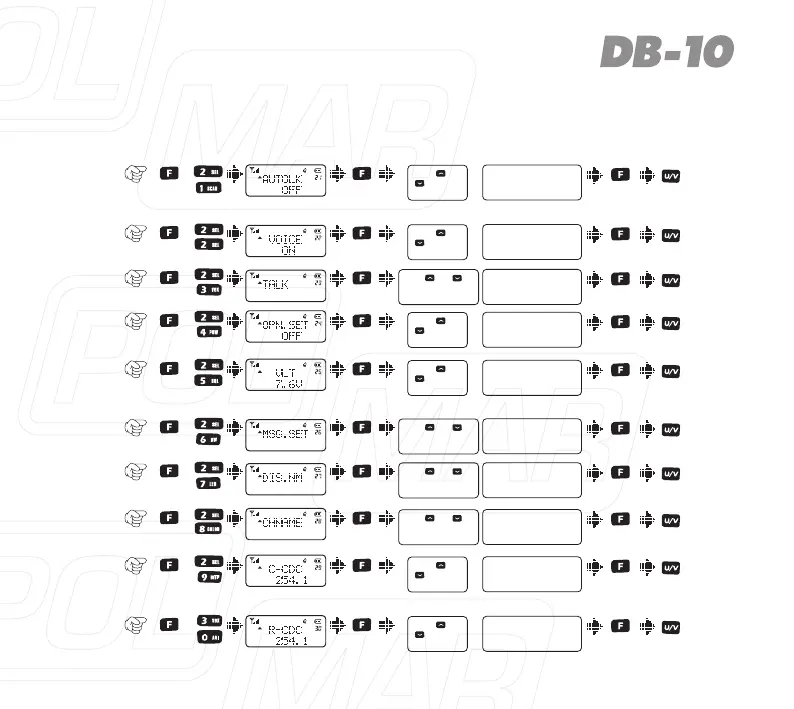
POLMAR DB-10 - DETAILED FUNCTION DESCRIPTIONS; Scan & Scan Mode setting

POLMAR DB-10
Print Icon
To Next Page IconTo Next Page
To Previous Page IconTo Previous Page
Loading...
63
Item
No.
Item
Name
Enter
item
Screen
Display
Parameter
Explanation
ConfirmReturn
Standby
Select
parameter
+
Auto
keypad
lock
21)
ON / OFF
Voice
prompt
22)
ON / OFF
+
23)
ON / OFF
+
26)
+
Battery
power
voltage
25)
Show current
voltage
27)
+
28)
+
+
Press [ ] or
[ ] to select
available values
Press [ ] or
[ ] to select
available values
Press [ ] or [ ]or
rotate the channel knob
to change the frequency
End-tone
elimination
Power-on
display
24)
OFF / DC / MSG
+
Press [ ] or
[ ] to select
available values
+
Press [ ] or
[ ] to select
available values
Press [ ] or [ ]or
rotate the channel knob
to change the frequency
MSG
setting
*LOCK/#T-R/U/V
Press [ ] or [ ]or
rotate the channel knob
to change the frequency
Display
the name
ON/OFF
Press [ ] or [ ]or
rotate the channel knob
to change the frequency
Channel
Name
*LOCK/#T-R/U/V
TX/RX
tone
coder
29)
OFF / QT / DCS
+
Press [ ] or
[ ] to select
available values
OFF / QT / DCS
RX tone
coder
30)
Press [ ] or
[ ] to select
available values

Table of Contents

Related product manuals