EasyManua.ls Logo

POLMAR DB-10 - Priority Transmit; VOX Level & VOX Switch; TX Power setting

POLMAR DB-10
Print Icon
To Next Page IconTo Next Page
To Previous Page IconTo Previous Page
Loading...
64
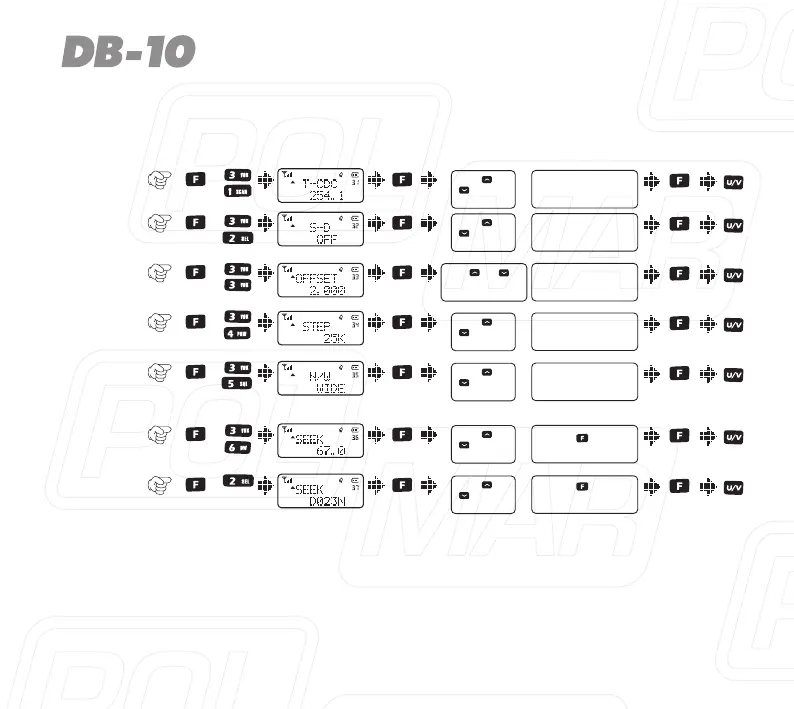
Item
No.
Item
Name
Enter
item
Screen
Display
Parameter
Explanation
ConfirmReturn
Standby
Select
parameter
+
+
+
0.000-99.9975MHz
+
+
+
Press [ ] or
[ ] to select
available values
TX tone
coder
31)
OFF / QT / DCS
Press [ ] or
[ ] to select
available values
Shift
direction
32)
+ / -
Press [ ] or
[ ] to select
available values
Repeater
Shift
33)
Press [ ] or [ ]or
rotate the channel knob
to change the frequency
VFO step34)
2.5K / 5K / 6.25K /
10K...100K
Press [ ] or
[ ] to select
available values
Wide/
Narrow
band
35)
Wide/Narrow
CTCSS
scan
36)
Press [ ] key to
start scan
Press [ ] or
[ ] to select
available values
DCS
scan
37)
Press [ ] key to
start scan
+
Press [ ] or
[ ] to select
available values

Table of Contents

Related product manuals