EasyManua.ls Logo

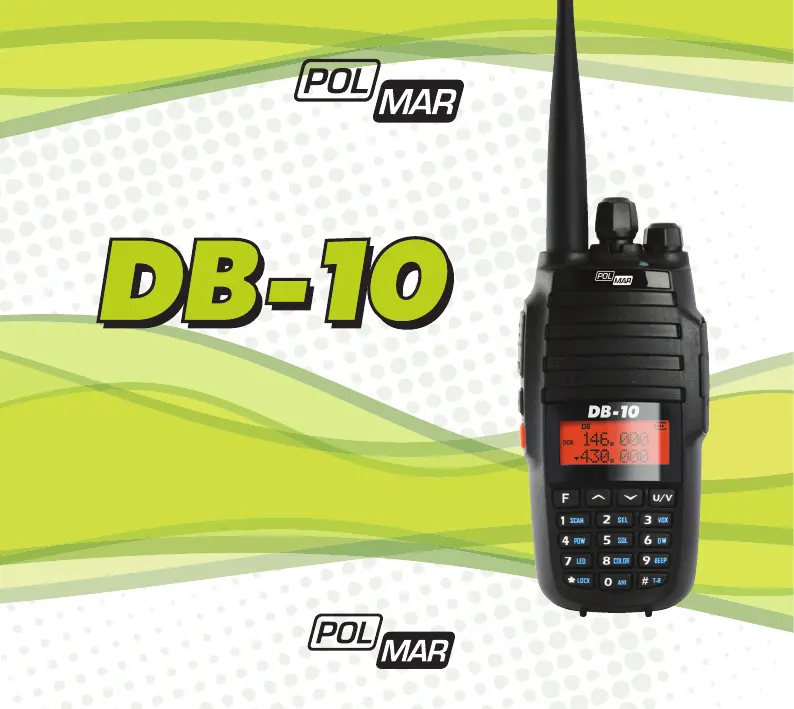
POLMAR DB-10 - User Manual

POLMAR DB-10
90 pages
Go to English
Print Icon
To Next Page IconTo Next Page
Loading...
Importato e distribuito da Polmar srl
RICETRASMETTITORE
DUAL BAND
TRANSCEIVER DUAL BAND
Manuale d’uso/User’s manual

Table of Contents

Questions and Answers

  • F
    fordrobertJul 28, 2025
    What to do if my POLMAR DB-10 Radio has no electrical source?
    • M
      Michele DennisJul 29, 2025
      If your POLMAR Radio has no electrical source, the battery may be exhausted. Try replacing or recharging the battery. Alternatively, the battery might be installed incorrectly; remove it and install it again correctly.
  • T
    thomas02Aug 3, 2025
    What to do if other radios cannot receive TX signals from my POLMAR Radio, or receive them in low volume?
    • R
      Renee LeeAug 3, 2025
      If other radios are not receiving the TX signals from your POLMAR Radio, or the volume is low, ensure the volume knob is set to the highest level. If the problem persists, the microphone may be damaged and should be checked by a local dealer.
  • S
    Samantha BrockAug 9, 2025
    Why am I not able to communicate with transceivers of the same group using my POLMAR Radio?
    • J
      Joyce WestAug 9, 2025
      If you are unable to communicate with transceivers in the same group using your POLMAR Radio, confirm that the CTCSS/DCS tone is the same for all transceivers. Also, the distance between the radios may be too far; ensure you are within the operational range.
  • A
    Aaron KingAug 15, 2025
    Why does the operating time of my POLMAR Radio become short, even when the battery is fully charged?
    • F
      fullerryanAug 15, 2025
      If the operating time of your POLMAR Radio becomes short even when the battery is fully charged, replace the battery.
  • N
    Nicole MunozAug 21, 2025
    What to do if I can hear the voice of another group on my POLMAR DB-10?
    • C
      Christopher CooperAug 21, 2025
      If you are hearing the voice of another group on your POLMAR Radio, change all CTCSS/DCS settings for your group.

Summary

USING TIPS

UNPACKING AND CHECKING EQUIPMENT

CHARGING BATTERY PACK

INSTALLATION OF ACCESSORIES

Installation of Battery Pack

Detailed steps for correctly attaching and removing the battery pack.

Installing and removing the antenna

Guidance on how to securely attach and detach the radio's antenna.

GETTING FAMILIAR

LCD Display

WORKING MODE

Frequency Mode (VFO)

Operating the radio using direct frequency input.

Frequency-Channel Mode (MR)

Using stored memory channels for operation.

SET MENU MODE

Menu Operation

Step-by-step guide on how to navigate and operate the radio's menu.

SHORTCUT MENU OPERATION

DETAILED FUNCTION DESCRIPTIONS

Scan & Scan Mode setting

Configuring and using the radio's scanning features.

Priority Transmit

Setting the radio to prioritize transmission on a specific sub-band.

VOX Level & VOX Switch

Adjusting and enabling the voice-activated transmission feature.

TX Power setting

Selecting the appropriate transmit power level for communication.

Squelch Adjustment

Adjusting the squelch level to filter background noise.

Dual Wait;Standby

Monitoring two different frequencies simultaneously.

Transmitter Time-Out Timer

Setting a limit for continuous transmission to conserve battery.

Auto Keypad Lock

Automatically locking the keypad to prevent accidental key presses.

Tone encoder and Tone searching

Using CTCSS/DCS for repeaters and searching for tones.

Offset frequency and direction setting

Setting repeater offset frequencies and transmission directions.

BASIC OPERATIONS

Turning the Radio On;Off

Procedure for powering the radio unit on and off.

Adjusting the Volume

How to control the audio output level of the radio.

Locking;Unlocking the Keypad

Methods to prevent accidental key presses by locking the keypad.

Reverse the frequency

Emergency Alarm

FM RADIO FUNCTION

DTMF Encoding

Manually sending DTMF codes for specific functions.

DTMF signaling

Sending DTMF signaling codes for identification or control.

CTCSS; DCS

TECHNICAL SPECIFICATIONS

TROUBLE SHOOTING

Declaration of Conformity

USER INFORMATION

SERVICE CARD

CONDIZIONI DI GARANZIA

Terms and conditions of the product warranty.

POLMAR DB-10 Specifications

General IconGeneral
BrandPOLMAR
ModelDB-10
CategoryRadio
LanguageEnglish

Related product manuals