HEAT MODE
Press the button a number of times until the " " " "
appears.symbol
Select the target temperature(13-27°С) by pressing the " "
or “ ” button until the corresponding value is displayed.
In heating mode, the fan speed is selected automatically by
Water is removed from the air and collected in the tank .
When the tank is full, the appliance shuts down and " " (full
tank) appears on the display. The tank cap must be extracted
and emptied (Reference “Intermittent drainage section”). Run off all
When the tank has been emptied, the appliance starts up again.
the appliance.
put the cap back in place.
When all the water has been water left into a basin. drained,
*
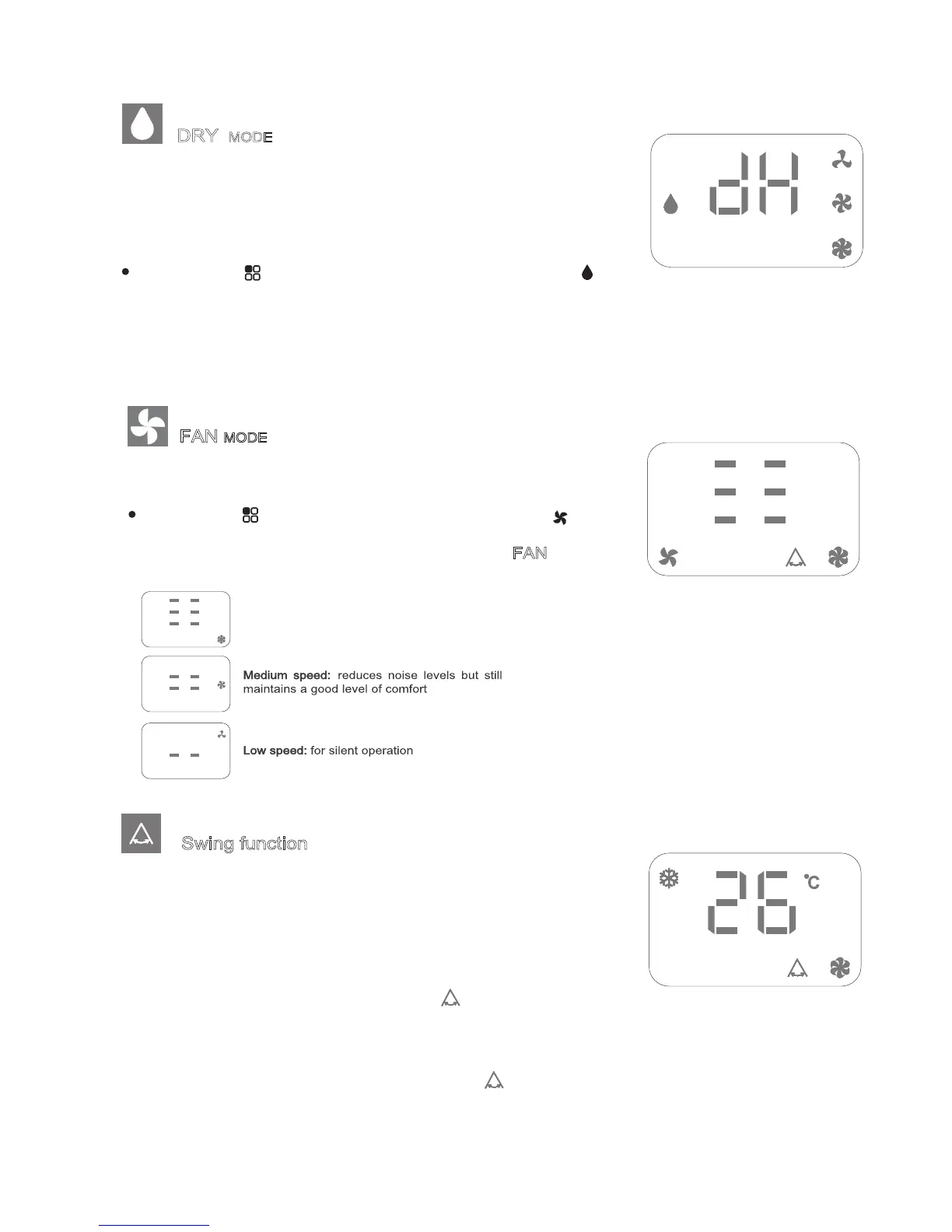
DRY MODE
Ideal to reduce room humidity (spring and autumn, damp rooms,
rainy periods, etc).
In dry mode, the appliance should be prepared in the same way
as for cool mode, with the air exhaust hose attached to enable
the moisture to be discharged outside.
To set this mode correctly:
Press the " " button a number of times until the " "
symbol appears.
In this mode, fan speed is selected automatically by the applian-
ce and can not be set manually.
FAN MODE
When using the appliance in this mode, the air hose does not
need to be attached.
To set this mode correctly:
Press the “ ”
button a number of times until the “ ”
symbol appears.
Select the required fan speed by pressing the F
AN button.
Three speeds are available:
N.B.- When operating in very cold rooms, the appliance defrost auto-
matically, momentarily interrupting normal operation. " " appears
on the display. During this operation, it is normal for the noise made
by the appliance to change.
- In this mode, you may have to wait for a few minutes before the
appliance starts giving out hot air.
the set temperature has already been reached.
- In this mode, the fan may operate for short periods, even though
“* ” means only the heat pump model have this function.
Swing function
- This function is useful for select the left / right of air delivery.
- To set this function:
- Select the operating mode( Cool/ Dry/ Fan/ Heat ) as described
above.
- Press the “ ” button, the appliance operates in the previously
selected mode, the symbol “ ”appears.
- Press the “ ” button again, the symbol disappears to indicate
the swing is stop.
High (maximum) speed: for maximum fan power
Using this function will cause the air direction louvres to swing
automatically, directing the air flow left and right.
Begin air conditioner operation by choosing the operating mode (Cool/
Dry/Fan) as described above before performing this procedure.
To select SWING operation:
• Press the swing button - the swing display
N.B.- When operating in very cold rooms, the appliance defrost auto-
matically, momentarily interrupting normal operation. " " appears
on the display. During this operation, it is normal for the noise made
by the appliance to change.
- In this mode, you may have to wait for a few minutes before the
appliance starts giving out hot air.
the set temperature has already been reached.
- In this mode, the fan may operate for short periods, even though
“* ” means only the heat pump model have this function.
Swing function
- This function is useful for select the left / right of air delivery.
- To set this function:
- Select the operating mode( Cool/ Dry/ Fan/ Heat ) as described
above.
- Press the “ ” button, the appliance operates in the previously
selected mode, the symbol “ ”appears.
- Press the “ ” button again, the symbol disappears to indicate
the swing is stop.
8
will light up and the
louvres will swing automatically
To stop swing operation:
• Press the swing button again - the swing display
N.B.- When operating in very cold rooms, the appliance defrost auto-
matically, momentarily interrupting normal operation. " " appears
on the display. During this operation, it is normal for the noise made
by the appliance to change.
- In this mode, you may have to wait for a few minutes before the
appliance starts giving out hot air.
the set temperature has already been reached.
- In this mode, the fan may operate for short periods, even though
“* ” means only the heat pump model have this function.
Swing function
- This function is useful for select the left / right of air delivery.
- To set this function:
- Select the operating mode( Cool/ Dry/ Fan/ Heat ) as described
above.
- Press the “ ” button, the appliance operates in the previously
selected mode, the symbol “ ”appears.
- Press the “ ” button again, the symbol disappears to indicate
the swing is stop.
8
will disappear
and the louvres will return to the setting before the swing function
was commenced.


 To Next Page
 Loading...