11
DESCRIPTION OF THE REMOTE CONTROL
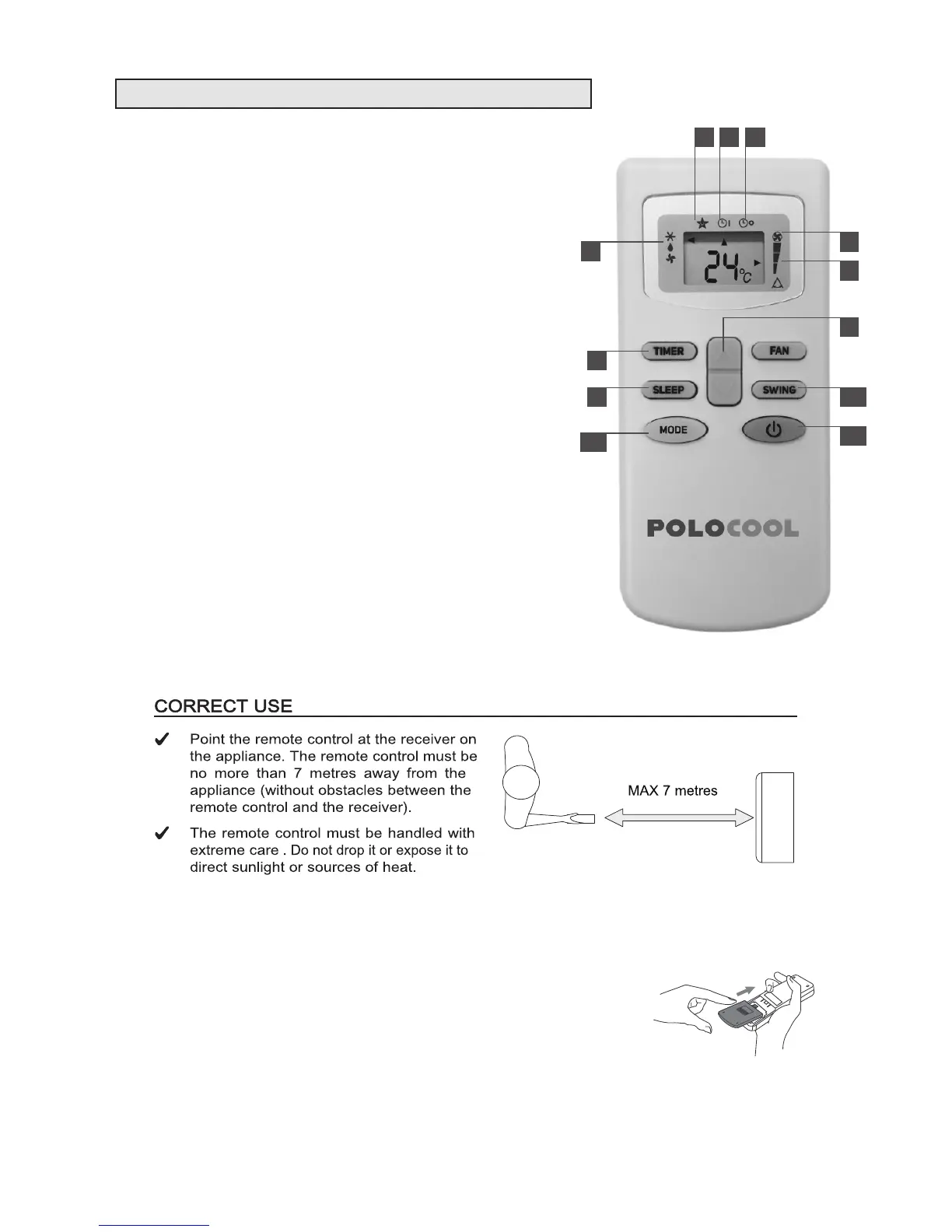
1. Mode indicator - COOL / DEHUMIDIFY (DRY) / FAN
2. Sleep indicator
3. Timer on
4. Timer off
5. Auto speed indicator
6. Fan speed indicator
7. (a) increase (+) button
(b) decrease (-) button
8. TIMER button
Press this button to set automatic startup / shutdown
9. SLEEP button
Press this button to set ON/OFF sleep function
10. MODE button
Press this button to select the modes of COOL/DRY
(Dehumidify) /FAN
11. SWING button
Press this button to switch ON/OFF the automatic swing function
12. ON/OFF button
Press this button to switch ON/OFF the appliance
INSERTING OR REPLACING THE BATTERIES
• Slide and remove the cover on the rear of the remote control;
• Insert two “AAA” 1.5V batteries in the correct position
(see instructions inside the battery compartment);
• Replace the cover
If the remote control is not used for long periods, remove the batteries.
1
32 4
6
5
7
8
9
10
11
12



 To Next Page