– Config
– image.zip
– version
• videocodec
– Config
– poly-video-<version>.zip
– release.json
– version
• ipmic
– Config
– image.zip
– version
• micadapter
– Config
– image.zip
– version
• touchctrl
– Config
– poly-tc8-<version>.zip
– version
– release.json
• trio8500
– <filename>.cfg
– <filename>.sip.Id
– version
• trio8800
– <filename>.cfg
– <filename>.sip.Id
– version
• trioC60
– <filename>.cfg
– <filename>.sip.Id
– version
• softwareupdate.cfg
3 Connect the USB flash drive to a USB port on the back of the system.
If the system detects the USB flash drive, a prompt displays on the monitor to confirm that you want to update the
software. If there’s no input to the system, it automatically starts the update after a short delay.
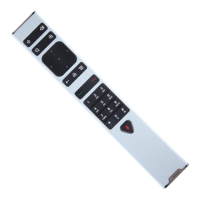
Update the Poly Bluetooth Remote Control Firmware
A system update may include new firmware for your Poly Bluetooth Remote Control.
You must be actively using the remote control for an available update to take effect. After 30 seconds of inactivity, the
remote control disconnects from the system until you pick it up or press a button.
Task
1 Update your system software.
2 Pick up the remote control or press a button.
The remote control automatically updates if it detects a new firmware version.
114



 To Next Page