Need help?
Do you have a question about the Poly Sync 40 Series and is the answer not in the manual?
Explanation of LED indicators for pairing, calls, and mute status.
Important safety, charging, and regulatory information before initial use.
Details on the pre-paired Bluetooth USB adapter and its connection.
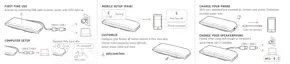
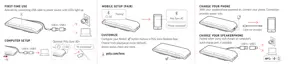
Connects the speakerphone using a USB cable for power and audio.
Pairs the speakerphone with a mobile device via Bluetooth for calls and audio.
Enhances Bluetooth security for conference calls and manages paired devices.
Guides on connecting and configuring the Bluetooth USB adapter for PC connectivity.
Instructions for re-pairing the USB adapter if it becomes disconnected or was bought separately.
Methods to check the speakerphone's current battery level.
Information on charging a mobile phone using the speakerphone's USB-A port.
Guidance on keeping firmware and software up-to-date using the Poly Lens App.
Instructions on powering the speakerphone on and off using the power button.
How to answer, end calls, and manage microphone mute status during calls.
Adjusting speakerphone volume using volume up and down buttons.
Activating smartphone voice assistants like Siri or Google Assistant.
Quickly opening and using Microsoft Teams via the dedicated button.
Personalizing speakerphone features via the Poly Lens Desktop App.
Wirelessly linking two Poly Sync speakerphones for combined audio output.
Configuring audio output modes (Party or Stereo) for linked speakerphones.


 To Next Page
 General