ZONEMASTER ZONE SWITCH (TWO ZONE) DAMPER CONTROL SYSTEM - Operation & Installation Instructions
3
1) Application
The Zonemaster Zone Switch control system is a simple On/O
control system engineered to manage the air ow from the Air
Conditioning unit to dierent outlets. This system is well suited to all
ducted reverse cycle and ducted heating systems in light commercial,
residential and apartment applications.
2) Features
Supports 2 individual zones.
Dampers are directly connected to the touchpad module.
LED indicators to show the ON/OFF status of the zones.
Personalised zone labelling using stickers.
All zones automatically resume their original on/o state
once powered up after power outage.
24 Volt for easy and safe installation and maintenance.
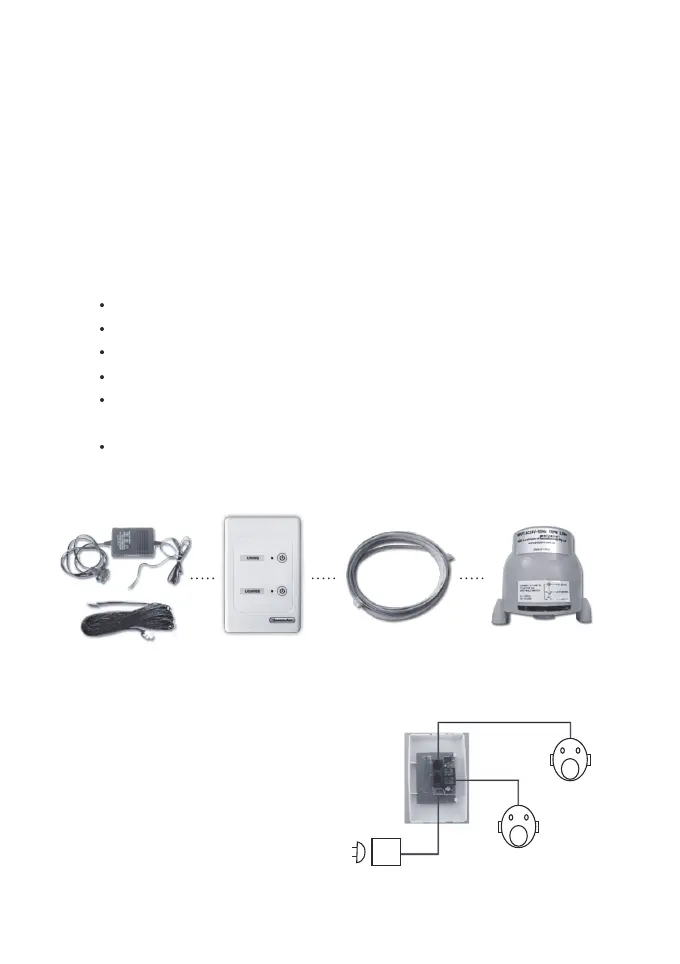
3) Components
4) Wiring Schematic
NOTE: The zones on the touchpad
are marked as Z1 and Z2 from
the top of the touchpad
INSTALLATION INSTRUCTIONS
Z1
Z2
P3
Touchpad
Connected to
Port 2
Connected to
Port 1
24 VAC TRANSFORMER
WITH STRIPPED WIRE
AND POWER CABLE
TOUCHPAD CABLE WITH CENTRE
LATCHED PLUG
DAMPER MOTOR (GREEN)
UP TO 2 DAMPER MO-
TORS



 To Next Page