ZONEMASTER ZONE SWITCH (TWO ZONE) DAMPER CONTROL SYSTEM - Operation & Installation Instructions
5
c) Applying 2 - Zone Label
The 2-zone label is applied after the zone names have been applied on
the touchpad. The 2-zone label is peeled o from the backing and then
applied on to the touchpad. Ensure the label has been applied within the
recess provided. After the label is applied on the touchpad, peel o the
transparent protective covering lm from the top of the label.
7) Installing the Touchpad
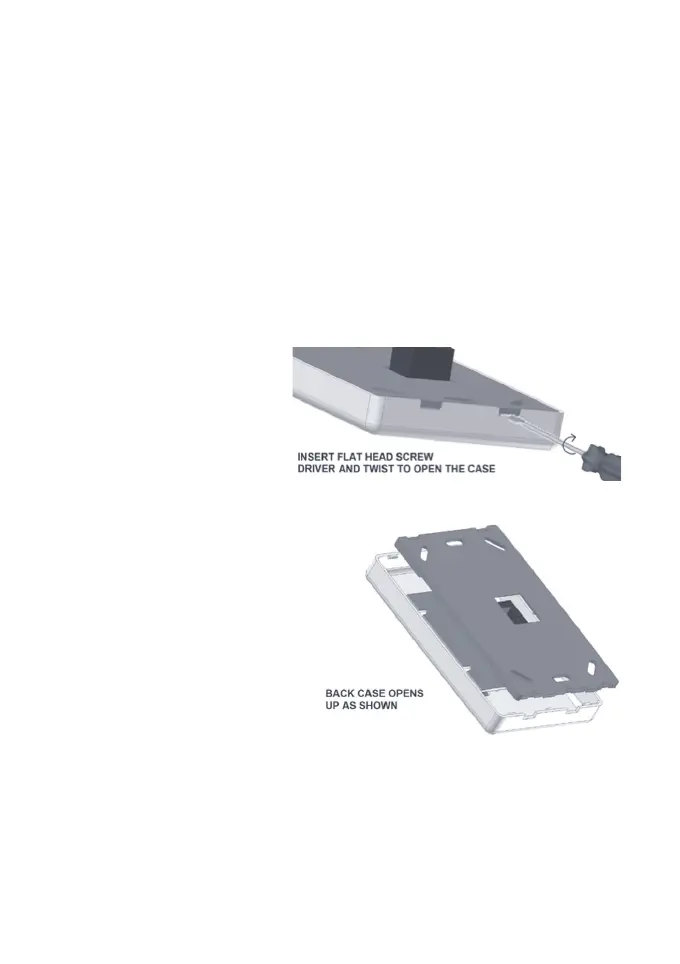
a) Insert a at head screw
driver into the two gaps at
the bottom of the casing and
turn the screw driver blade
just enough to open the
cover as shown in Figure 3
then remove the back cover
by sliding it out.
b) Position the back cover
on the wall (about 1.5m high
from the oor) and mark the
positions for screws and the
cut-out hole for the socket.
Cut the hole and retrieve the
power and control cables
and plug them into the
touchpad. Mount the back
cover to the wall on the
previously marked location.
c) Attach the front cover to
the back cover
FIGURE 3
FIGURE 4



 To Next Page