ZONEMASTER ZONE SWITCH (TWO ZONE) DAMPER CONTROL SYSTEM - Operation & Installation Instructions
4
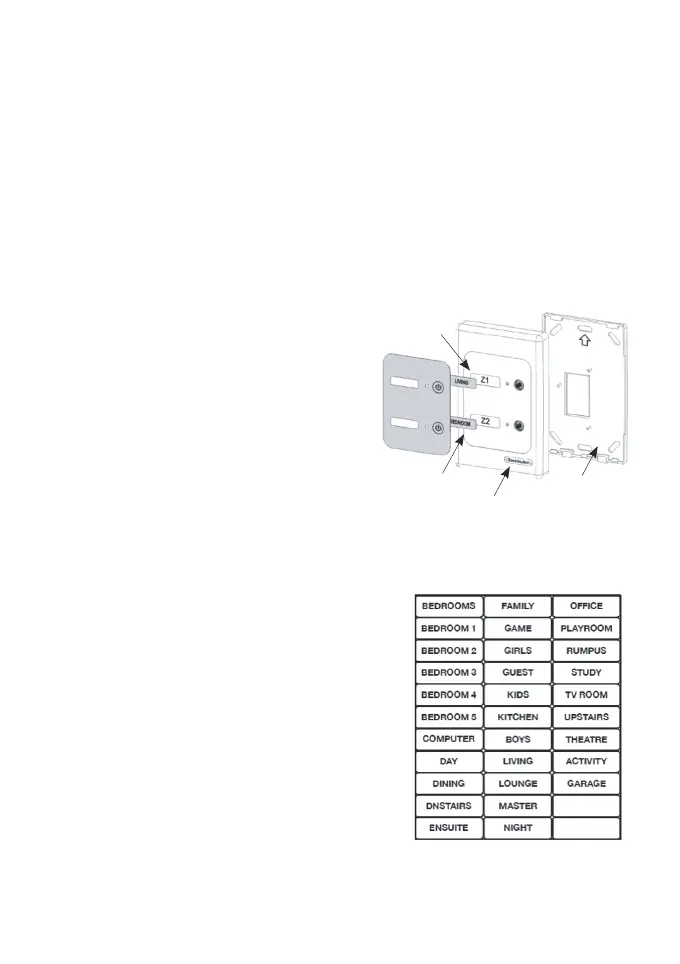
FIGURE 2 - ZONE NAME STICKER SHEET
FIGURE 1 - Exploded view of touchpad assembly
ZONE NAMES
2 - ZONE LABEL
TOUCHPAD FRONT
COVER
TOUCHPAD BACK
COVER
5) Zoning areas
Air conditioned areas can be zoned according to their functions and
daily usage such as Family room, Lounge, Library, etc. These zone
names are chosen as desired.
IMPORTANT NOTE: The Zone Switch system does not contain
any safety features to prevent the pressure from building up and
potentially causing duct damage. Please make sure a separate
dedicated open spill zone is designed
with this system to prevent the above
from occurring.
6) Touchpad Preparation
a) Exploded Diagram
Figure 1 shows an exploded view of the
touchpad assembly.
b) Applying Zone Names to Zones
It is essential to apply correct names
against the zones to make sure the end
user is fully aware of the location of
each zone. The zone names are printed
on a sticker which is to be peeled o as
desired and applied in the relevant
zonename recess on the touchpad.
There are 31 preset names which can
be used or personal names can be
written on the 2 blank stickers provided
(Figure 2). After applying the zone
name label on the touchpad, peel o
the transparent protective covering lm
from the top of the label.



 To Next Page