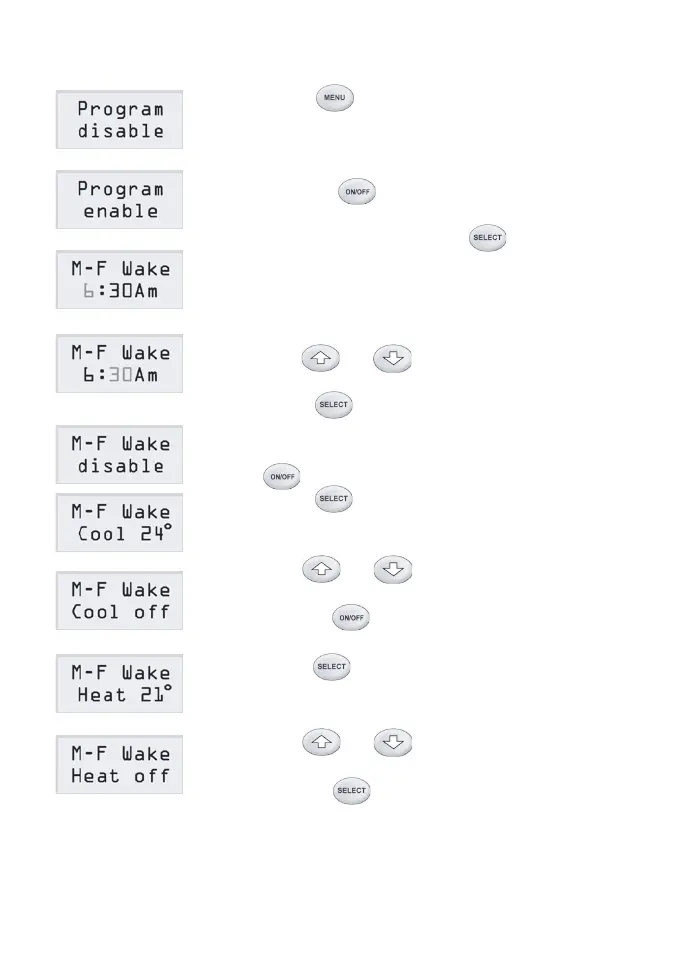
Adjust Program Time
1) Press button twice, the LCD shows
the program status.
2) Factory default status of the program is
disabled that means no program control.
Pressing button once will enable the
program.
3) In enable status, pressing button will
select each of the program data to be adjusted.
At the rst screen, it shows the start time of the
Wake event of the program for Monday to
Friday.
4) Use or button to change the
ashing hours to the desired value.
5) Press button once to select minutes,
and repeat step 4) to change the minutes.
6) If you do not want the event to happen press
button to disable it.
7) Press button again, the LCD will show
the temperature setpoint for cooling mode of
the event.
8) Use or button to change the
setpoint in cooling mode to the desired value
or press button to turn off the zone at
the start time in cooling mode.
9) Press button again, the LCD will show
the temperature setpoint for heating mode of
the event.
10) Use or button to change the
setpoint in heating mode to the desired value
or press button to turn off the zone at
the start time in heating mode.
Page 11



 To Next Page