12
IMPORTANT! Your filter pump is protected by a thermal switch. The switch senses the temperature of the filter pump. If it gets too hot, the switch will stop the
pump from running until it cools off. This is a safety device to prevent pump damage and prolong service life. If your pump is automatically turning off, it is because of
high pool water temperature and/or low water flow through the pump. If this happens you need to check the water flow and correct it if needed, as this filter pump uses the
water flow for cooling. It is recommended that you run the pump at night or early morning when the temperature is lower to prevent overheating.
PUMP MOTOR CARE
1. Locate a grounded receptacle at least 15 feet (4.5 m) away from the pool.
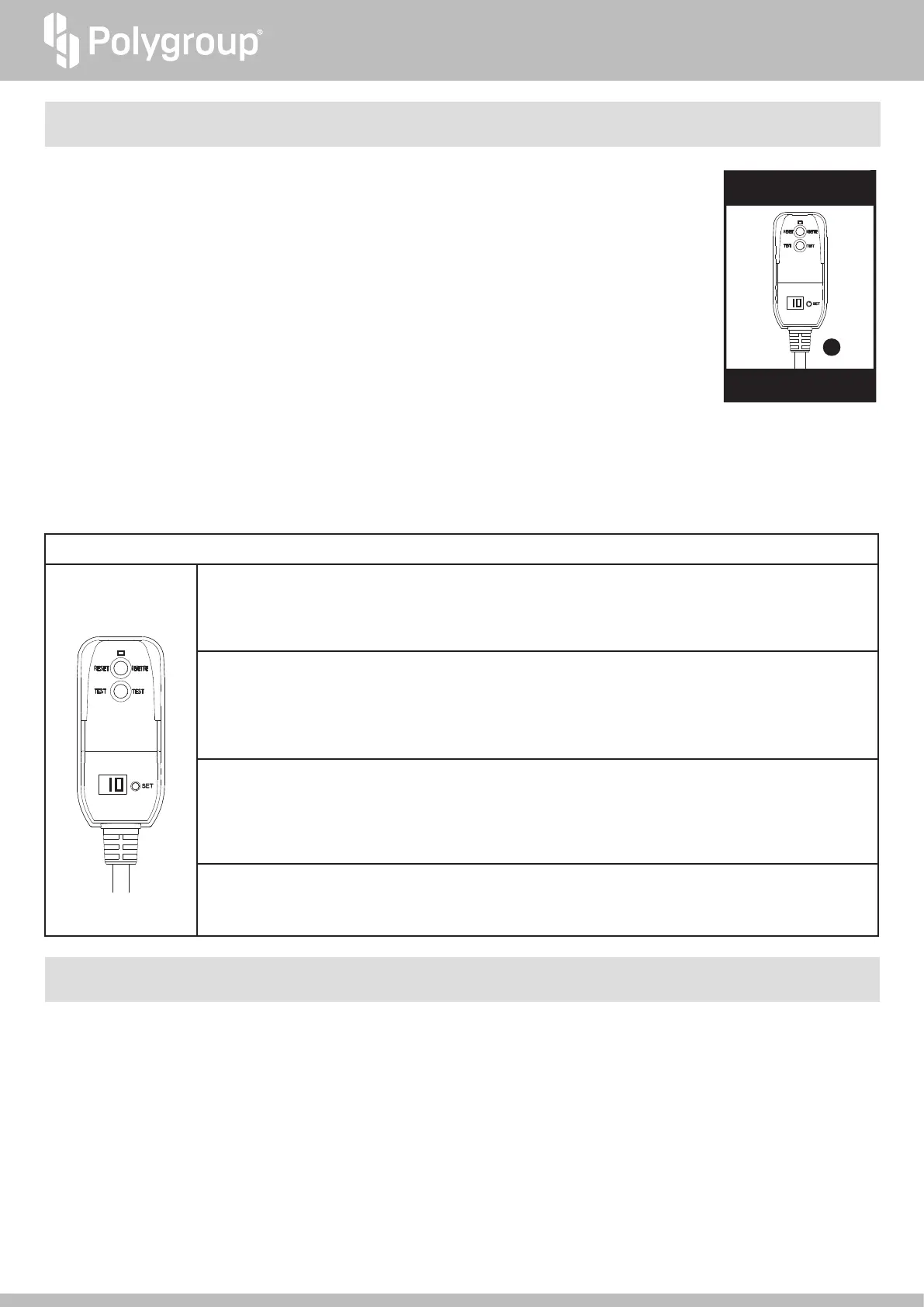
2. To turn on the Pump, plug in the GFCI power cord set
f
to the power outlet.
3. The GFCI power cord set
f
comes with a pre-set timer function.
a. Default timer setting: When the power is on, the display screen shows “10”, indicating that the default working
time of the pump is 10 hours. The pump will automatically turn off after the 10 hours and remain off for 14 hours. This
is based on a 24-hour cycle. This cycle will then continue as long as the power is on.
b. Time adjustment: Press the "SET" button to set the desired operating time of the pump between 1 to 10 hours,
with each press increases the time by 1 hour. For example, when the display screen on the plug shows “05”, the pump will
work for 5 hours and restart after a 19 hours break.
c. If the display screen shows "00", it indicates that the pre-set working time has ended and the pump is currently off.
d. To restart the pump earlier than the pre-set time, press the “SET” button.
In this case, the pre-set working time will increase by 1 hour from the previous setting.
4. To turn off the pump, press the “TEST” button of the GFCI Plug, and unplug it from the power outlet.
If you accidentally press the “TEST” button while the pump is working, you can press the “RESET” button to restore the pump to work.
5. From inside the pool, check if the water flow from the RF Diverter
7
is correct. It should feel like a solid stream of water returning to the pool. If not, or if you feel
a reduction in flow, clean or replace the Filter Cartridge
o
For details, see FILTER CARTRIDGE USE & CARE (p. 13) as well as Symptom 2 of the
TROUBLESHOOTING GUIDE (p. 15).
6. VERY IMPORTANT: Check and adjust the pH and chlorine levels daily. FILTER PUMP ALONE WILL NOT PREVENT ALGAE FROM GROWING IN POOL
WATER; THIS CAN ONLY BE DONE BY MAINTAINING PROPER CHLORINE AND pH LEVELS AT ALL TIMES. For details, see POOL WATER CARE (p. 14).
USE OF PUMP
GFCI Plug with
Timer Function
*Do not connect to
another timer device
23
“RESET” button:
• When the display screen shows a number between "01” to “10", but the pump is not working (e.g. the "TEST" button is pressed
while the pump is working), you can press the "RESET" button to restore the pump to work.
• When the display screen shows "00”, the pump has stopped working, pressing the "RESET" button will have no action.
“TEST” button:
• To test the GFCI’s leakage protection function: Plug the GFCI power cord set into the power outlet, make sure the pump is in
working mode (i.e. display screen of the GFCI plug IS NOT showing “00”). Push the “TEST” button, the power to the pump should
be interrupted by the GFCI and the pump will stop working.
• When the display screen shows "00”, the pump has stopped working, pressing the "TEST" button will have no action.
“SET” button:
• Press the "SET" button to set the desired operating time of the pump between 1 to 10 hours, with each press increases the time
by 1 hour.
• If the display screen shows "00", press the "SET" button will restart the pump. In this case, the pre-set working time will increase
by 1 hour from the previous setting.
Display Screen:
• Shows “01”, “02”…to “10” to represent the pre-set working time when the GFCI power cord set is plugged into a power outlet.
• Shows "00” when the pump is in off mode.
Description of GFCI Plug with Timer Function


 To Next Page
 Loading...