16
1. First turn the pump off and unplug the main power cord of the system. Remove the RF Diverter
7
from the Return Fitting
6
and then seal the Return Fitting
6
with the Service Plug
8
, Hand tighten the Service Cap
5
onto the Suction Fitting
2
.
2. Slowly unscrew the Vent Screw
e
from the Seal Top
t
to depressurize the pump.
3. Loosen the Hose Clamps
q
at the filter pump inlet and outlet. Detach both Hoses
9
from the filter pump.
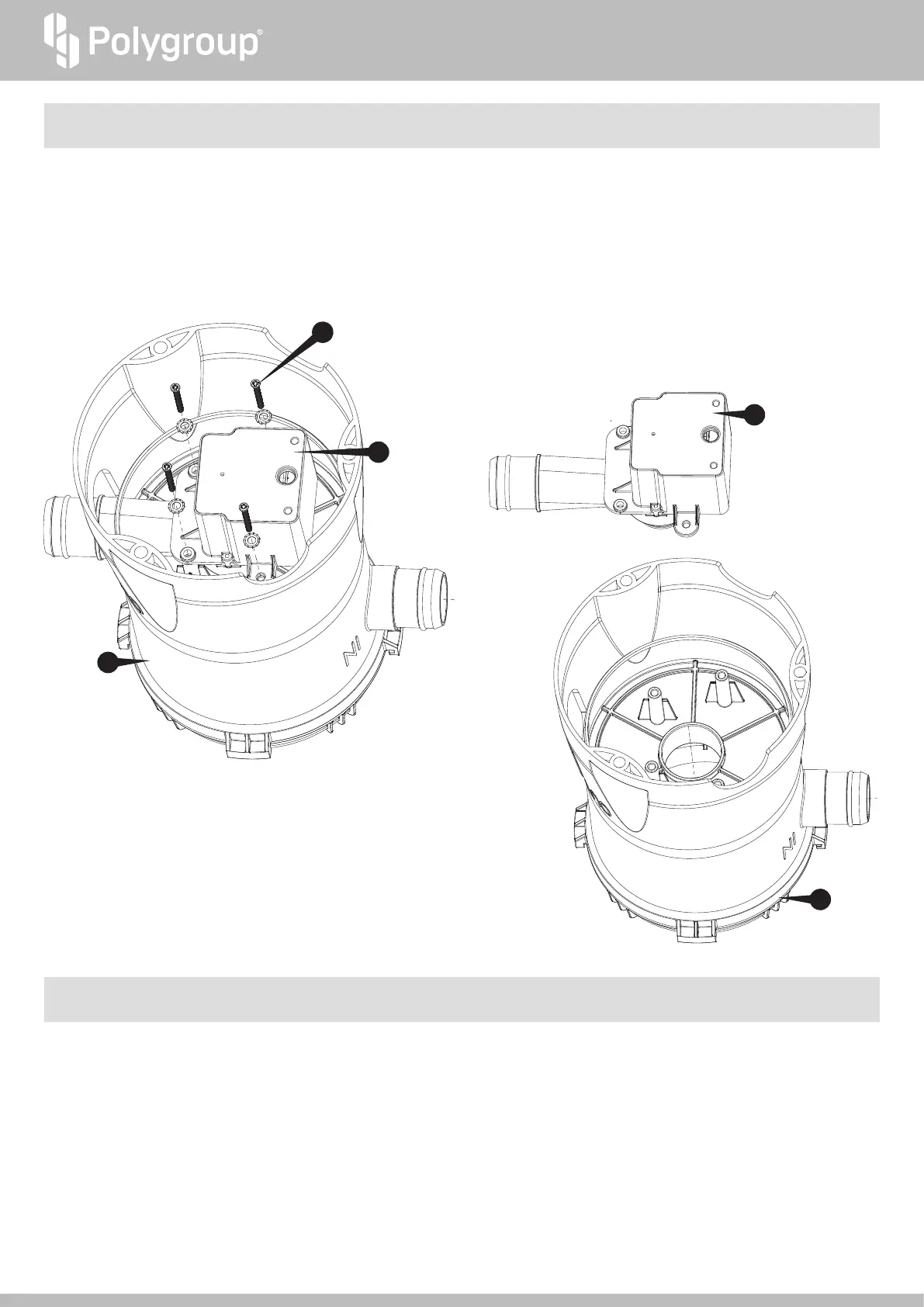
4. Turn the filter pump upside down. Remove the Motor Assembly Washer and Screw Set
h
.
(REMEMBER TO KEEP ALL PARTS IN A SAFE PLACE FOR REASSEMBLY LATER)
1. To replace the Rotor Assembly
a
, remove the Volute Housing Screw Set
d
. Grasp the Pump Motor Body in one hand and the volute cover discharge nozzle in
the other hand. Rotate the nozzle counterclockwise to release the tabs of volute housing from the brackets of pump body.
2. Carefully pull upwards once the tabs are clear of the brackets.
3. Remove the Volute Housing
s
and pull out the Rotor Assembly
a
from the Pump Motor Body
p
. Please be careful as the Rotor Assembly has multiple parts
which may come out separately.
4. Inspect the Rotor Assembly to make sure that it has all of its parts and that the Rotor Shaft, Magnet Axle, or Impeller are not broken as this will cause the pump
to fail. If your Rotor Assembly is broken, a complete Rotor Assembly may be purchased at polygroupstore.com without having to replace the whole pump.
PUMP REMOVAL INSTRUCTIONS FOR TROUBLESHOOTING
ROTOR INSPECTION AND REPLACEMENT INSTRUCTIONS
16
16
17
17
25
(REMEMBER TO KEEP ALL PARTS IN A SAFE PLACE FOR REASSEMBLY LATER)
5. Remove the Motor Assembly
i
from the Canister
u
.




 To Next Page