10
User’s manual
KSTEP 2: Switch on the power supply and check if the devices work
After all the devices have been connected, switch on the power supply.
Use Manual operation function in order to check if particular devices work properly.
Use ▲ and ▼ to select the device and press MENU – the device should switch on. Follow
this procedure to check all the devices.
STEP 3: Activate the Internet module
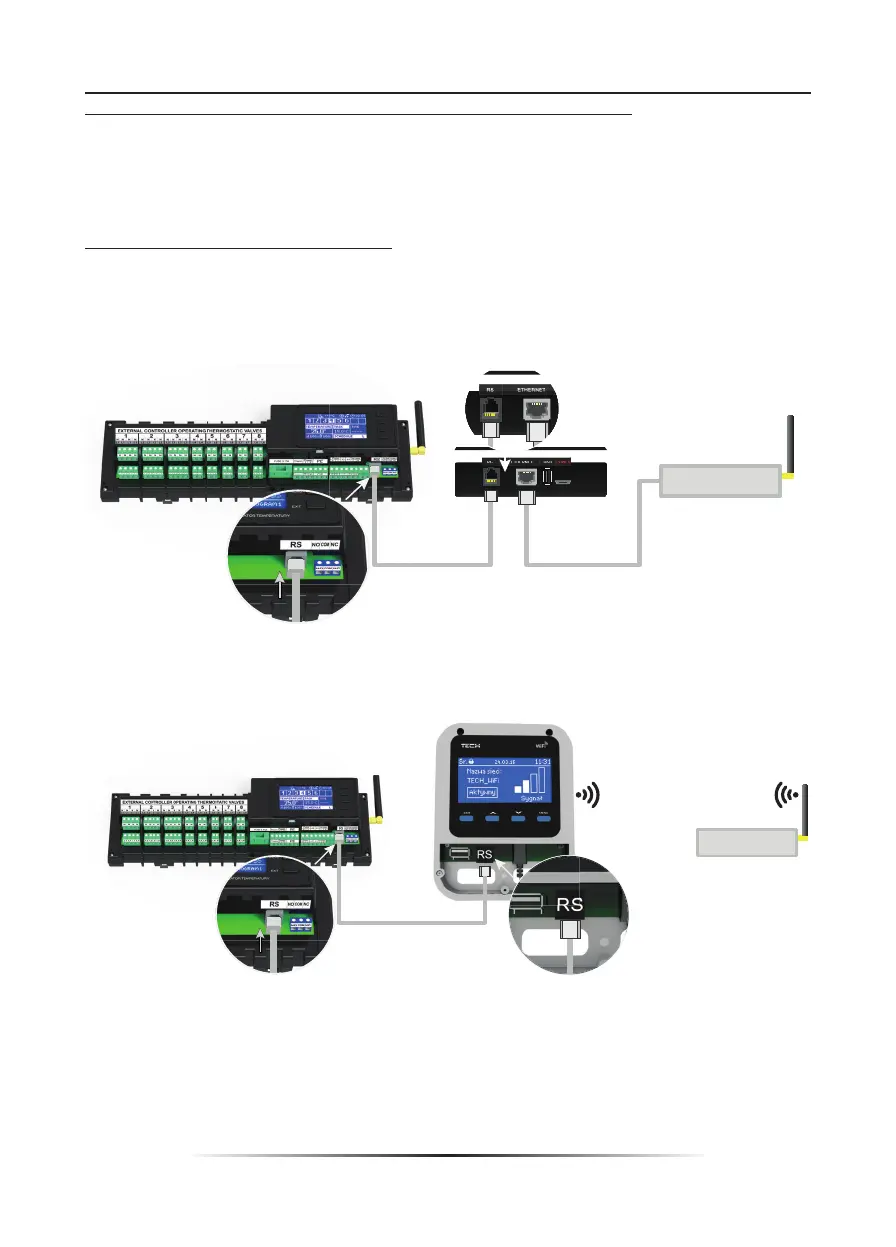
UFH8ZMP external controller is compatible with UFHINTMODP and UFHINTWIFIP Internet
modules.
UFHINTWIFIP uses WiFi wireless network whereas UFHINTMODP needs to be connected to
a router with RJ45 network cable.
Connection diagram for UFHINTMODP Internet module
Connection diagram for UFHINTWIFIP Internet module.
Internet modules should be connected as illustrated in the diagrams above. Next, activate
the module: Main menu/Fitter’s menu/Internet module/ON. Further steps are described in
detail in the instruction manual for the Internet module.



 To Next Page