6
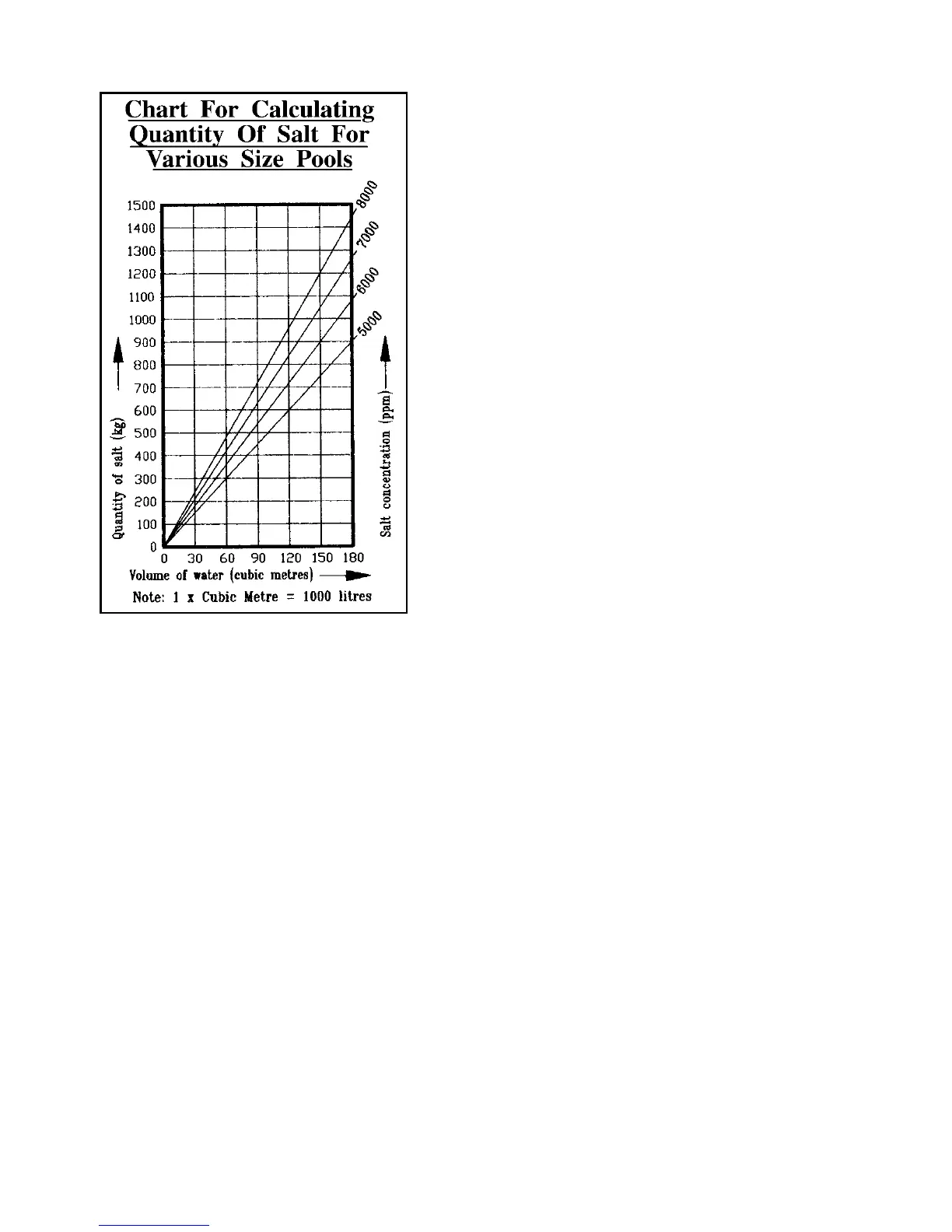
To find the correct amount of salt using this chart:
1. Mark the point along the bottom edge which
corresponds with the calculated volume of
water in the pool.
2. Draw a vertical line from this point which
intersects the inclined lines showing salt
concentrations.
3. From the point where this vertical line
intersects the inclined line showing the chosen
salt concentration, draw a horizontal line
across to the left. Where this line crosses the
left side of the graph, the quantity of salt in
kilograms will be indicated.
Adding Salt And Stabiliser To The Pool
If you are quite sure of your calculations then add
the calculated amount of salt directly to your pool.
Warning:
Only swimming pool grade salt (Sodium
Chloride) should be used. Inferior grades may
lead to problems with the chlorinator cell.
Do not attempt to add salt via the surface skimmer
as this can cause damage to the filtration system.
Any suction type pool cleaners should also be
disconnected before adding salt.
At the same time add the recommended quantity of cyanuric acid stabiliser. This is
most important as your Surechlor will not operate efficiently during summer months
without the correct level of stabiliser in the pool. Recommended level for maximum
efficiency is between 30 and 60 mg/l (ppm). pH buffer can also be added now if required.
Dissolving The Salt
Before attempting to operate the Surechlor 4000 cell, the salt must be allowed to fully
dissolve in the pool water. This is the best achieved (after allowing sufficient time for
the glue on the pipe fittings to set properly) by running the filter pump without the cell
operating for 24 hours to circulate the water.
To assist the dissolving of the salt, regularly brush the floor of the pool with a pool
broom until the salt has dissolved.
When The Salt Has Dissolved
With the pump still operating, increase the Chlorine Control to maximum. The Monitor
should indicate 10 bars.
Your Surechlor is now generating chlorine!
Should the Output Monitor read low with the Chlorine Control at maximum, do not be
concerned, just allow the system to run for another 24-48 hours. If the display
continues to give a low reading after this period, press the Salt Test (with the system
running) and note the display message.
If the water temperature is around 25°C and the cell is relatively clean, this reading will
indicate salt concentration. If it confirms the salt level is low then add more salt
gradually over a period of days until the display reads normal. Continue brushing floor
of pool until the additional salt has dissolved.


 To Next Page