EasyManua.ls Logo

Porsche 968 - Clock and Stopwatch Functions; Setting the Clock (968;968 CS); Stopwatch Operation

Porsche 968
111 pages
Print Icon
To Next Page IconTo Next Page
To Previous Page IconTo Previous Page
Loading...
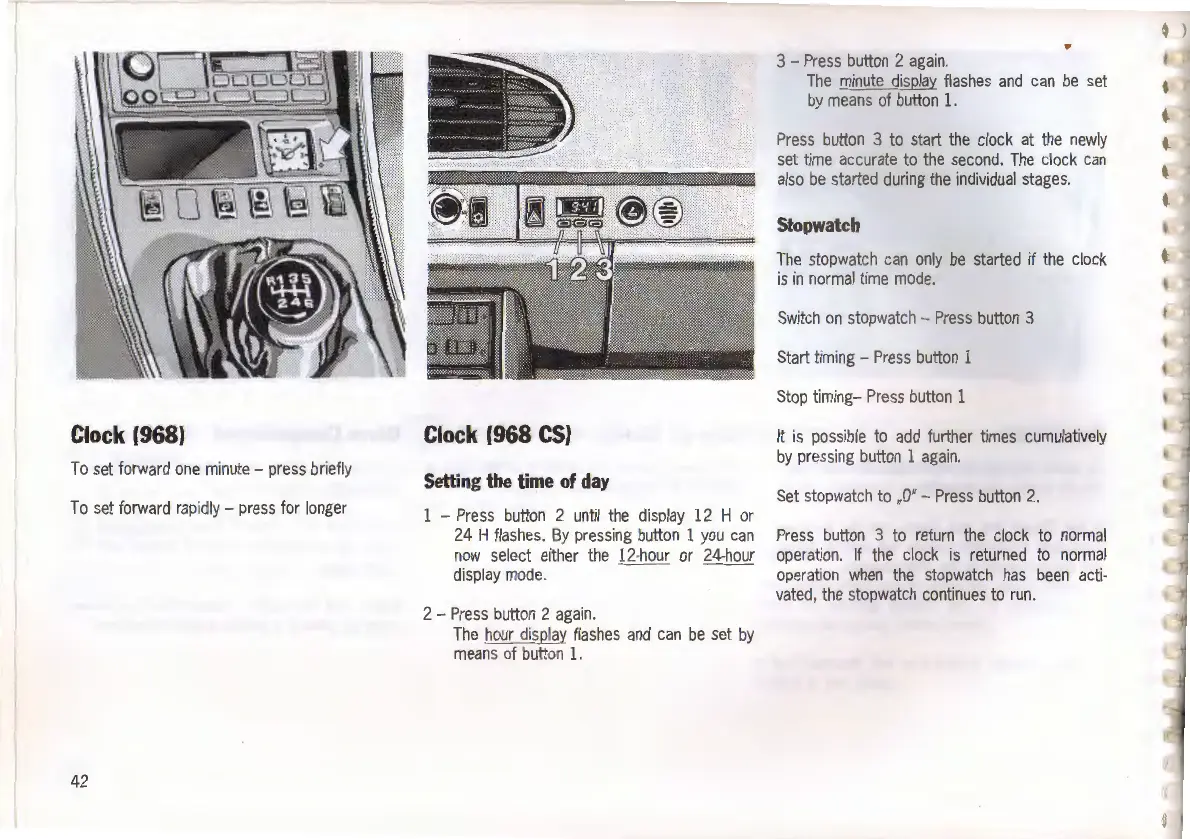
Clock
(968)
To
set
forward
one
minute
-
press
briefly
To
set
forward
rapidly
-
press
for
longer
42
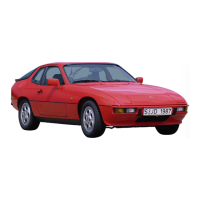
Clock
(968
CS)
Setting
the
time
of
day
-
Press
button
2
until
the
display
12
H
or
24
H
flashes
.
By
pressing
button
1
you
can
now
select
either
the
12-hour
or
24-hour
display
mode.
2 -
Press
button
2
again.
The
hour
display
flashes
and
can
be
set
by
means
of
button
1.
"'
3 -
Press
button
2
again.
The
minute
display
flashes
and
can
be
set
by
means
of
button
1.
Press
button
3
to
start
the
clock
at
the
newly
set
time
accurate
to
the
second.
The
clock
can
also
be
started
during
the
individual
stages.
Stopwatch
The
stopwatch
can
only
be
started
if
the
clock
is
in
normal
time
mode
.
Switch
on
stopwatch
-
Press
button
3
Start
timing
-
Press
button
1
Stop
timing-
Press
button
1
It
is
possible
to
add
further
times
cumulatively
by
pressing
button
1
again.
Set
stopwatch
to
..
O"-
Press
button
2.
Press
button
3
to
return
the
clock
to
normal
operation
.
If
the
clock
is
returned
to
normal
operation
when
the
stopwatch
has
been
acti-
vated
,
the
stopwatch
continues
to
run.

Related product manuals