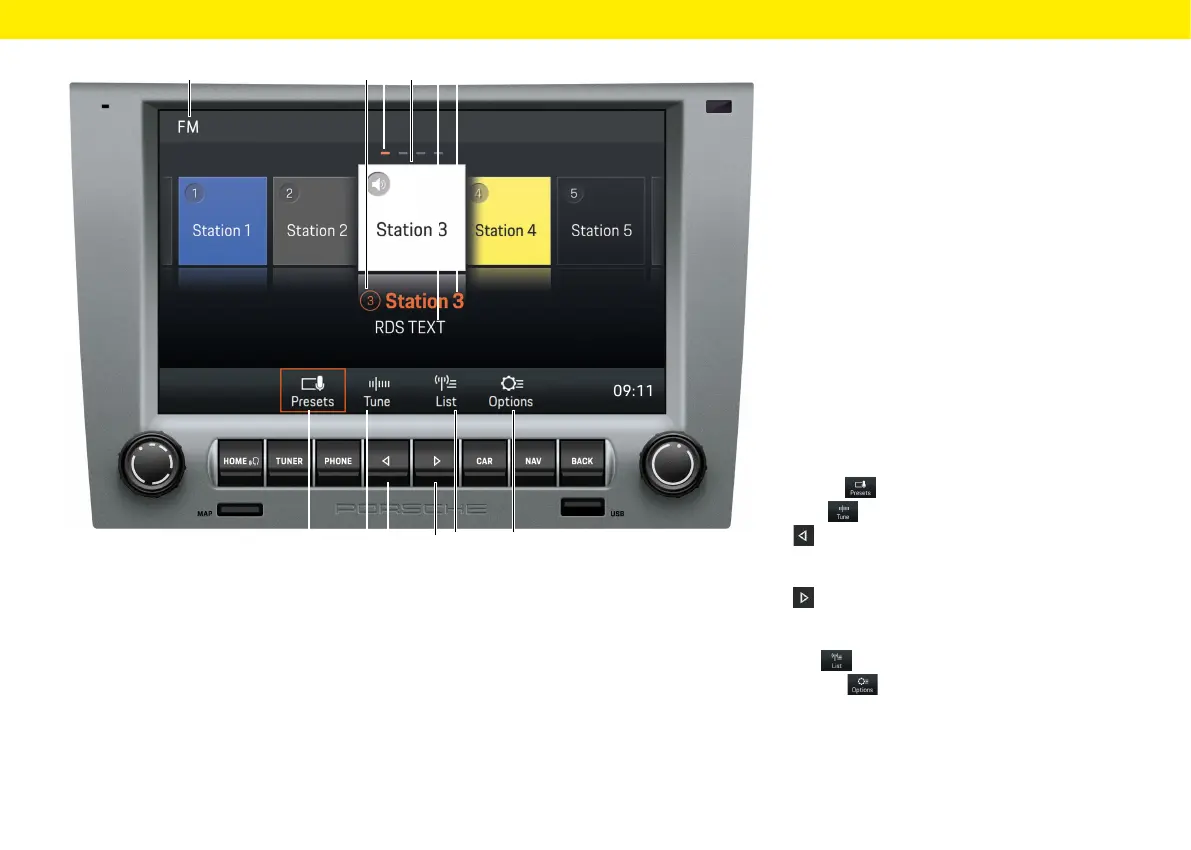
Radio function control
elements
A FM/AM/DAB+ reception range
B Station button/program storage location
Indicates the program storage location
ofthestation currently selected
C Page indicator
D Selected station
E RDS TEXT
This display shows the radio text currently being
broadcast. This information is the additional
data being broadcast by the station that appears
inthe display. Such information may be the track
and artist of the song being played or the latest
news.
F Station name or frequency display
Displays the name or the transmission frequency
of the station currently selected.
G Presets Main view of the tuner
H Tune Frequency band display
I
The Skip le button allows you to skip tothe
previous station in the program storage loca-
tions.
J
The Skip right button allows you to skip
tothe next station in the program storage loca-
tions.
K List Channel list display
L Options Radio settings
– Switch on/o AM
– Save station
– Switch on/o Trac Announcements (TA)
– Filter/sort station lists by RDS name
– Sort DAB+ station lists
– Select frequency range (by region)
Overviews
G H L
A CB FD E
I
J
K
15



 To Next Page